> ## Documentation Index
> Fetch the complete documentation index at: https://docs.getbifrost.ai/llms.txt
> Use this file to discover all available pages before exploring further.
# Audit Logs
> Track administrative activity in Bifrost Enterprise with signed audit events, filtering, and export support.
## Overview
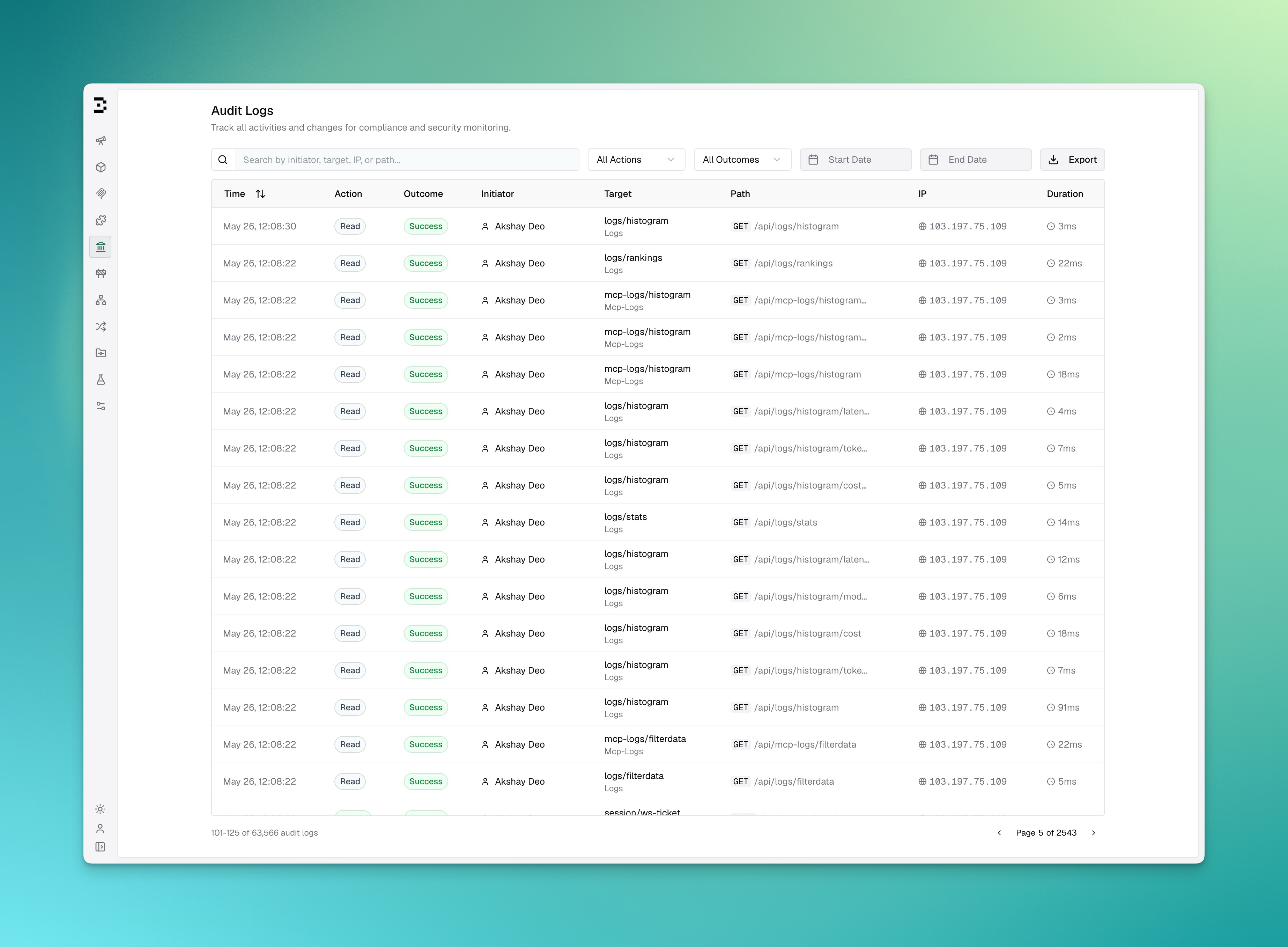
**Audit Logs** in Bifrost Enterprise record administrative activity so operators can review who changed what, when it happened, and which resource was affected.
Audit log entries can be signed with an HMAC key, retained for a configurable number of days, viewed in the dashboard, and exported for downstream review.
 ### Key Features
| Feature | Description |
| --------------------------- | -------------------------------------------------------------------------------------------------------------------------------------------- |
| **Signed events** | Configure an HMAC key so audit entries can be verified. |
| **Dashboard review** | View audit entries from the **Audit Logs** workspace page. |
| **Filtering** | Filter by search text, action, outcome, and date range. |
| **Export** | Export matching entries as JSON, JSON Lines, or Syslog when the user has download permission. |
| **Retention** | Configure how long audit log entries are kept. |
| **Object storage archival** | Periodically archive audit events to S3/GCS in time-windowed, size-bounded JSONL objects for long-term, off-box, compliance-grade retention. |
***
## Configuration
```json theme={null}
{
"audit_logs": {
"disabled": false,
"hmac_key": "env.AUDIT_HMAC_KEY",
"retention_days": 365
}
}
```
### Configuration Fields
| Field | Type | Description |
| -------------------------- | ------- | ------------------------------------------------------------------------------------------------------------------------------------------------------------------------------------------------------------------------- |
| `disabled` | boolean | When `true`, audit logging is turned off. Default: `false`. |
| `hmac_key` | string | HMAC secret key used to sign audit events. Minimum 32 bytes. Supports `env.` prefix for environment variables (e.g. `env.AUDIT_HMAC_KEY`). |
| `retention_days` | integer | Days to retain audit log entries **in the database**. `0` disables retention-based cleanup. Does not affect archived objects (see [Archiving to Object Storage](#archiving-to-object-storage)). |
| `object_storage` | object | Optional. When set, archives audit events to S3/GCS in addition to the database. Setting it is what enables archival — there is no separate on/off flag. See [Archiving to Object Storage](#archiving-to-object-storage). |
| `archive_interval` | string | Archival window size, as a Go duration string (e.g. `"6h"`). Also the nominal period of the archival job. Default: `"24h"`. Minimum: `"5m"` (lower values are clamped up). |
| `archive_grace_period` | string | How long a window is held open past its end before it may be archived, absorbing clock skew and late inserts. Must be **strictly less than** `archive_interval`. Default: `"15m"`. |
| `archive_max_object_bytes` | integer | Uncompressed JSONL size at which a new part object is started. Default: `134217728` (128 MiB). Minimum 1 MiB, maximum 4 GiB. |
The three `archive_*` fields only take effect when `object_storage` is configured.
`config.schema.json` constrains these fields, so an editor wired to it (via `$schema`) will flag a malformed duration like `"6 hours"` or an out-of-range `archive_max_object_bytes` as you type. The gateway itself does **not** reject such values at startup: each field is normalized independently at runtime, so a value that gets past the schema **falls back to its default or is clamped into range rather than failing startup**. A typo like `"6 hours"` silently yields the 24h default, and `archive_interval: "10s"` is quietly raised to the 5m floor.
Because a bad value fails quietly rather than loudly, confirm what actually took effect from the startup log line, which reports all three:
```
audit log archive routine started (interval: 24h0m0s, grace: 15m0s, max part size: 134217728 bytes)
```
## Viewing Audit Logs
Open **Governance > Audit Logs** in the Bifrost dashboard.
The table shows:
| Column | Description |
| ------------- | ---------------------------------------------------------------------------------------------------- |
| **Time** | When the event occurred. |
| **Action** | The operation performed, such as create, update, delete, authenticate, authorize, export, or import. |
| **Outcome** | The result of the operation: success, failure, or pending. |
| **Initiator** | The user, API key, or system actor that initiated the action. |
| **Target** | The resource affected by the action. |
| **Path** | The request method and path, when available. |
| **IP** | The request IP address, when available. |
| **Duration** | Request duration in milliseconds, when available. |
You can search by initiator, target, IP, or path, and filter by action, outcome, start date, and end date.
## Exporting Audit Logs
Users with `AuditLogs:Download` permission can export the currently filtered audit log results from the dashboard.
Supported export formats:
| Format | Use Case |
| ----------------- | ------------------------------------------------------------ |
| JSON | Structured review or ad hoc processing. |
| JSON Lines | Line-delimited ingestion pipelines. |
| Syslog (RFC 5424) | SIEM or log-forwarding pipelines that accept syslog records. |
## Archiving to Object Storage
By default, audit events live only in the database, which is the source of truth for everything you see in the dashboard (viewing, filtering, HMAC verification, and export). Databases, however, are not ideal for multi-year compliance retention or off-box durability.
When you configure `object_storage`, a background job **additionally** copies every audit event to an S3-compatible bucket (S3, GCS, MinIO, R2), one time window at a time. This is a copy, not an offload: the full event ends up in **both** the database and object storage, so each store holds a complete, independent copy.
This differs from [Log Exports](/enterprise/log-exports), where object storage *offloads* the heavy request/response payload out of the database. For audit logs, object storage is a complete **mirror** — the database is never trimmed of data by enabling it.
### Database vs. Object Storage
| Concern | Database | Object Storage |
| ---------------------------------------------- | ---------------------------------- | --------------------------------------------------------------------------------------------------------------------------------------------------------------------------------------------------- |
| Role | Source of truth | Durable archive |
| Used by dashboard / API / export / HMAC verify | Yes | No |
| Contents | Full event | Full event (identical copy) |
| Retention | Governed by `retention_days` | Governed by your bucket's lifecycle rules |
| When populated | Immediately (buffered, sub-second) | Only when `object_storage` is configured, **going forward** (no backfill), and only once a window closes — so the archive trails the database by at least `archive_interval + archive_grace_period` |
Because the two are decoupled, the archive can outlive the database: once `retention_days` deletes an old row, its object in the bucket is left untouched. Use S3 Object Lock / WORM and bucket lifecycle rules to govern how long the archive is kept.
Retention and archival are **independent** loops — the cleaner deletes by age and does not wait for a window to be archived. Keep `retention_days` comfortably larger than `archive_interval + archive_grace_period`, or rows may be deleted from the database before they are ever copied to the bucket. With the defaults (24h window, 15m grace) the shortest safe setting is `retention_days: 2`; `retention_days: 1` races the archiver.
### How Archival Works
Archival runs as a **periodic background job**, not as part of the request path. Time is divided into fixed windows of `archive_interval`, and each closed window is archived as a unit, in order:
1. **A window closes.** The window `[start, end)` becomes eligible only once `end` is further in the past than `archive_grace_period`. The grace period absorbs clock skew and rows that land slightly late, so a window is not archived while events may still be arriving for it.
2. **A job is enqueued.** One job archives one window. Job IDs derive from the window bounds, so in a multi-node cluster every node can tick while exactly one job row is created and exactly one node runs it — no leader election or lock is involved.
3. **Rows are streamed into part objects.** Committed rows in the window are streamed from the database and encoded as JSON Lines. A new part is rolled each time the accumulated uncompressed JSONL crosses `archive_max_object_bytes`; a part boundary never splits a JSON line.
4. **A manifest commits the window.** After every part has been durably stored, a `manifest.json` listing exactly those parts is written. The manifest is the **commit point** — only once it lands does the archival watermark advance to `end`, making the next window eligible.
Objects for a window live under a single window prefix:
```
{prefix}/audit-logs/{YYYY}/{MM}/{DD}/{start}-{end}/part-00000.jsonl[.gz]
{prefix}/audit-logs/{YYYY}/{MM}/{DD}/{start}-{end}/manifest.json[.gz]
```
For example, with `"prefix": "acme-prod"`, `"compress": true`, and a 24h interval:
```
acme-prod/audit-logs/2026/07/14/20260714T000000Z-20260715T000000Z/part-00000.jsonl.gz
acme-prod/audit-logs/2026/07/14/20260714T000000Z-20260715T000000Z/part-00001.jsonl.gz
acme-prod/audit-logs/2026/07/14/20260714T000000Z-20260715T000000Z/manifest.json.gz
```
| Key segment | Meaning |
| ------------------ | ---------------------------------------------------------------------------------------------------------------------- |
| `{prefix}` | The configurable base path from `object_storage.prefix` (default `bifrost`). |
| `audit-logs` | Fixed segment so audit objects never collide with request logs (`logs/`, `mcp-logs/`). |
| `{YYYY}/{MM}/{DD}` | UTC date of the window's **start** — enables lifecycle rules and prefix-scoped queries (Athena, SIEM ingestion). |
| `{start}-{end}` | The window's UTC bounds in compact ISO-8601 (`20060102T150405Z`), so windows sort chronologically in a bucket listing. |
| `part-00000` | Zero-padded part index, ordered. A window has as many parts as `archive_max_object_bytes` requires. |
| `manifest.json` | The window's commit record. Written last; see below. |
| `.gz` | Present only when `compress` is enabled. |
Every object also carries tags (`type`, `window_start`, `window_end`, `count`, and `part`/`parts`) so lifecycle rules and consumers can select objects without listing and pattern-matching keys. Manifests are tagged `type=audit-logs-manifest`, parts `type=audit-logs`.
#### Reading the Archive
**Always read a window through its manifest, and ignore any object the manifest does not list.** A retried window can leave behind an orphaned part from an earlier attempt; the manifest lists exactly the parts that belong to the window, which is what makes it authoritative.
```json theme={null}
{
"version": 1,
"window_start": "2026-07-14T00:00:00Z",
"window_end": "2026-07-15T00:00:00Z",
"event_count": 128402,
"compressed": true,
"completed_at": "2026-07-15T00:15:04Z",
"parts": [
{ "key": "acme-prod/audit-logs/2026/07/14/.../part-00000.jsonl.gz", "event_count": 96311, "bytes": 134217508 },
{ "key": "acme-prod/audit-logs/2026/07/14/.../part-00001.jsonl.gz", "event_count": 32091, "bytes": 44821904 }
]
}
```
A window that contained no events still gets a manifest, with an empty `parts` array — a positive record that the window was examined and held nothing. The absence of a manifest means the window is **not** yet committed, not that it was empty.
#### Delivery Guarantees
| Property | Behavior |
| ----------------------------- | ------------------------------------------------------------------------------------------------------------------------------------------------------------------------------------------------------------------------------------------------------------------------------------------------------- |
| **Archive-only** | The job never deletes database rows. Retention stays governed by `retention_days`. |
| **At-least-once** | A window commits only after its manifest is durably written, so a crash re-runs the window. Object uploads are retried (3 attempts, exponential backoff), and a window that fails outright is retried on the next pass with the watermark left untouched — archival does not skip ahead past a failure. |
| **Contiguous** | Exactly one window is in flight at a time, so committed windows never skip a gap. |
| **First complete write wins** | Once a window has a manifest, a retry keeps the committed archive as-is. Fields enriched *after* a window was committed are deliberately not re-archived. |
| **No backfill** | On first run a marker records the starting watermark. Audit events written **before** you enabled `object_storage` are never copied to the bucket. |
Unlike the earlier per-flush implementation, archival is **no longer best-effort** — a failed upload is retried rather than logged and dropped, and the watermark will not advance past a window that did not commit. The database nevertheless remains the source of truth: it is what the dashboard, API, export, and HMAC verification read, and it is written independently of whether the bucket is reachable. Object-storage problems delay the archive; they never block audit logging or request handling.
#### Tuning
* **`archive_interval`** trades archive freshness against object count. Longer windows mean fewer, larger objects and a longer lag before events reach the bucket; shorter windows mean fresher data and more objects. The job wakes at least hourly regardless, so a window that closes shortly after a tick is not left waiting a full 24h.
* **`archive_max_object_bytes`** bounds peak memory: a part is buffered in memory before upload, so expect roughly **2× this value** per archiving node when `compress` is enabled (compression allocates a second buffer). The 128 MiB default implies a \~256 MiB peak. Raise it for fewer, larger objects on nodes with headroom; lower it on memory-constrained nodes.
* **`archive_grace_period`** rarely needs changing. Raise it if you run with meaningful clock skew across nodes.
### Configuration
```json theme={null}
{
"audit_logs": {
"hmac_key": "env.AUDIT_HMAC_KEY",
"retention_days": 365,
"archive_interval": "24h",
"archive_grace_period": "15m",
"archive_max_object_bytes": 134217728,
"object_storage": {
"type": "s3",
"bucket": "acme-audit-archive",
"prefix": "acme-prod",
"compress": true,
"region": "us-east-1",
"access_key_id": "env.AUDIT_S3_KEY",
"secret_access_key": "env.AUDIT_S3_SECRET"
}
}
}
```
```json theme={null}
{
"audit_logs": {
"hmac_key": "env.AUDIT_HMAC_KEY",
"retention_days": 365,
"archive_interval": "24h",
"archive_grace_period": "15m",
"archive_max_object_bytes": 134217728,
"object_storage": {
"type": "gcs",
"bucket": "acme-audit-archive",
"prefix": "acme-prod",
"compress": true,
"credentials_json": "env.AUDIT_GCS_CREDENTIALS"
}
}
}
```
#### Object Storage Fields
| Field | Type | Required | Description |
| ------------------- | ------- | -------- | -------------------------------------------------------------------------------------------------------------------- |
| `type` | string | Yes | Backend type: `s3` or `gcs`. |
| `bucket` | string | Yes | Bucket name. Supports `env.` references. |
| `prefix` | string | No | Configurable base key path; `audit-logs/` is appended under it. Default: `bifrost`. |
| `compress` | boolean | No | Gzip stored objects (objects use a `.jsonl.gz` extension). Default: `false`. |
| `region` | string | No | AWS region (S3). Supports `env.` references. |
| `endpoint` | string | No | Custom S3-compatible endpoint for MinIO/R2. Supports `env.` references. |
| `access_key_id` | string | No | AWS access key ID. Omit to use the default credential chain (instance role, env vars). Requires `secret_access_key`. |
| `secret_access_key` | string | No | AWS secret access key. Supports `env.` references. |
| `session_token` | string | No | STS temporary session token. |
| `role_arn` | string | No | IAM role ARN for STS AssumeRole. |
| `force_path_style` | boolean | No | Path-style URLs (required for MinIO). Default: `false`. |
| `credentials_json` | string | No | GCS service account JSON or file path. Omit to use Application Default Credentials. |
| `project_id` | string | No | GCP project ID override (GCS). |
You can point audit archival at its own dedicated (ideally write-once/locked) bucket, or reuse the same bucket as request `logs_store` with a distinct `prefix`. The `audit-logs/` path segment keeps the two from overlapping.
If the object store cannot be reached at startup, Bifrost logs the error and continues **without** archival — audit logging to the database is never blocked by object-storage problems.
The watermark is persisted, not held in memory, so archival **resumes where it left off** after a restart or an outage: windows that closed while the archiver was down are archived on subsequent passes until it catches up. Nothing is skipped — provided the rows are still in the database, which is what the `retention_days` guidance above protects.
Catch-up is paced, though: each pass enqueues **one** window, and passes run every `archive_interval` (capped at hourly). After a long outage, expect a backlog of *N* windows to take roughly *N* passes to drain — so a multi-day outage with a 24h interval clears at about one window per hour, not all at once.
On shutdown the archiver stops before the object store is released, and an in-flight window is allowed to finish rather than being cancelled, so parts are never left behind without a manifest.
## API Reference
For the exact request and response contract, see the [API Reference](/api-reference).
### Key Features
| Feature | Description |
| --------------------------- | -------------------------------------------------------------------------------------------------------------------------------------------- |
| **Signed events** | Configure an HMAC key so audit entries can be verified. |
| **Dashboard review** | View audit entries from the **Audit Logs** workspace page. |
| **Filtering** | Filter by search text, action, outcome, and date range. |
| **Export** | Export matching entries as JSON, JSON Lines, or Syslog when the user has download permission. |
| **Retention** | Configure how long audit log entries are kept. |
| **Object storage archival** | Periodically archive audit events to S3/GCS in time-windowed, size-bounded JSONL objects for long-term, off-box, compliance-grade retention. |
***
## Configuration
```json theme={null}
{
"audit_logs": {
"disabled": false,
"hmac_key": "env.AUDIT_HMAC_KEY",
"retention_days": 365
}
}
```
### Configuration Fields
| Field | Type | Description |
| -------------------------- | ------- | ------------------------------------------------------------------------------------------------------------------------------------------------------------------------------------------------------------------------- |
| `disabled` | boolean | When `true`, audit logging is turned off. Default: `false`. |
| `hmac_key` | string | HMAC secret key used to sign audit events. Minimum 32 bytes. Supports `env.` prefix for environment variables (e.g. `env.AUDIT_HMAC_KEY`). |
| `retention_days` | integer | Days to retain audit log entries **in the database**. `0` disables retention-based cleanup. Does not affect archived objects (see [Archiving to Object Storage](#archiving-to-object-storage)). |
| `object_storage` | object | Optional. When set, archives audit events to S3/GCS in addition to the database. Setting it is what enables archival — there is no separate on/off flag. See [Archiving to Object Storage](#archiving-to-object-storage). |
| `archive_interval` | string | Archival window size, as a Go duration string (e.g. `"6h"`). Also the nominal period of the archival job. Default: `"24h"`. Minimum: `"5m"` (lower values are clamped up). |
| `archive_grace_period` | string | How long a window is held open past its end before it may be archived, absorbing clock skew and late inserts. Must be **strictly less than** `archive_interval`. Default: `"15m"`. |
| `archive_max_object_bytes` | integer | Uncompressed JSONL size at which a new part object is started. Default: `134217728` (128 MiB). Minimum 1 MiB, maximum 4 GiB. |
The three `archive_*` fields only take effect when `object_storage` is configured.
`config.schema.json` constrains these fields, so an editor wired to it (via `$schema`) will flag a malformed duration like `"6 hours"` or an out-of-range `archive_max_object_bytes` as you type. The gateway itself does **not** reject such values at startup: each field is normalized independently at runtime, so a value that gets past the schema **falls back to its default or is clamped into range rather than failing startup**. A typo like `"6 hours"` silently yields the 24h default, and `archive_interval: "10s"` is quietly raised to the 5m floor.
Because a bad value fails quietly rather than loudly, confirm what actually took effect from the startup log line, which reports all three:
```
audit log archive routine started (interval: 24h0m0s, grace: 15m0s, max part size: 134217728 bytes)
```
## Viewing Audit Logs
Open **Governance > Audit Logs** in the Bifrost dashboard.
The table shows:
| Column | Description |
| ------------- | ---------------------------------------------------------------------------------------------------- |
| **Time** | When the event occurred. |
| **Action** | The operation performed, such as create, update, delete, authenticate, authorize, export, or import. |
| **Outcome** | The result of the operation: success, failure, or pending. |
| **Initiator** | The user, API key, or system actor that initiated the action. |
| **Target** | The resource affected by the action. |
| **Path** | The request method and path, when available. |
| **IP** | The request IP address, when available. |
| **Duration** | Request duration in milliseconds, when available. |
You can search by initiator, target, IP, or path, and filter by action, outcome, start date, and end date.
## Exporting Audit Logs
Users with `AuditLogs:Download` permission can export the currently filtered audit log results from the dashboard.
Supported export formats:
| Format | Use Case |
| ----------------- | ------------------------------------------------------------ |
| JSON | Structured review or ad hoc processing. |
| JSON Lines | Line-delimited ingestion pipelines. |
| Syslog (RFC 5424) | SIEM or log-forwarding pipelines that accept syslog records. |
## Archiving to Object Storage
By default, audit events live only in the database, which is the source of truth for everything you see in the dashboard (viewing, filtering, HMAC verification, and export). Databases, however, are not ideal for multi-year compliance retention or off-box durability.
When you configure `object_storage`, a background job **additionally** copies every audit event to an S3-compatible bucket (S3, GCS, MinIO, R2), one time window at a time. This is a copy, not an offload: the full event ends up in **both** the database and object storage, so each store holds a complete, independent copy.
This differs from [Log Exports](/enterprise/log-exports), where object storage *offloads* the heavy request/response payload out of the database. For audit logs, object storage is a complete **mirror** — the database is never trimmed of data by enabling it.
### Database vs. Object Storage
| Concern | Database | Object Storage |
| ---------------------------------------------- | ---------------------------------- | --------------------------------------------------------------------------------------------------------------------------------------------------------------------------------------------------- |
| Role | Source of truth | Durable archive |
| Used by dashboard / API / export / HMAC verify | Yes | No |
| Contents | Full event | Full event (identical copy) |
| Retention | Governed by `retention_days` | Governed by your bucket's lifecycle rules |
| When populated | Immediately (buffered, sub-second) | Only when `object_storage` is configured, **going forward** (no backfill), and only once a window closes — so the archive trails the database by at least `archive_interval + archive_grace_period` |
Because the two are decoupled, the archive can outlive the database: once `retention_days` deletes an old row, its object in the bucket is left untouched. Use S3 Object Lock / WORM and bucket lifecycle rules to govern how long the archive is kept.
Retention and archival are **independent** loops — the cleaner deletes by age and does not wait for a window to be archived. Keep `retention_days` comfortably larger than `archive_interval + archive_grace_period`, or rows may be deleted from the database before they are ever copied to the bucket. With the defaults (24h window, 15m grace) the shortest safe setting is `retention_days: 2`; `retention_days: 1` races the archiver.
### How Archival Works
Archival runs as a **periodic background job**, not as part of the request path. Time is divided into fixed windows of `archive_interval`, and each closed window is archived as a unit, in order:
1. **A window closes.** The window `[start, end)` becomes eligible only once `end` is further in the past than `archive_grace_period`. The grace period absorbs clock skew and rows that land slightly late, so a window is not archived while events may still be arriving for it.
2. **A job is enqueued.** One job archives one window. Job IDs derive from the window bounds, so in a multi-node cluster every node can tick while exactly one job row is created and exactly one node runs it — no leader election or lock is involved.
3. **Rows are streamed into part objects.** Committed rows in the window are streamed from the database and encoded as JSON Lines. A new part is rolled each time the accumulated uncompressed JSONL crosses `archive_max_object_bytes`; a part boundary never splits a JSON line.
4. **A manifest commits the window.** After every part has been durably stored, a `manifest.json` listing exactly those parts is written. The manifest is the **commit point** — only once it lands does the archival watermark advance to `end`, making the next window eligible.
Objects for a window live under a single window prefix:
```
{prefix}/audit-logs/{YYYY}/{MM}/{DD}/{start}-{end}/part-00000.jsonl[.gz]
{prefix}/audit-logs/{YYYY}/{MM}/{DD}/{start}-{end}/manifest.json[.gz]
```
For example, with `"prefix": "acme-prod"`, `"compress": true`, and a 24h interval:
```
acme-prod/audit-logs/2026/07/14/20260714T000000Z-20260715T000000Z/part-00000.jsonl.gz
acme-prod/audit-logs/2026/07/14/20260714T000000Z-20260715T000000Z/part-00001.jsonl.gz
acme-prod/audit-logs/2026/07/14/20260714T000000Z-20260715T000000Z/manifest.json.gz
```
| Key segment | Meaning |
| ------------------ | ---------------------------------------------------------------------------------------------------------------------- |
| `{prefix}` | The configurable base path from `object_storage.prefix` (default `bifrost`). |
| `audit-logs` | Fixed segment so audit objects never collide with request logs (`logs/`, `mcp-logs/`). |
| `{YYYY}/{MM}/{DD}` | UTC date of the window's **start** — enables lifecycle rules and prefix-scoped queries (Athena, SIEM ingestion). |
| `{start}-{end}` | The window's UTC bounds in compact ISO-8601 (`20060102T150405Z`), so windows sort chronologically in a bucket listing. |
| `part-00000` | Zero-padded part index, ordered. A window has as many parts as `archive_max_object_bytes` requires. |
| `manifest.json` | The window's commit record. Written last; see below. |
| `.gz` | Present only when `compress` is enabled. |
Every object also carries tags (`type`, `window_start`, `window_end`, `count`, and `part`/`parts`) so lifecycle rules and consumers can select objects without listing and pattern-matching keys. Manifests are tagged `type=audit-logs-manifest`, parts `type=audit-logs`.
#### Reading the Archive
**Always read a window through its manifest, and ignore any object the manifest does not list.** A retried window can leave behind an orphaned part from an earlier attempt; the manifest lists exactly the parts that belong to the window, which is what makes it authoritative.
```json theme={null}
{
"version": 1,
"window_start": "2026-07-14T00:00:00Z",
"window_end": "2026-07-15T00:00:00Z",
"event_count": 128402,
"compressed": true,
"completed_at": "2026-07-15T00:15:04Z",
"parts": [
{ "key": "acme-prod/audit-logs/2026/07/14/.../part-00000.jsonl.gz", "event_count": 96311, "bytes": 134217508 },
{ "key": "acme-prod/audit-logs/2026/07/14/.../part-00001.jsonl.gz", "event_count": 32091, "bytes": 44821904 }
]
}
```
A window that contained no events still gets a manifest, with an empty `parts` array — a positive record that the window was examined and held nothing. The absence of a manifest means the window is **not** yet committed, not that it was empty.
#### Delivery Guarantees
| Property | Behavior |
| ----------------------------- | ------------------------------------------------------------------------------------------------------------------------------------------------------------------------------------------------------------------------------------------------------------------------------------------------------- |
| **Archive-only** | The job never deletes database rows. Retention stays governed by `retention_days`. |
| **At-least-once** | A window commits only after its manifest is durably written, so a crash re-runs the window. Object uploads are retried (3 attempts, exponential backoff), and a window that fails outright is retried on the next pass with the watermark left untouched — archival does not skip ahead past a failure. |
| **Contiguous** | Exactly one window is in flight at a time, so committed windows never skip a gap. |
| **First complete write wins** | Once a window has a manifest, a retry keeps the committed archive as-is. Fields enriched *after* a window was committed are deliberately not re-archived. |
| **No backfill** | On first run a marker records the starting watermark. Audit events written **before** you enabled `object_storage` are never copied to the bucket. |
Unlike the earlier per-flush implementation, archival is **no longer best-effort** — a failed upload is retried rather than logged and dropped, and the watermark will not advance past a window that did not commit. The database nevertheless remains the source of truth: it is what the dashboard, API, export, and HMAC verification read, and it is written independently of whether the bucket is reachable. Object-storage problems delay the archive; they never block audit logging or request handling.
#### Tuning
* **`archive_interval`** trades archive freshness against object count. Longer windows mean fewer, larger objects and a longer lag before events reach the bucket; shorter windows mean fresher data and more objects. The job wakes at least hourly regardless, so a window that closes shortly after a tick is not left waiting a full 24h.
* **`archive_max_object_bytes`** bounds peak memory: a part is buffered in memory before upload, so expect roughly **2× this value** per archiving node when `compress` is enabled (compression allocates a second buffer). The 128 MiB default implies a \~256 MiB peak. Raise it for fewer, larger objects on nodes with headroom; lower it on memory-constrained nodes.
* **`archive_grace_period`** rarely needs changing. Raise it if you run with meaningful clock skew across nodes.
### Configuration
```json theme={null}
{
"audit_logs": {
"hmac_key": "env.AUDIT_HMAC_KEY",
"retention_days": 365,
"archive_interval": "24h",
"archive_grace_period": "15m",
"archive_max_object_bytes": 134217728,
"object_storage": {
"type": "s3",
"bucket": "acme-audit-archive",
"prefix": "acme-prod",
"compress": true,
"region": "us-east-1",
"access_key_id": "env.AUDIT_S3_KEY",
"secret_access_key": "env.AUDIT_S3_SECRET"
}
}
}
```
```json theme={null}
{
"audit_logs": {
"hmac_key": "env.AUDIT_HMAC_KEY",
"retention_days": 365,
"archive_interval": "24h",
"archive_grace_period": "15m",
"archive_max_object_bytes": 134217728,
"object_storage": {
"type": "gcs",
"bucket": "acme-audit-archive",
"prefix": "acme-prod",
"compress": true,
"credentials_json": "env.AUDIT_GCS_CREDENTIALS"
}
}
}
```
#### Object Storage Fields
| Field | Type | Required | Description |
| ------------------- | ------- | -------- | -------------------------------------------------------------------------------------------------------------------- |
| `type` | string | Yes | Backend type: `s3` or `gcs`. |
| `bucket` | string | Yes | Bucket name. Supports `env.` references. |
| `prefix` | string | No | Configurable base key path; `audit-logs/` is appended under it. Default: `bifrost`. |
| `compress` | boolean | No | Gzip stored objects (objects use a `.jsonl.gz` extension). Default: `false`. |
| `region` | string | No | AWS region (S3). Supports `env.` references. |
| `endpoint` | string | No | Custom S3-compatible endpoint for MinIO/R2. Supports `env.` references. |
| `access_key_id` | string | No | AWS access key ID. Omit to use the default credential chain (instance role, env vars). Requires `secret_access_key`. |
| `secret_access_key` | string | No | AWS secret access key. Supports `env.` references. |
| `session_token` | string | No | STS temporary session token. |
| `role_arn` | string | No | IAM role ARN for STS AssumeRole. |
| `force_path_style` | boolean | No | Path-style URLs (required for MinIO). Default: `false`. |
| `credentials_json` | string | No | GCS service account JSON or file path. Omit to use Application Default Credentials. |
| `project_id` | string | No | GCP project ID override (GCS). |
You can point audit archival at its own dedicated (ideally write-once/locked) bucket, or reuse the same bucket as request `logs_store` with a distinct `prefix`. The `audit-logs/` path segment keeps the two from overlapping.
If the object store cannot be reached at startup, Bifrost logs the error and continues **without** archival — audit logging to the database is never blocked by object-storage problems.
The watermark is persisted, not held in memory, so archival **resumes where it left off** after a restart or an outage: windows that closed while the archiver was down are archived on subsequent passes until it catches up. Nothing is skipped — provided the rows are still in the database, which is what the `retention_days` guidance above protects.
Catch-up is paced, though: each pass enqueues **one** window, and passes run every `archive_interval` (capped at hourly). After a long outage, expect a backlog of *N* windows to take roughly *N* passes to drain — so a multi-day outage with a 24h interval clears at about one window per hour, not all at once.
On shutdown the archiver stops before the object store is released, and an in-flight window is allowed to finish rather than being cancelled, so parts are never left behind without a manifest.
## API Reference
For the exact request and response contract, see the [API Reference](/api-reference).