> ## Documentation Index
> Fetch the complete documentation index at: https://docs.getbifrost.ai/llms.txt
> Use this file to discover all available pages before exploring further.
# Bifrost Enterprise Gateway
> Production-grade AI gateway for organizations running mission-critical AI workloads. Built on top of open-source Bifrost with high-availability clustering, fine-grained governance, audit-grade compliance, and managed deployment options.
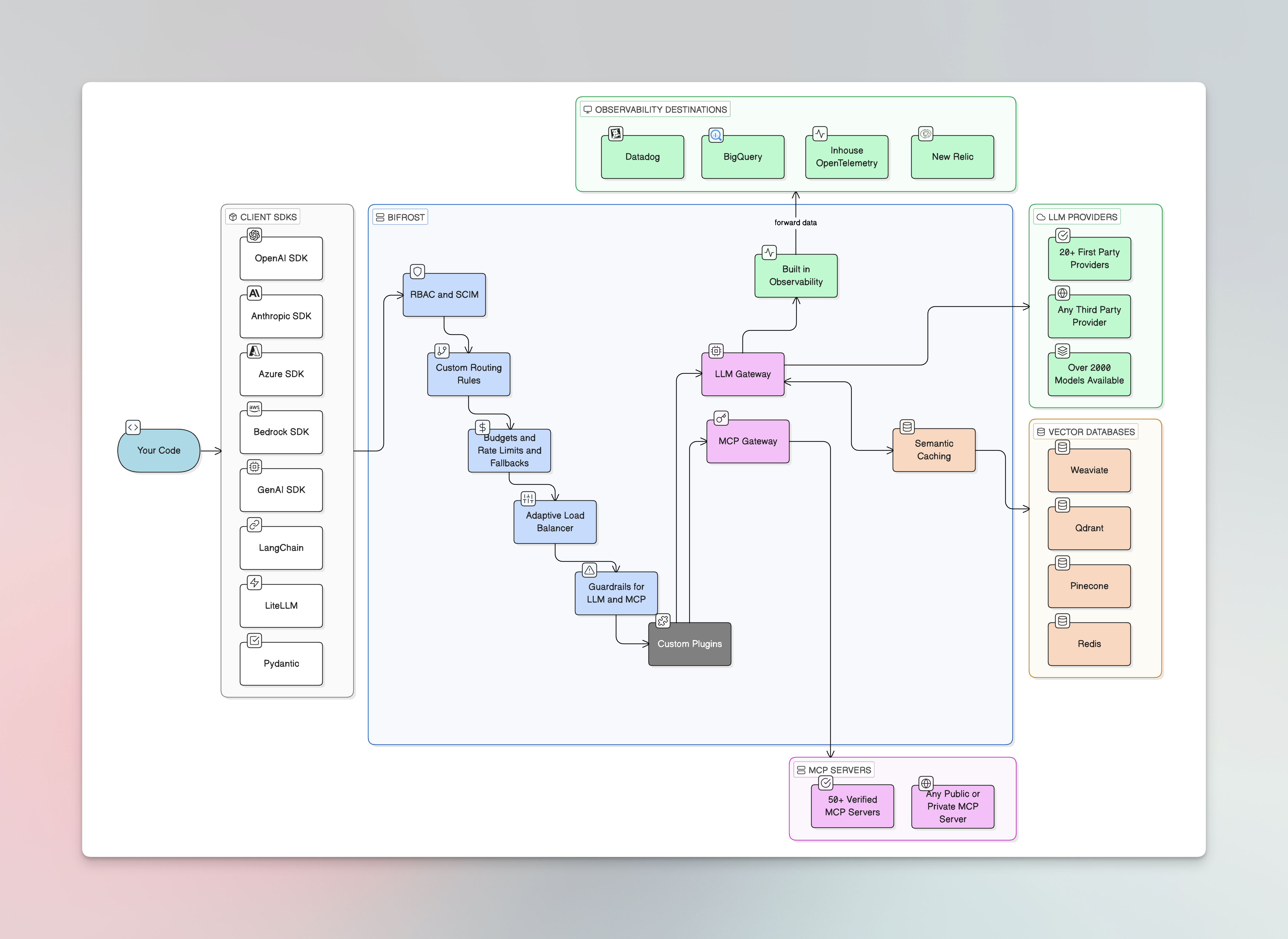
Bifrost Enterprise builds on the open-source [Bifrost AI Gateway](/overview) with the reliability, security, and governance capabilities required to run AI in production at organizational scale. Every OSS feature ships in Enterprise - plus high-availability clustering, predictive load balancing, identity federation, role-based access control, audit-grade compliance logging, and private-network deployment options.
 Start a 14-day free trial. No credit card required.
Walk through Enterprise capabilities with a Bifrost engineer.
## Built on open source
Bifrost Enterprise is a strict superset of the [open-source gateway](/overview). Every provider, integration, plugin, and SDK supported in OSS works identically in Enterprise - no migration, no re-integration, same `config.json` schema. Enterprise adds the capabilities organizations need at scale.
***
## 1. Observe & audit
Before anything else, make sure you can see traffic, exports, and incident-grade audit trails. Production trust starts with visibility.
Immutable, timestamped audit trails for every configuration change. SOC 2, GDPR, HIPAA, ISO 27001 friendly.
Automated export of request logs and telemetry to S3, GCS, BigQuery, and other data lakes.
Native Datadog APM, LLM Observability, and metrics integration with full request tracing.
***
## 2. Identity
Federate user identity through your existing IdP so accounts, groups, and lifecycle state stay in sync.
OIDC login with directory-based user and group sync for lifecycle management.
### Connect your identity provider
OIDC login with Okta plus 24-hour background user sync.
Azure AD / Entra ID with GCC High and DoD cloud support.
Self-hosted identity with OIDC login and Admin REST API backed sync.
Cloud-native identity with first-class user grants and project mapping.
Workspace directory federation with Application Default Credentials inheritance.
***
## 3. Safety
Apply content guardrails so unsafe input and output are caught before they reach your models or your users.
Content safety, PII detection, secrets detection, and redaction with native checks plus Presidio, Azure AI Language PII, AWS Bedrock Guardrails, Azure Content Safety, Google Model Armor, CrowdStrike AIDR, GraySwan, and Patronus AI.
Out-of-the-box building blocks:
Catch API keys, credentials, and tokens in prompts and completions before they leave your perimeter.
Define organization-specific patterns for redaction or rejection.
***
## 4. Policy
Decide what each user is allowed to do with the gateway: which providers, which models, what budgets, which MCP tools.
Reusable provider, model, budget, and rate-limit policies. Auto-allocate virtual keys to users at scale.
Curated bundles of MCP tools attachable to virtual keys, teams, customers, users, providers, or API keys.
***
## 5. Access
Define who can configure the gateway, and limit which rows each operator can see in the dashboard.
Hierarchical governance across teams, customers, and business units, layered on top of OSS governance.
Custom roles with fine-grained permissions across every Bifrost resource.
Row-level scope (own / team / all) so different operators see only what their role entitles them to.
***
## 6. Deploy at scale
Once policy and access are wired up, move from a single-node install to a clustered, geo-redundant production deployment.
High-availability clustering with automatic service discovery, gossip-based state sync, and zero-downtime rolling deployments.
Predictive scaling with real-time provider health monitoring; traffic shifts automatically to the fastest available upstream.
Automatic failover to a backup provider when a primary endpoint signals degradation via response headers.
Deploy entirely within your private cloud with no traffic crossing public network boundaries.
### Cloud-specific deployment guides
Deploy on EKS or ECS with IRSA / IAM Task Roles for cloud-native authentication.
Deploy on GKE with Workload Identity for keyless service account access.
Deploy on AKS with Azure Workload Identity Federation.
Air-gapped or self-hosted deployments with Docker credentials.
***
## 7. Extend
For workflows the built-in features don't cover, write a custom plugin.
Build native plugins for organization-specific workflows and business logic.
***
## Security & compliance
Encryption at rest and in transit, vulnerability scanning, dependency management, and secure defaults.
***
## Stay current
How Enterprise releases are versioned and shipped.
Step-by-step upgrade instructions for major versions.
***
## Next steps
* New to Bifrost entirely? Start with the [open-source quickstart](/quickstart/gateway/setting-up) to get the gateway running locally before layering Enterprise on top.
* Already running OSS in production? Skip to [Audit Logs](/enterprise/audit-logs) and [User Provisioning](/enterprise/user-provisioning) to begin the upgrade path.
* Evaluating? Read the [Security Posture](/security), then [book a demo](https://www.getmaxim.ai/bifrost/book-a-demo).
Start a 14-day free trial. No credit card required.
Walk through Enterprise capabilities with a Bifrost engineer.
## Built on open source
Bifrost Enterprise is a strict superset of the [open-source gateway](/overview). Every provider, integration, plugin, and SDK supported in OSS works identically in Enterprise - no migration, no re-integration, same `config.json` schema. Enterprise adds the capabilities organizations need at scale.
***
## 1. Observe & audit
Before anything else, make sure you can see traffic, exports, and incident-grade audit trails. Production trust starts with visibility.
Immutable, timestamped audit trails for every configuration change. SOC 2, GDPR, HIPAA, ISO 27001 friendly.
Automated export of request logs and telemetry to S3, GCS, BigQuery, and other data lakes.
Native Datadog APM, LLM Observability, and metrics integration with full request tracing.
***
## 2. Identity
Federate user identity through your existing IdP so accounts, groups, and lifecycle state stay in sync.
OIDC login with directory-based user and group sync for lifecycle management.
### Connect your identity provider
OIDC login with Okta plus 24-hour background user sync.
Azure AD / Entra ID with GCC High and DoD cloud support.
Self-hosted identity with OIDC login and Admin REST API backed sync.
Cloud-native identity with first-class user grants and project mapping.
Workspace directory federation with Application Default Credentials inheritance.
***
## 3. Safety
Apply content guardrails so unsafe input and output are caught before they reach your models or your users.
Content safety, PII detection, secrets detection, and redaction with native checks plus Presidio, Azure AI Language PII, AWS Bedrock Guardrails, Azure Content Safety, Google Model Armor, CrowdStrike AIDR, GraySwan, and Patronus AI.
Out-of-the-box building blocks:
Catch API keys, credentials, and tokens in prompts and completions before they leave your perimeter.
Define organization-specific patterns for redaction or rejection.
***
## 4. Policy
Decide what each user is allowed to do with the gateway: which providers, which models, what budgets, which MCP tools.
Reusable provider, model, budget, and rate-limit policies. Auto-allocate virtual keys to users at scale.
Curated bundles of MCP tools attachable to virtual keys, teams, customers, users, providers, or API keys.
***
## 5. Access
Define who can configure the gateway, and limit which rows each operator can see in the dashboard.
Hierarchical governance across teams, customers, and business units, layered on top of OSS governance.
Custom roles with fine-grained permissions across every Bifrost resource.
Row-level scope (own / team / all) so different operators see only what their role entitles them to.
***
## 6. Deploy at scale
Once policy and access are wired up, move from a single-node install to a clustered, geo-redundant production deployment.
High-availability clustering with automatic service discovery, gossip-based state sync, and zero-downtime rolling deployments.
Predictive scaling with real-time provider health monitoring; traffic shifts automatically to the fastest available upstream.
Automatic failover to a backup provider when a primary endpoint signals degradation via response headers.
Deploy entirely within your private cloud with no traffic crossing public network boundaries.
### Cloud-specific deployment guides
Deploy on EKS or ECS with IRSA / IAM Task Roles for cloud-native authentication.
Deploy on GKE with Workload Identity for keyless service account access.
Deploy on AKS with Azure Workload Identity Federation.
Air-gapped or self-hosted deployments with Docker credentials.
***
## 7. Extend
For workflows the built-in features don't cover, write a custom plugin.
Build native plugins for organization-specific workflows and business logic.
***
## Security & compliance
Encryption at rest and in transit, vulnerability scanning, dependency management, and secure defaults.
***
## Stay current
How Enterprise releases are versioned and shipped.
Step-by-step upgrade instructions for major versions.
***
## Next steps
* New to Bifrost entirely? Start with the [open-source quickstart](/quickstart/gateway/setting-up) to get the gateway running locally before layering Enterprise on top.
* Already running OSS in production? Skip to [Audit Logs](/enterprise/audit-logs) and [User Provisioning](/enterprise/user-provisioning) to begin the upgrade path.
* Evaluating? Read the [Security Posture](/security), then [book a demo](https://www.getmaxim.ai/bifrost/book-a-demo).