> ## Documentation Index
> Fetch the complete documentation index at: https://docs.getbifrost.ai/llms.txt
> Use this file to discover all available pages before exploring further.
# Patronus AI
> Integrate Patronus AI with Bifrost for LLM security and safety including hallucination detection, PII identification, toxicity screening, and custom evaluators.
## Overview
Bifrost Enterprise supports [**Patronus AI**](https://www.patronus.ai/) as a third-party guardrail provider for evaluating LLM request and response text with Patronus evaluators.
Use it when you want evaluator-based checks such as PII detection, toxicity screening, prompt-injection checks, response quality criteria, or custom evaluators from your Patronus account.
## How It Works
You'll need a Patronus API key to authenticate with their Evaluate API - grab one from the [Patronus dashboard](https://app.patronus.ai/experiments).
1. You create a guardrail provider with `provider_name: "patronus-ai"` and your Patronus API key.
2. You configure one or more Patronus evaluators.
3. You attach that provider to a guardrail rule.
4. The rule decides when to run the provider and whether to evaluate `input`, `output`, or `both`.
5. Bifrost calls the Patronus Evaluate API at `/v1/evaluate`.
6. If any evaluator returns `pass: false`, Bifrost returns `GUARDRAIL_INTERVENED`.
The Patronus evaluator flow supported here is text-based: Bifrost sends selected request or response text as the evaluation input.
**Streaming output:** When this profile is used in an `output` or `both` rule, Bifrost accumulates the stream until the model response is complete, then checks the full response. It does not check individual stream chunks. See [Streaming Output Guardrails](/enterprise/guardrails#streaming-output-guardrails) for details.
## Capabilities
* **PII Detection**: Identify personally identifiable information using Patronus evaluators
* **Toxicity Screening**: Evaluate text for toxic or unsafe content
* **Prompt Injection Checks**: Use Patronus judge criteria such as `patronus:prompt-injection`
* **Response Quality Checks**: Evaluate outputs for criteria such as conciseness, helpfulness, politeness, JSON validity, code validity, or CSV validity
* **Bias Checks**: Use Patronus criteria for age, gender, and racial bias checks
* **Custom Evaluators**: Use evaluator IDs and criteria configured in your Patronus account
## Configuration Fields
| Field | Type | Required | Default | Description |
| ------------ | ------- | -------- | ------------------------- | ------------------------------------------------------------------------------------ |
| `api_key` | string | Yes | - | Patronus API key. Supports `env.PATRONUS_API_KEY`. |
| `base_url` | string | No | `https://api.patronus.ai` | Custom Patronus API base URL. Bifrost appends `/v1/evaluate`. |
| `evaluators` | array | Yes | - | Patronus evaluator entries to run. At least one is required. |
| `capture` | enum | No | `none` | Controls whether Patronus stores evaluation results: `none`, `fails-only`, or `all`. |
| `timeout` | integer | No | `30` | Provider execution timeout in seconds. |
### Evaluator Fields
| Field | Type | Required | Description |
| ------------------ | ------ | -------- | ------------------------------------------------------------------------------------------------------ |
| `evaluator` | string | Yes | Patronus evaluator name, such as `pii`, `toxicity-perspective-api`, `judge`, or a custom evaluator ID. |
| `criteria` | string | No | Criteria/profile name for evaluators that require one, for example `patronus:is-concise`. |
| `explain_strategy` | enum | No | When to include evaluator explanations: `never`, `on-fail`, `on-success`, or `always`. |
### Capture Modes
Captured evaluation results appear under the **Traces** section in the Patronus dashboard.
| Value | Meaning |
| ------------ | -------------------------------------------------- |
| `none` | Do not capture evaluation results in Patronus. |
| `fails-only` | Capture only failed evaluator results in Patronus. |
| `all` | Capture all evaluator results in Patronus. |
### Explanation Response Modes
| Value | Meaning |
| ------------ | -------------------------------------------------- |
| `never` | Do not request evaluator explanations. |
| `on-fail` | Request explanations for failed evaluator results. |
| `on-success` | Request explanations for passed evaluator results. |
| `always` | Request explanations for all evaluator results. |
## Built-In UI Presets
The Bifrost dashboard exposes common Patronus evaluator presets:
| Preset | Evaluator | Criteria |
| ------------------- | -------------------------- | ------------------------------ |
| Detect PII | `pii` | - |
| Detect Toxicity | `toxicity-perspective-api` | - |
| Prompt Injection | `judge` | `patronus:prompt-injection` |
| Answer Refusal | `judge` | `patronus:answer-refusal` |
| Is Concise | `judge` | `patronus:is-concise` |
| Is Helpful | `judge` | `patronus:is-helpful` |
| Is Polite | `judge` | `patronus:is-polite` |
| No Apologies | `judge` | `patronus:no-apologies` |
| No OpenAI Reference | `judge` | `patronus:no-openai-reference` |
| No Age Bias | `judge` | `patronus:no-age-bias` |
| No Gender Bias | `judge` | `patronus:no-gender-bias` |
| No Racial Bias | `judge` | `patronus:no-racial-bias` |
| Is JSON | `judge` | `patronus:is-json` |
| Is Code | `judge` | `patronus:is-code` |
| Is CSV | `judge` | `patronus:is-csv` |
You can also select **Custom evaluator** and provide your own `evaluator` and optional `criteria`.
## Configuration
1. Go to **Guardrails** > **Providers**.
2. Select **Patronus AI**.
3. Click **Add Configuration**.
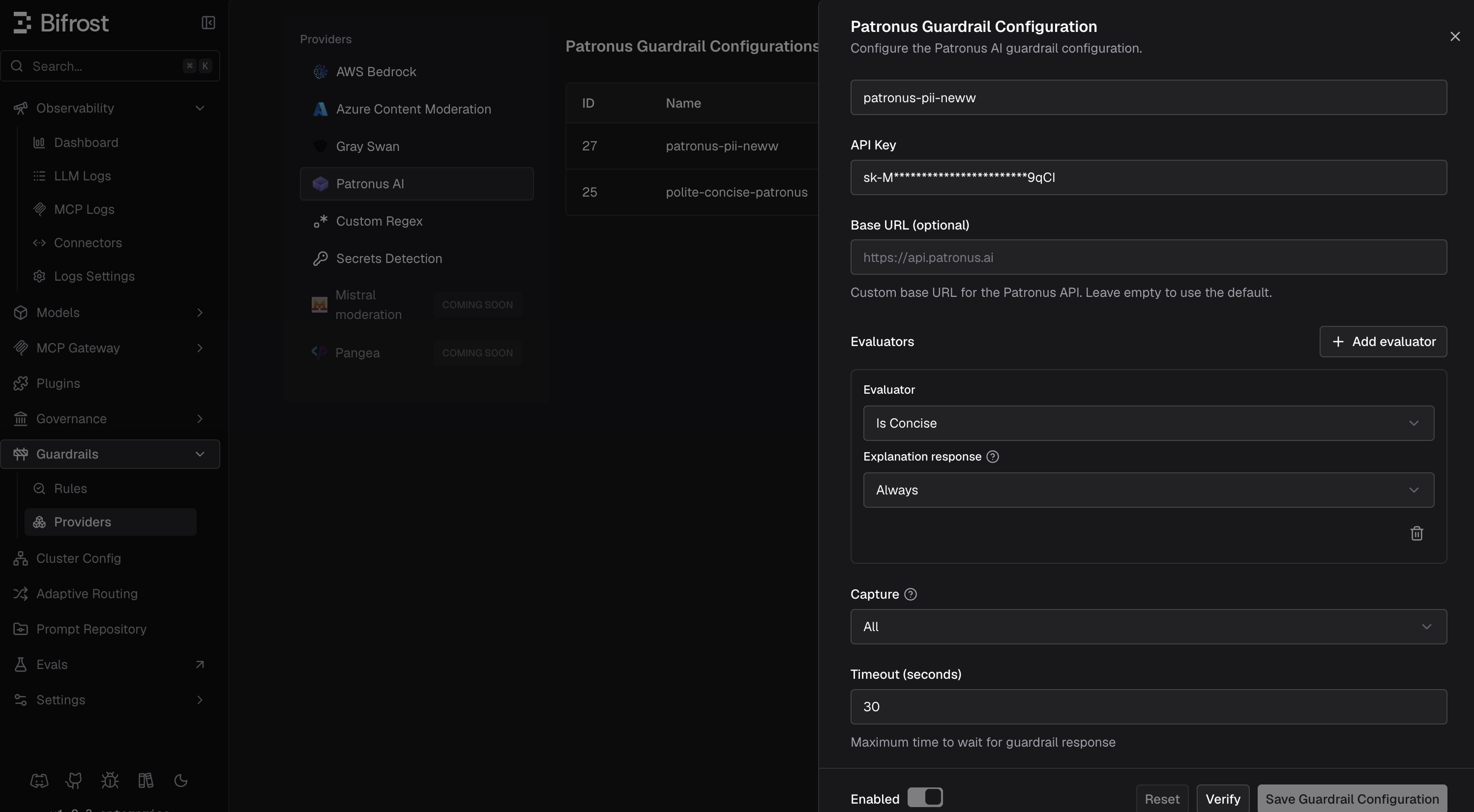 4. Enter a descriptive **Name**.
5. Set your **API Key** directly or through an environment variable.
6. Leave **Base URL** empty or use the default `https://api.patronus.ai`, or set a custom Patronus endpoint.
7. Add one or more evaluators.
8. Choose a **Capture** mode. Bifrost defaults to **None**.
9. Set the timeout and save the configuration.
10. Attach the configuration to a guardrail rule under **Guardrails** > **Configuration**.
Create the Patronus AI provider configuration directly with the management API. The Enterprise backend registers guardrail provider APIs at `/api/guardrails/{provider}`; the provider type is the path segment (`patronus-ai`), and the API assigns the configuration ID after creation.
```bash theme={null}
curl -X POST http://localhost:8080/api/guardrails/patronus-ai \
-H "Content-Type: application/json" \
-d '{
"name": "patronus-quality-checks",
"enabled": true,
"config": {
"api_key": "env.PATRONUS_API_KEY",
"base_url": "https://api.patronus.ai",
"evaluators": [
{
"evaluator": "pii",
"explain_strategy": "on-fail"
},
{
"evaluator": "judge",
"criteria": "patronus:is-concise",
"explain_strategy": "on-fail"
}
],
"capture": "none",
"timeout": 30
}
}'
```
To attach it to a rule, fetch the generated config ID with `GET /api/guardrails/patronus-ai`, then reference it in `selectedGuardrailProfiles` (in the form `patronus-ai:`) on `POST /api/guardrails/rules`.
```json theme={null}
{
"guardrails_config": {
"guardrail_providers": [
{
"id": 40,
"provider_name": "patronus-ai",
"policy_name": "patronus-quality-checks",
"enabled": true,
"timeout": 30,
"config": {
"api_key": "env.PATRONUS_API_KEY",
"base_url": "https://api.patronus.ai",
"evaluators": [
{
"evaluator": "pii",
"explain_strategy": "on-fail"
},
{
"evaluator": "judge",
"criteria": "patronus:is-concise",
"explain_strategy": "on-fail"
}
],
"capture": "none"
}
}
],
"guardrail_rules": [
{
"id": 401,
"name": "patronus-openai-output",
"description": "Run Patronus checks on OpenAI responses",
"enabled": true,
"cel_expression": "provider == 'openai'",
"apply_to": "output",
"sampling_rate": 100,
"timeout": 30,
"provider_config_ids": [40]
}
]
}
}
```
```yaml theme={null}
bifrost:
guardrails:
providers:
- id: 40
provider_name: "patronus-ai"
policy_name: "patronus-quality-checks"
enabled: true
timeout: 30
config:
api_key: "env.PATRONUS_API_KEY"
base_url: "https://api.patronus.ai"
evaluators:
- evaluator: "pii"
explain_strategy: "on-fail"
- evaluator: "judge"
criteria: "patronus:is-concise"
explain_strategy: "on-fail"
capture: "none"
rules:
- id: 401
name: "patronus-openai-output"
description: "Run Patronus checks on OpenAI responses"
enabled: true
cel_expression: "provider == 'openai'"
apply_to: "output"
sampling_rate: 100
timeout: 30
provider_config_ids: [40]
```
For provider comparison and information on configuring guardrail rules and profiles, see [Guardrails](/enterprise/guardrails).
4. Enter a descriptive **Name**.
5. Set your **API Key** directly or through an environment variable.
6. Leave **Base URL** empty or use the default `https://api.patronus.ai`, or set a custom Patronus endpoint.
7. Add one or more evaluators.
8. Choose a **Capture** mode. Bifrost defaults to **None**.
9. Set the timeout and save the configuration.
10. Attach the configuration to a guardrail rule under **Guardrails** > **Configuration**.
Create the Patronus AI provider configuration directly with the management API. The Enterprise backend registers guardrail provider APIs at `/api/guardrails/{provider}`; the provider type is the path segment (`patronus-ai`), and the API assigns the configuration ID after creation.
```bash theme={null}
curl -X POST http://localhost:8080/api/guardrails/patronus-ai \
-H "Content-Type: application/json" \
-d '{
"name": "patronus-quality-checks",
"enabled": true,
"config": {
"api_key": "env.PATRONUS_API_KEY",
"base_url": "https://api.patronus.ai",
"evaluators": [
{
"evaluator": "pii",
"explain_strategy": "on-fail"
},
{
"evaluator": "judge",
"criteria": "patronus:is-concise",
"explain_strategy": "on-fail"
}
],
"capture": "none",
"timeout": 30
}
}'
```
To attach it to a rule, fetch the generated config ID with `GET /api/guardrails/patronus-ai`, then reference it in `selectedGuardrailProfiles` (in the form `patronus-ai:`) on `POST /api/guardrails/rules`.
```json theme={null}
{
"guardrails_config": {
"guardrail_providers": [
{
"id": 40,
"provider_name": "patronus-ai",
"policy_name": "patronus-quality-checks",
"enabled": true,
"timeout": 30,
"config": {
"api_key": "env.PATRONUS_API_KEY",
"base_url": "https://api.patronus.ai",
"evaluators": [
{
"evaluator": "pii",
"explain_strategy": "on-fail"
},
{
"evaluator": "judge",
"criteria": "patronus:is-concise",
"explain_strategy": "on-fail"
}
],
"capture": "none"
}
}
],
"guardrail_rules": [
{
"id": 401,
"name": "patronus-openai-output",
"description": "Run Patronus checks on OpenAI responses",
"enabled": true,
"cel_expression": "provider == 'openai'",
"apply_to": "output",
"sampling_rate": 100,
"timeout": 30,
"provider_config_ids": [40]
}
]
}
}
```
```yaml theme={null}
bifrost:
guardrails:
providers:
- id: 40
provider_name: "patronus-ai"
policy_name: "patronus-quality-checks"
enabled: true
timeout: 30
config:
api_key: "env.PATRONUS_API_KEY"
base_url: "https://api.patronus.ai"
evaluators:
- evaluator: "pii"
explain_strategy: "on-fail"
- evaluator: "judge"
criteria: "patronus:is-concise"
explain_strategy: "on-fail"
capture: "none"
rules:
- id: 401
name: "patronus-openai-output"
description: "Run Patronus checks on OpenAI responses"
enabled: true
cel_expression: "provider == 'openai'"
apply_to: "output"
sampling_rate: 100
timeout: 30
provider_config_ids: [40]
```
For provider comparison and information on configuring guardrail rules and profiles, see [Guardrails](/enterprise/guardrails).