

Overview
Audit Logs in Bifrost Enterprise record administrative activity so operators can review who changed what, when it happened, and which resource was affected. Audit log entries can be signed with an HMAC key, retained for a configurable number of days, viewed in the dashboard, and exported for downstream review.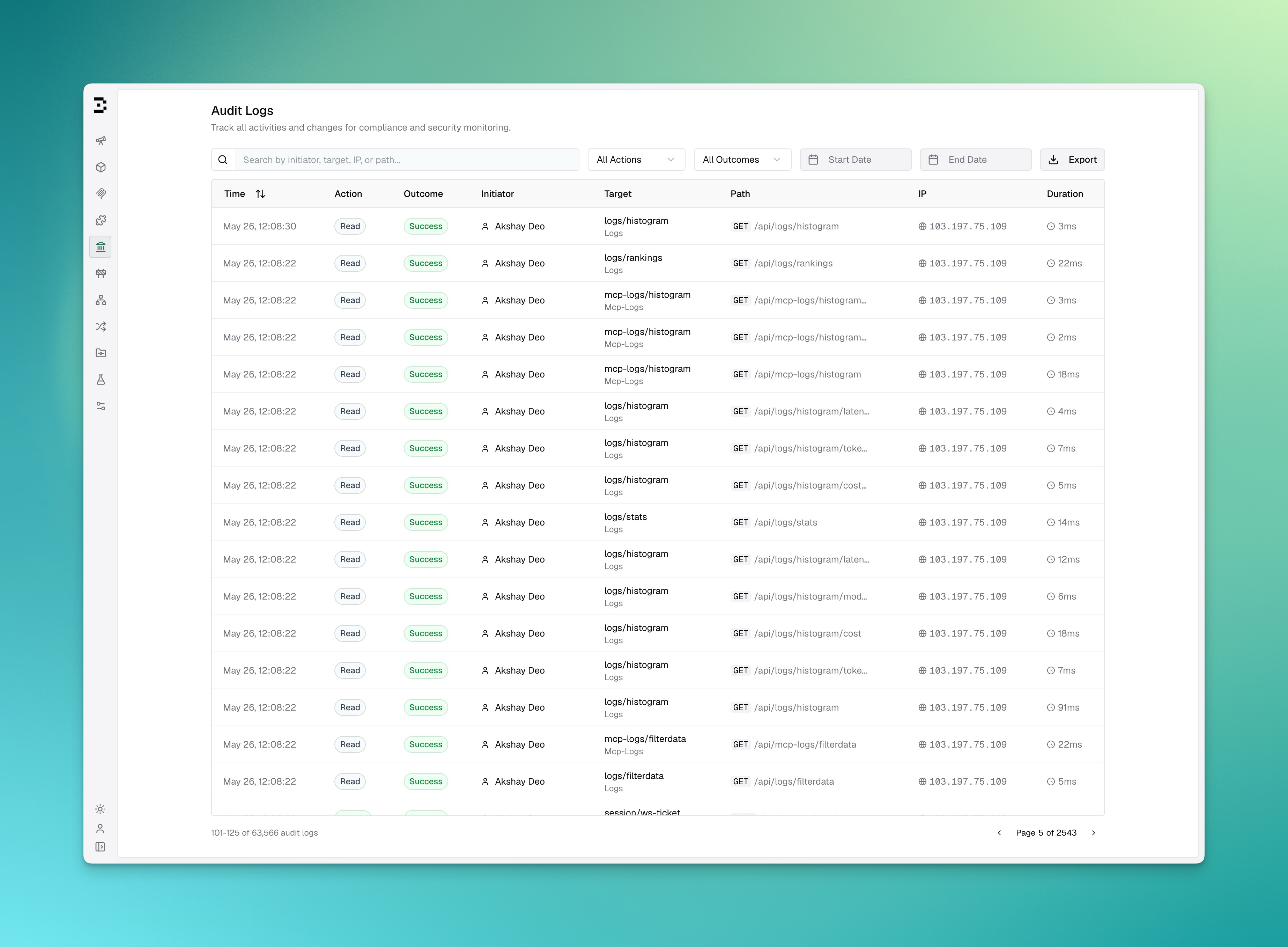
Key Features
Configuration
Configuration Fields
The three
archive_* fields only take effect when object_storage is configured.config.schema.json constrains these fields, so an editor wired to it (via $schema) will flag a malformed duration like "6 hours" or an out-of-range archive_max_object_bytes as you type. The gateway itself does not reject such values at startup: each field is normalized independently at runtime, so a value that gets past the schema falls back to its default or is clamped into range rather than failing startup. A typo like "6 hours" silently yields the 24h default, and archive_interval: "10s" is quietly raised to the 5m floor.Because a bad value fails quietly rather than loudly, confirm what actually took effect from the startup log line, which reports all three:Omitting IP Addresses
Some deployments can’t record where employees connect from. Employee privacy law and works council agreements, common in Germany, often rule it out. Setomit_ip_addresses to keep the audit trail without IPs:
- The gateway never reads the client IP (
X-Forwarded-For,X-Real-IPor the socket address) for audit events. New rows have an emptyrequest_ipand initiator host. - The initiator, action, target, path, method, user agent, outcome and duration are still recorded. HMAC signatures don’t cover the IP fields, so signature verification keeps working.
- IPs in rows written before you turned the setting on are hidden from the list and detail APIs, the dashboard and every export format.
- Search no longer matches on IP, IP filters are ignored, and the filter data endpoint returns no request IPs. Otherwise a caller could filter older rows by an address to learn who used it.
- Events that object storage archival copies after the change carry no IP, including events from older rows.
Viewing Audit Logs
Open Governance > Audit Logs in the Bifrost dashboard. The table shows:
You can search by initiator, target, IP, or path, and filter by action, outcome, start date, and end date. With
omit_ip_addresses on, search skips IPs and the IP filter disappears.
Exporting Audit Logs
Users withAuditLogs:Download permission can export the currently filtered audit log results from the dashboard.
Supported export formats:
With
omit_ip_addresses on, exports contain no IP addresses in any format. The syslog clientIP parameter is left out.
Event type URI
Every audit event has atypeURI field. New events use https://getbifrost.ai/schemas/auditlog.json. Older events keep http://schemas.bifrost.io/audit/api/v1.
Stored events are not rewritten, so exports and searches that cover both periods return both values. If a SIEM rule matches on typeURI, make it accept both.
Archiving to Object Storage
By default, audit events live only in the database, which is the source of truth for everything you see in the dashboard (viewing, filtering, HMAC verification, and export). Databases, however, are not ideal for multi-year compliance retention or off-box durability. When you configureobject_storage, a background job additionally copies every audit event to an S3-compatible bucket (S3, GCS, MinIO, R2), one time window at a time. This is a copy, not an offload: the full event ends up in both the database and object storage, so each store holds a complete, independent copy.
This differs from Log Exports, where object storage offloads the heavy request/response payload out of the database. For audit logs, object storage is a complete mirror — the database is never trimmed of data by enabling it.
Database vs. Object Storage
Because the two are decoupled, the archive can outlive the database: once
retention_days deletes an old row, its object in the bucket is left untouched. Use S3 Object Lock / WORM and bucket lifecycle rules to govern how long the archive is kept.
How Archival Works
Archival runs as a periodic background job, not as part of the request path. Time is divided into fixed windows ofarchive_interval, and each closed window is archived as a unit, in order:
- A window closes. The window
[start, end)becomes eligible only onceendis further in the past thanarchive_grace_period. The grace period absorbs clock skew and rows that land slightly late, so a window is not archived while events may still be arriving for it. - A job is enqueued. One job archives one window. Job IDs derive from the window bounds, so in a multi-node cluster every node can tick while exactly one job row is created and exactly one node runs it — no leader election or lock is involved.
- Rows are streamed into part objects. Committed rows in the window are streamed from the database and encoded as JSON Lines. A new part is rolled each time the accumulated uncompressed JSONL crosses
archive_max_object_bytes; a part boundary never splits a JSON line. - A manifest commits the window. After every part has been durably stored, a
manifest.jsonlisting exactly those parts is written. The manifest is the commit point — only once it lands does the archival watermark advance toend, making the next window eligible.
"prefix": "acme-prod", "compress": true, and a 24h interval:
Every object also carries tags (
type, window_start, window_end, count, and part/parts) so lifecycle rules and consumers can select objects without listing and pattern-matching keys. Manifests are tagged type=audit-logs-manifest, parts type=audit-logs.
Reading the Archive
Always read a window through its manifest, and ignore any object the manifest does not list. A retried window can leave behind an orphaned part from an earlier attempt; the manifest lists exactly the parts that belong to the window, which is what makes it authoritative.parts array — a positive record that the window was examined and held nothing. The absence of a manifest means the window is not yet committed, not that it was empty.
Delivery Guarantees
Unlike the earlier per-flush implementation, archival is no longer best-effort — a failed upload is retried rather than logged and dropped, and the watermark will not advance past a window that did not commit. The database nevertheless remains the source of truth: it is what the dashboard, API, export, and HMAC verification read, and it is written independently of whether the bucket is reachable. Object-storage problems delay the archive; they never block audit logging or request handling.
Tuning
archive_intervaltrades archive freshness against object count. Longer windows mean fewer, larger objects and a longer lag before events reach the bucket; shorter windows mean fresher data and more objects. The job wakes at least hourly regardless, so a window that closes shortly after a tick is not left waiting a full 24h.archive_max_object_bytesbounds peak memory: a part is buffered in memory before upload, so expect roughly 2× this value per archiving node whencompressis enabled (compression allocates a second buffer). The 128 MiB default implies a ~256 MiB peak. Raise it for fewer, larger objects on nodes with headroom; lower it on memory-constrained nodes.archive_grace_periodrarely needs changing. Raise it if you run with meaningful clock skew across nodes.
Configuration
- S3 / MinIO / R2
- GCS
Object Storage Fields
You can point audit archival at its own dedicated (ideally write-once/locked) bucket, or reuse the same bucket as request
logs_store with a distinct prefix. The audit-logs/ path segment keeps the two from overlapping.retention_days guidance above protects.
Catch-up is paced, though: each pass enqueues one window, and passes run every archive_interval (capped at hourly). After a long outage, expect a backlog of N windows to take roughly N passes to drain — so a multi-day outage with a 24h interval clears at about one window per hour, not all at once.
On shutdown the archiver stops before the object store is released, and an in-flight window is allowed to finish rather than being cancelled, so parts are never left behind without a manifest.