

Not to be confused with prompt caching. Semantic caching is
Bifrost replaying a response it has already seen, so the provider is never called.
Prompt caching is the provider reusing the prefix of your request, so the call still
happens and is still billed: cache reads are cheaper than fresh input, but the turn that
writes the cache can cost more than fresh input (on Anthropic, 1.25x for a 5m TTL and 2x
for 1h). They are independent and can both be on.
Overview
Bifrost can cache LLM responses and replay them for repeated requests, avoiding a round-trip to the provider. It offers two complementary lookup paths:- Direct (hash) matching — deterministic, exact-match replay. The request is normalized and hashed; an identical request is served instantly. No embeddings required.
- Semantic (similarity) matching — embedding-based lookup that serves a cached answer when a new request is close enough to a previous one, even if the wording differs.
In the Web UI this feature is labeled Local Cache (under Settings → Caching). “Semantic caching” refers to the embedding-based mode; “direct” mode is the embedding-free path. They are the same plugin (
semantic_cache).- Cost reduction — skip paid LLM calls for repeated or similar prompts.
- Lower latency — sub-millisecond cache reads vs. multi-second provider calls.
- Two modes — exact-match deduplication (direct) or fuzzy similarity (semantic).
- Streaming support — streamed responses are cached and replayed chunk-by-chunk.
How it works
A few things that trip up first-time users — read these before configuring:- A cache key is mandatory. Caching only engages when a request carries a cache key (the
x-bf-cache-keyheader, or theCacheKeycontext value in the Go SDK). Without one — and without a configureddefault_cache_key— the request bypasses the cache entirely. This is the single most common reason “nothing is being cached.” - Direct runs before semantic. When both paths are enabled, a direct hash hit is served first; the semantic search only runs on a direct miss. You can narrow a request to one path with the
x-bf-cache-typeheader. - Writes are asynchronous. On a cache miss, Bifrost returns the provider’s response immediately and stores it in the background, so the first request never blocks on a cache write.
- Entries persist across restarts. Cache entries live in your vector store with a per-entry expiry (
expires_at). They are not purged when Bifrost shuts down — a restart keeps serving warm cache (see Cache lifecycle).
Prerequisites
- A vector store is required as the storage backend for both modes — even direct-only mode stores its entries there. Bifrost supports:
Redis / Valkey
In-memory, RediSearch-compatible. Recommended for direct-only mode.
Weaviate
Production-ready vector database with gRPC support.
Qdrant
Rust-based vector search engine with advanced filtering.
Pinecone
Managed, serverless vector database service.
- An embedding-capable provider — only if you want semantic mode. Direct-only mode needs no provider.
See the Vector Store documentation for per-store setup. The vector store must be enabled in
config.json before the Enable Caching toggle becomes available in the UI.For Valkey, keep
vector_store.type as "redis" and point config.addr at your Valkey endpoint.Configuration
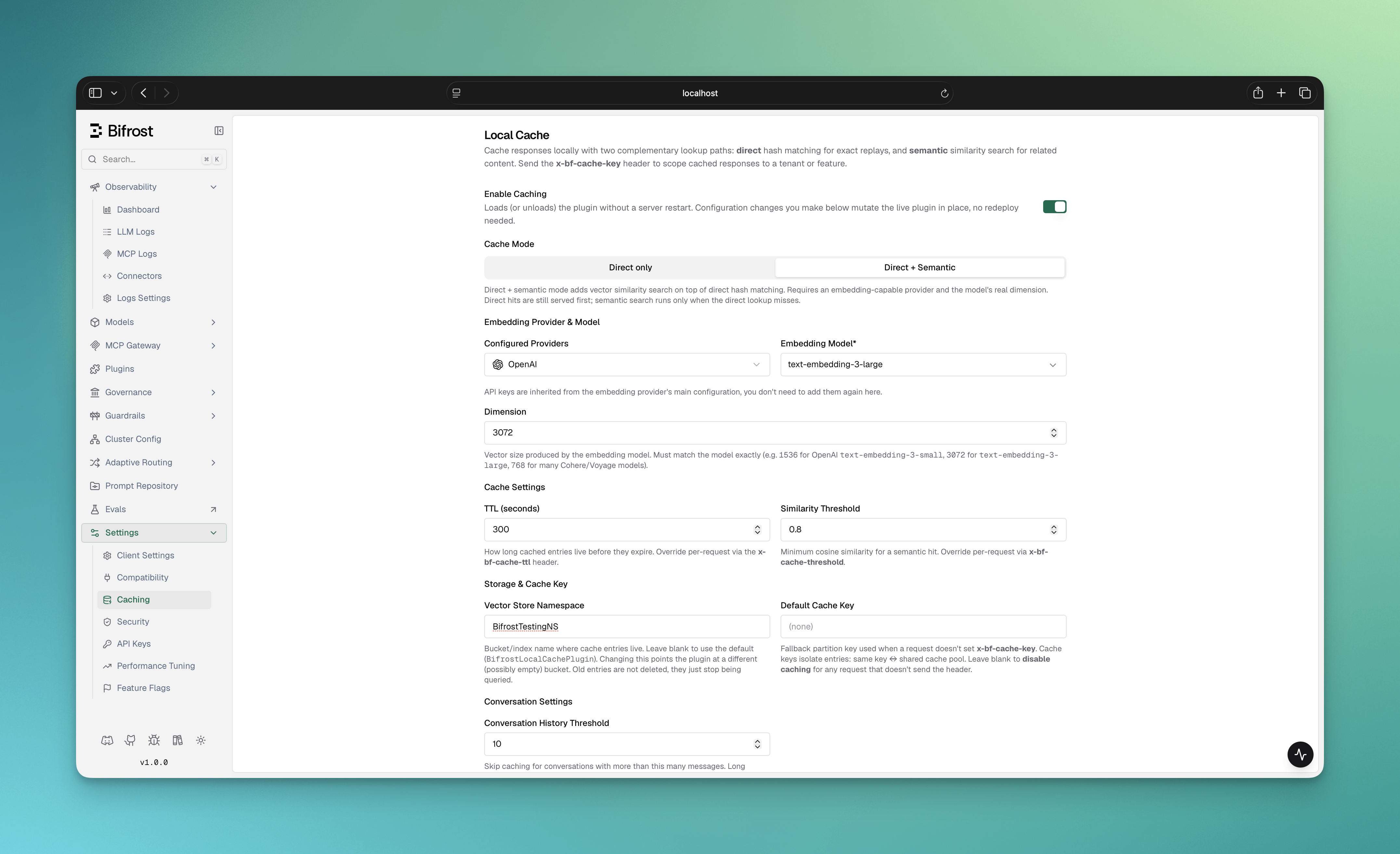
- Web UI
- API
- config.json
- Helm
- Go SDK
-
Configure and enable a vector store in
config.json(see Prerequisites). Without it, the toggle stays disabled. - In the Bifrost UI, go to Settings → Caching. You’ll see the Local Cache panel.
- Flip Enable Caching on. The plugin loads live — no server restart needed.
-
Pick a Cache Mode using the tabs at the top of the panel:
- Direct only — exact-match caching. No provider or embeddings. Cheapest path; ideal for stable, repeated prompts.
- Direct + Semantic — adds vector similarity on top of direct matching. Requires an embedding-capable provider. (This tab is disabled until at least one embedding-capable provider is configured.)
-
For semantic mode, fill in the embedding provider, model, and dimension that appear below the tabs:
- Configured Providers — an embedding-capable provider already set up in Bifrost. Its API keys are inherited automatically.
- Embedding Model — e.g.
text-embedding-3-small. - Dimension — the vector size the model produces. Must match the model exactly (e.g.
1536fortext-embedding-3-small,3072fortext-embedding-3-large,768for many Cohere/Voyage models).
- Tune Cache Settings, Storage & Cache Key, Conversation Settings, and Cache Key Composition (all explained in the field reference below).
- Click Save Changes. Config changes mutate the live plugin in place.
-
Send a request with an
x-bf-cache-keyheader to start caching (see Triggering the cache).
Field reference
Direct vs. semantic mode
Direct-only setup
Direct mode hashes each request deterministically from its normalized input, parameters, and stream flag. Identical requests hit; any difference is a miss. The deterministic cache ID keeps repeated lookups consistent across retries, streaming, and restarts. To enable direct-only mode, setdimension: 1 and omit provider and embedding_model. In the UI, pick the Direct only tab.
- config.json
- Go SDK
- Helm
x-bf-cache-type header — no embeddings are generated and no embedding credentials are needed.
Vector stores in direct-only mode
Every vector store works in direct-only mode. Redis/Valkey-compatible stores are the lightest choice: they store no vector for metadata-only entries, and all cache fields are indexed as TAG fields for fast exact-match lookups. Weaviate, Qdrant, and Pinecone require a vector for every entry, so the plugin stores a fixed placeholder vector with each one; it needs no embedding provider, and lookups still match on the request hash alone.Triggering the cache
The cache key is the partition every lookup and write is scoped to — it’s part of the cache entry’s identity alongside the model and provider. It exists for two reasons:- Isolation (no cross-talk). Entries are only ever matched within the same key — and, on top of that, within the same identity (see the note below). A request under
tenant-Acan never be served a response cached undertenant-B, even if the prompts are identical. The key is how you draw sharing boundaries within an identity (per session, per feature, etc.). - Explicit opt-in. Caching changes behavior — a response can be replayed instead of freshly generated. Requiring a key makes that a deliberate choice per request (or per deployment via
default_cache_key), so you never accidentally serve a cached answer where you wanted a live one.
By default every cache entry is scoped to the identity that wrote it, on top of whatever
x-bf-cache-key/default_cache_key you set. The identity is the request’s resolved virtual key
and, where the request is attributed to a user, that user. Two different identities never share
a cache entry, even with the exact same cache key and prompt. Requests that carry no identity
share entries only with each other. Set disable_identity_scoping: true (or turn off Scope
Cache by Identity in the UI) to let every identity share entries by cache key; entries written
in one mode are not served in the other.The identity is folded into the entry’s hash and is never stored on the entry, so the stored
cache key stays the value you sent. Clearing a key with
DELETE /api/cache/clear-by-key/{cacheKey} removes every identity’s entries under that key.Responses that carry tool calls (chat
tool_calls, or Responses API function_call,
custom_tool_call, computer_call, local_shell_call, mcp_call, mcp_approval_request items)
are not cached by default: a replayed tool call would run in a later caller’s agent loop with arguments the model
chose for someone else’s prompt. Set cache_tool_call_responses: true to opt in.When a request carries a resolved virtual key, the effective cache partition is automatically
scoped to that virtual key on top of whatever
x-bf-cache-key/default_cache_key you set - two
different virtual keys can never share a cache entry, even if they’re configured with the exact
same cache key. This applies with zero configuration; there’s nothing to opt into. Requests
without a virtual key (no governance/VK enforcement in use) are partitioned by cache key alone,
same as before.- HTTP API
- Go SDK
Set the cache key in the
x-bf-cache-key header:Per-request overrides
Every plugin default can be overridden per request via headers (HTTP) or context keys (Go SDK).- HTTP API
- Go SDK
In direct-only mode (no embedding provider),
x-bf-cache-type and x-bf-cache-threshold have no effect — every request uses direct matching.Cache management
Every cached or cache-checked response carries debug metadata so you can confirm caching is working and capture the entry’s ID for management. Location:response.ExtraFields.CacheDebug
Examples:
On a streamed response, only the final chunk carries the full
cache_debug payload.Response headers
Every inference response the cache looked up also carries the same fields asx-bifrost-cache-* response headers, on every route. They are the only way to read them where the response body has no extra_fields: the Anthropic, GenAI, Bedrock and Cohere SDK routes (the Anthropic route includes extra_fields only when raw capture is on), and streams on those routes. Requests the cache did not look up, and error responses, carry no cache headers.
A stream sends its headers before the first chunk, so they report the lookup as it was recorded. They match the final chunk’s
cache_debug except x-bifrost-cache-hit-latency-ms, which is measured when the lookup outcome is recorded, before the first chunk.
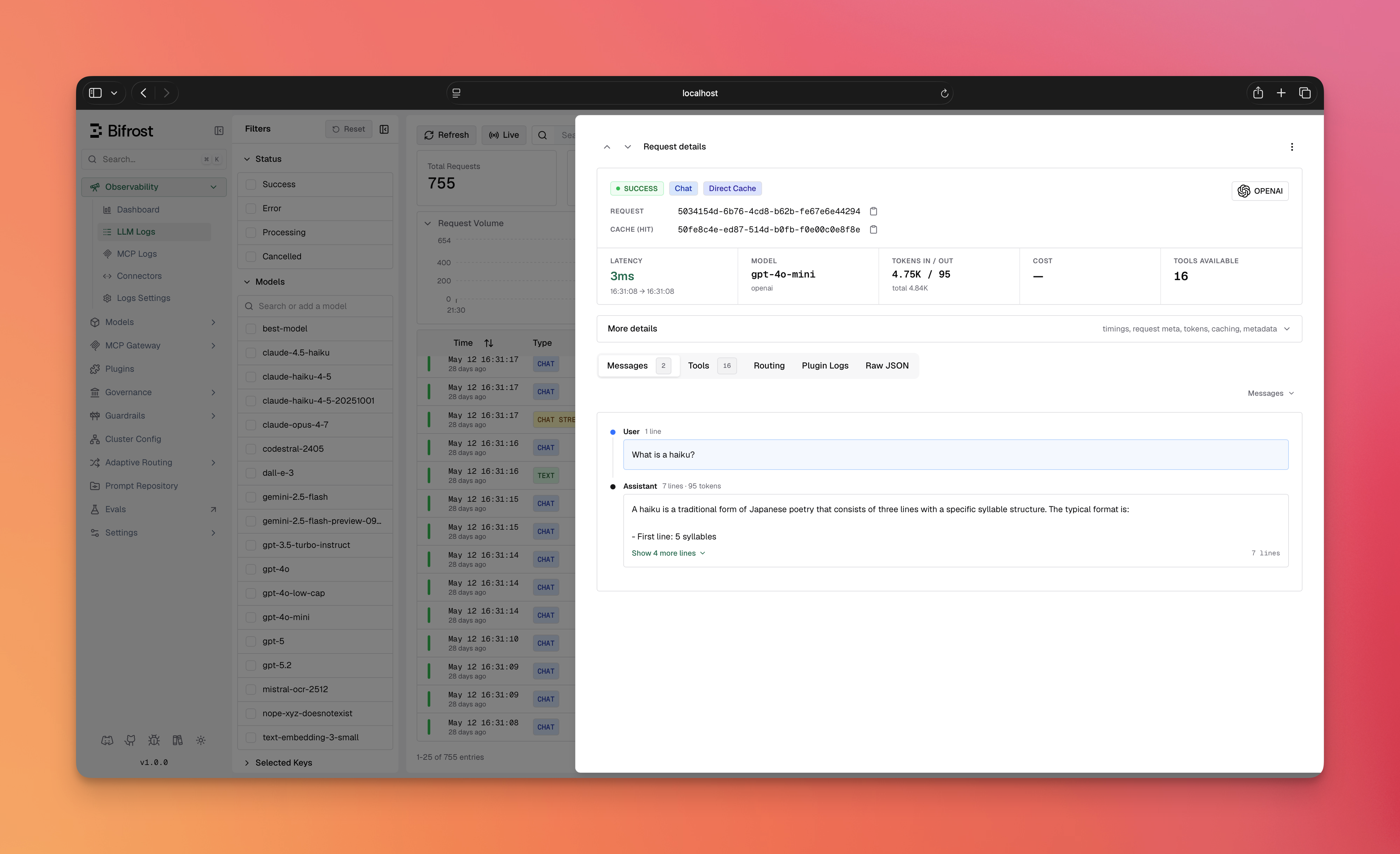
- Hit-type badge — a cache hit is tagged with a Direct Cache or Semantic Cache badge on the log entry.
- Cache row — each cached request shows a
Cache (hit)/Cache (miss)row with the copyablecache_id. - Caching Details block — expands to the
cache_debugfields: cache type, and for semantic hits the embedding provider, embedding model, threshold, similarity score, and embedding input tokens. - Local Caching filter — the logs filter sidebar lets you filter requests by hit type (Direct cache / Semantic cache).
Invalidation
Use thecache_id from cache_debug to invalidate a single entry, or clear a whole cache key. Clearing a key removes the entries of every identity that wrote under it; to remove one identity’s entry, clear it by its cache_id. Clearing a cache_id that does not exist, or has already expired, succeeds on every vector store.
- HTTP API
- Go SDK
Lifecycle & Cleanup
- TTL expiration — every entry is stored with an
expires_attimestamp. Expired entries are no longer served and are swept out over time. - Entries persist across restarts — cache data lives in your vector store and is not purged when Bifrost shuts down. A restart resumes serving the existing (unexpired) cache. To wipe entries, use the cache-clear APIs or clear the namespace in your vector store directly.
- Namespace isolation — each
vector_store_namespaceis an independent cache pool. Use distinct namespaces to keep separate caches from colliding.
Troubleshooting
Nothing is being cached
Nothing is being cached
Most common cause: no cache key. Caching only engages when a request sends
x-bf-cache-key (or you’ve set a default_cache_key). Confirm the header is present, then check cache_debug on the response.The first request is always a miss
The first request is always a miss
Expected. The cache is populated after the first response is returned (writes are asynchronous). Send the same request again to see a hit.
Semantic hits stop and logs show "semantic search skipped"
Semantic hits stop and logs show "semantic search skipped"
The embedding provider failed for those requests: an invalid or missing key, a rate limit, or a provider outage. The request itself still succeeds, and its response is still cached, so an exact repeat is served from cache; only similarity matches are lost until embeddings work again. The plugin records the failure as a warning in the request’s plugin logs, visible on the log entry. On stores that require a vector per entry, the entry is stored under a fixed placeholder vector that never matches a similarity search.
Semantic mode never hits
Semantic mode never hits
- Verify
dimensionexactly matches your embedding model’s output size. - Lower the
threshold(e.g.0.8→0.75) if genuinely-similar prompts aren’t matching. - Check
cache_debug.similarityon a miss to see how close you got.
Writes fail / reads silently miss after changing the model
Writes fail / reads silently miss after changing the model
You changed
dimension/provider/embedding_model against an existing namespace. See the dimension-change warning — use a fresh namespace or drop the old class/index.The "Direct + Semantic" tab is disabled in the UI
The "Direct + Semantic" tab is disabled in the UI
No embedding-capable provider is configured. Add one under Providers first; its keys are inherited automatically.
The "Enable Caching" toggle is disabled
The "Enable Caching" toggle is disabled
No vector store is enabled. Configure and enable one in
config.json (see Prerequisites).Next steps
- Vector Store setup — configure Weaviate, Redis/Valkey, Qdrant, or Pinecone.
- Plugins overview — how Bifrost’s plugin pipeline works.
- Providers — configure the embedding provider used for semantic mode.