

Overview
Bifrost computes request costs using a built-in pricing catalog that is automatically synced from a remote datasheet. Custom Pricing lets you override those catalog prices at runtime without redeploying, applying your own rates for any model across any combination of provider, key, and virtual key scopes. Key capabilities:- Scoped overrides - apply prices globally or narrow them to a specific provider, provider key, virtual key, or user
- Pattern matching - target an exact model name or a wildcard prefix (e.g.
gpt-4*) - Request type filtering - restrict an override to one or more specific operations (chat, embeddings, image generation, etc.); at least one request type is required
- Hierarchical resolution - the most-specific matching override always wins; broader scopes act as fallbacks
Pricing data source
Before configuring overrides, Bifrost needs a pricing catalog to work from. By default it ships with built-in prices and syncs them every 24 hours. You can point it at a custom pricing URL if you maintain your own datasheet.- Web UI
- config.json
- Navigate to Models in the sidebar
- Click the Pricing Settings tab
- Enter your pricing datasheet URL in the Pricing Datasheet URL field
- Set the Pricing Sync Interval (in hours)
- Click Save
Scope hierarchy
Every override is assigned a scope kind that determines which requests it applies to. When Bifrost resolves pricing for a request, it evaluates all matching overrides and selects the one with the most specific scope. More specific scopes always win over broader ones. The virtual-key family is checked before the user family, which is checked before the provider/global scopes; within a family, more identifiers present means a more specific match.Scope identifiers are exclusive to their scope kind - you cannot mix them. For example,
virtual_key_provider requires virtual_key_id and provider_id and must not include provider_key_id.Providers that report their own cost
Some providers return ausage.cost with each response, and Bifrost uses it in place of catalog pricing whenever it is above zero, so overrides don’t apply to them. If that figure is in another unit or currency, as with Cortecs credits, enable ignore_provider_cost on the provider. Bifrost then prices those requests from the catalog and your overrides. See Ignore provider-reported cost.
Pattern matching
Thepattern field controls which model names the override applies to. The match_type field controls how the pattern is interpreted.
For wildcard patterns, append a
* at the end of the prefix. For example, claude-3* will match all Claude 3 variants.Lookup precedence
When pricing resolves a request, it tries lookup candidates in this order against the catalog (built-in entries + your overrides):- The alias’s canonical
model_name(routing_info.resolved_key_alias.model_name) - The alias’s wire
model_id(routing_info.resolved_key_alias.model_id) - The model the caller sent (
routing_info.model)
12345-azure-prod) to a catalog-known canonical name (e.g. claude-sonnet-4-5) via Static Aliasing, pricing hits the catalog via the canonical name even though the wire identifier wouldn’t.
When no key-level alias matches, candidates (1) and (2) are absent and the lookup falls straight through to the model the caller sent — preserving pre-alias behavior.
Overrides are matched against the wire model (model_id when an alias matched, otherwise the caller-sent model) so per-deployment override pricing stays addressable regardless of how the catalog entry was found.
Request type filtering
request_types is required and must contain at least one value. Only request types that have pricing support are accepted. Stream variants are treated identically to their base type - specifying chat_completion covers both streaming and non-streaming chat requests.
Creating an override
- Web UI
- API
- config.json
-
Navigate to Models → Pricing Overrides in the sidebar
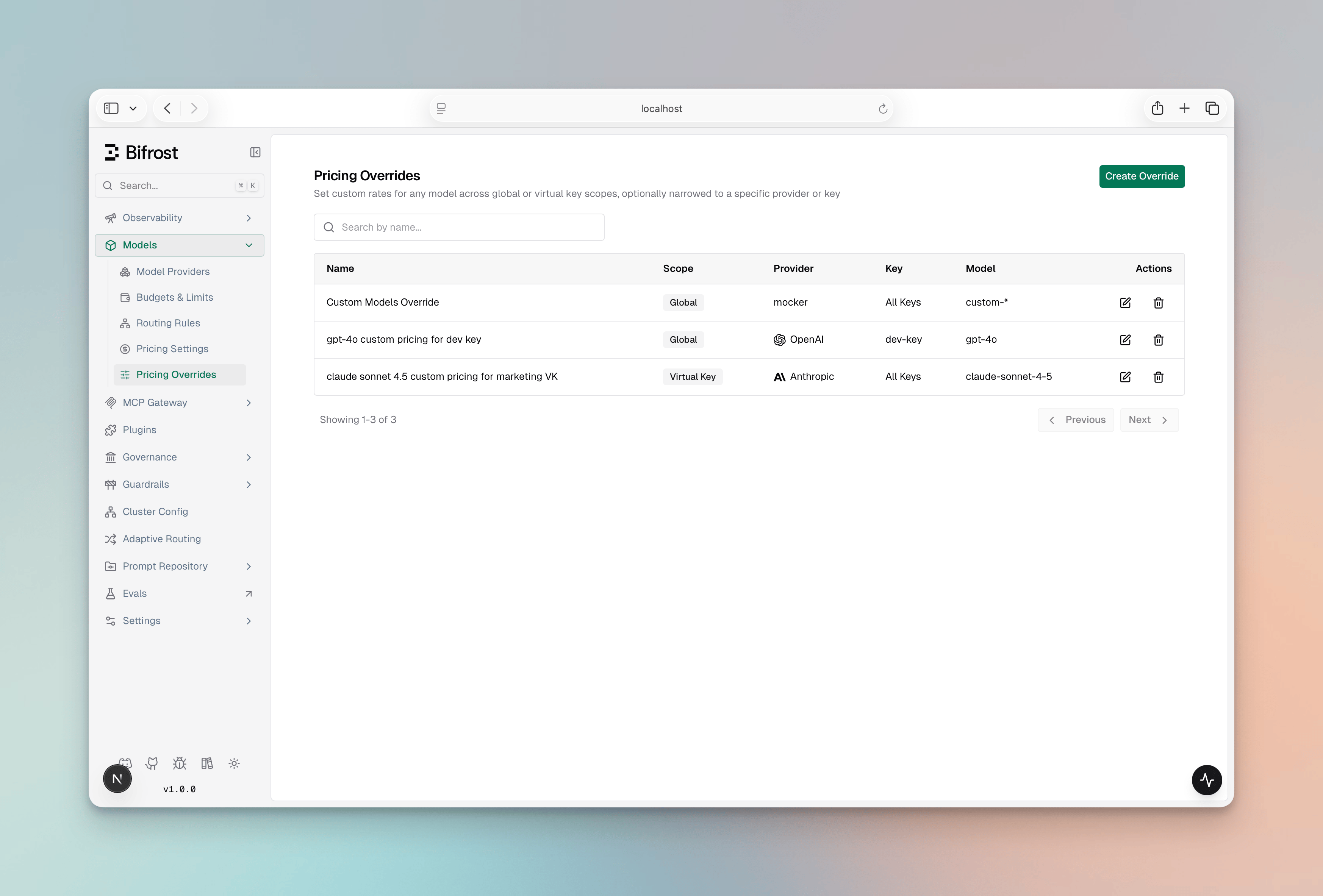
- Click Create Override
-
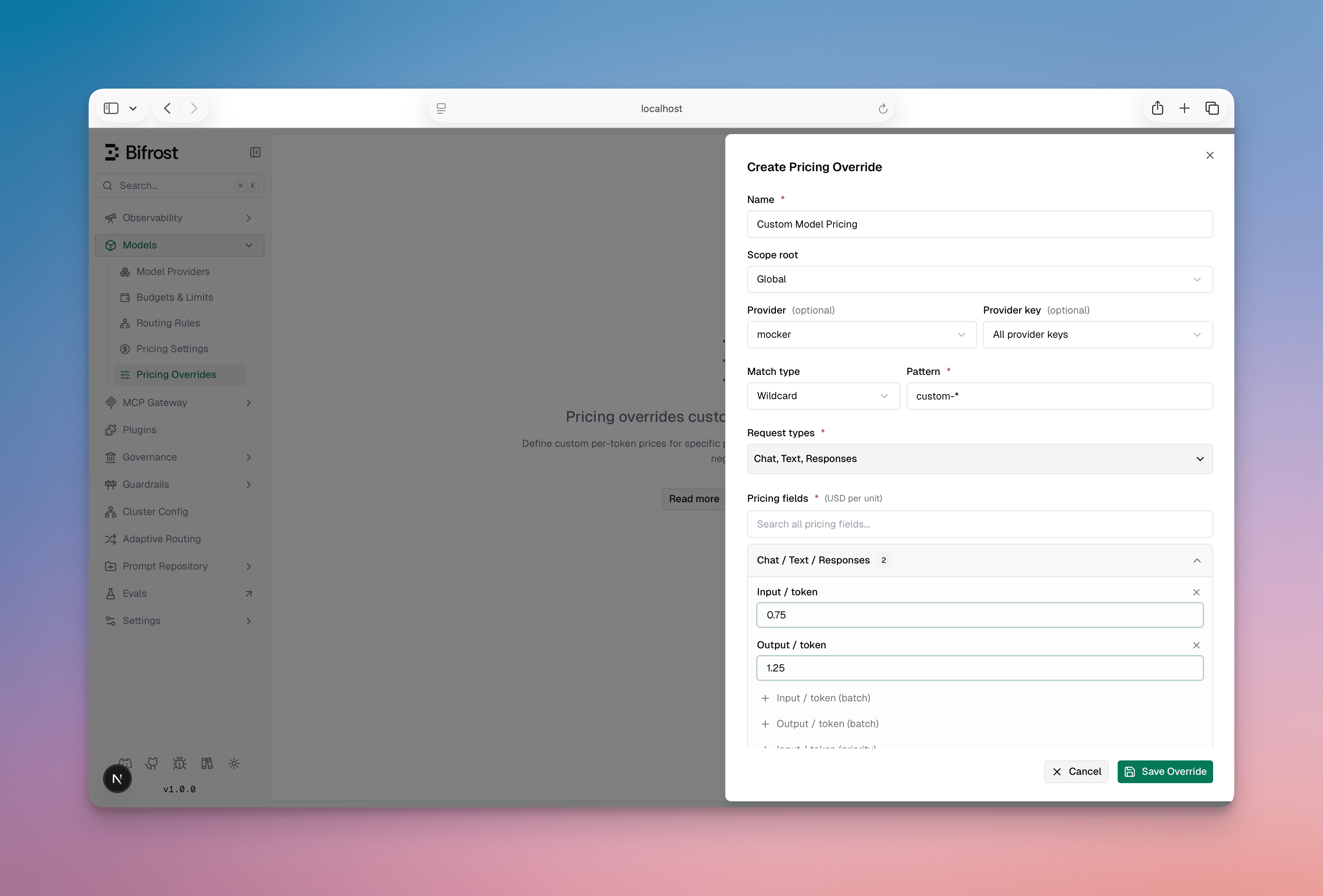
Fill in the form:
- Name - a human-readable label
- Scope - select the scope kind and provide the matching IDs
- Pattern - enter the model name or wildcard prefix
- Match type - choose Exact or Wildcard
- Request types - select one or more request types (required)
- Pricing fields - enter the price values you want to override (only non-zero fields are applied)
-
Click Save
Pricing fields reference
Any field you set (including0) is applied as an override; omitted fields are left unchanged. Cost fields are per unit in USD, except cost_per_request, which is a flat fee applied once per billed request; multiplier fields are dimensionless.
Token costs
Token tier costs
Cache costs
Image costs
The megapixel rates are available in Bifrost v2.0.0 and above.
output_cost_per_image.
The 1024×1536 and 1536×1024 thresholds have the same pixel count, so they are matched on width
and height rather than on the total. An image that clears both (width at least 1536 and height at
least 1536) is billed at the 1536×1024 rate, which is checked first.
Audio and video costs
The resolution-banded video rates are matched on the short edge of the generated video’s size, so
1920x1080 and 1080x1920 both resolve to output_cost_per_video_per_second_1080p. A size matching no band falls back to output_cost_per_video_per_second, then output_cost_per_second. The resolved rate is multiplied by the number of clips the job returned.
Other costs
input_cost_per_query and cost_per_request are available in Bifrost v2.0.0 and above.OCR costs
Time-of-day costs
Some providers bill the same model at different rates depending on when the request is made. DeepSeek, for example, charges half its normal rate outside a set of published peak windows.
Three rules govern how this works:
- Base rates are the peak rates. Every other cost field is the higher, peak-hour price, and
off_peak_cost_multiplierdiscounts downward from it. A row that carries a schedule but no multiplier — or whose schedule cannot be evaluated — bills at the full base rate rather than silently under-billing. - Both fields are required on the resolved row. A multiplier with no schedule has no way to know when to apply, and a schedule with no multiplier has nothing to apply. An override may set one and inherit the other from the model’s datasheet entry, so setting the multiplier alone still discounts when the datasheet already declares a schedule. It bills at the base rate only when neither the override nor the datasheet supplies the missing half.
- Flat fees are not discounted.
cost_per_request,input_cost_per_query, andweb_search_cost_per_requestare per-request and per-query charges rather than usage charges, so they are billed in full at any hour.
peak_hours takes a timezone and a list of windows:
timezoneis an IANA location name. Leave it empty for UTC.daysare weekday numbers,0= Sunday through6= Saturday.startandendare"HH:MM"in the schedule’s own timezone, covering the half-open interval[start, end)— a window ending at04:00does not include04:00itself, so adjacent windows never double-count.- An
endless than or equal tostartwraps past midnight. In that casedaysnames the weekday the window starts on, soMon 22:00-02:00also covers Tuesday’s small hours.
Peak vs off-peak is decided by the request’s start time, not its completion time. This keeps pricing deterministic and reproducible, and makes streaming and non-streaming requests agree. A long stream that crosses a window boundary bills entirely at its start-time rate.
off_peak_cost_multiplier as a numeric field. peak_hours is a schedule object rather than a number, so it is edited through the API or the JSON patch editor; an existing schedule is preserved when you edit an override’s other fields in the UI.
Examples
Flat rate for all Anthropic models
Apply a single input/output rate to every Claude model globally:Per-virtual-key negotiated rate
A specific virtual key has negotiated lower prices for GPT-4o:Image generation override
Override costs for a specific image model at global scope:Halving costs outside peak hours
Mirrors DeepSeek’s published schedule: base rates are the peak prices, and everything outside Monday-Friday01:00-04:00 and 06:00-10:00 UTC bills at half.
Global catch-all for a new model
Use a global override to add pricing for a model not yet in the built-in catalog:Next steps
- Virtual Keys - Attach virtual-key-scoped overrides to virtual keys for per-customer pricing
- Budget and Limits - Understand how costs are tracked against budgets
- Model Catalog - Deep dive into how pricing resolution and cost calculation work internally