

Overview
Bifrost provides three levels of tool filtering to control which MCP tools are available:- Client Configuration - Set which tools a client can execute (
tools_to_execute) - Request Headers - Filter tools per-request via HTTP headers or context
- Virtual Key Configuration - Control tools per-VK (Gateway only)
Level 1: Client Configuration
Thetools_to_execute field on each MCP client config defines the baseline of available tools.
Semantics
Configuration
- Gateway
- Go SDK
- config.json
Level 2: Request-Level Filtering
Filter tools dynamically on a per-request basis using headers (Gateway) or context values (SDK).Available Filters
Gateway Headers
Go SDK Context Values
Wildcard Support
Tool Naming Convention
Important: All MCP tools follow a consistent naming convention using the prefixed formatclientName-toolName:
-
External MCP Clients (HTTP, SSE, STDIO): Tools use the format
clientName-toolName- Example:
filesystem-read_file,web_search-search - The
clientNameis the name configured for the MCP client
- Example:
-
Internal (In-Process) Tools: Tools registered via
RegisterTool()use the prefixbifrostInternal-- Example:
bifrostInternal-echo,bifrostInternal-my_custom_tool - These tools are registered via
RegisterTool()in the SDK
- Example:
Level 3: Virtual Key Filtering (Gateway Only)
Virtual Keys can have their own MCP tool access configuration, which is the ceiling for request-level headers: a header can narrow the key’s allow-list, never widen it.When a Virtual Key has no MCP configurations, no MCP tools are available (deny-by-default) except from clients marked Allow by Default. You must explicitly add MCP client configurations to allow other tools. When the caller sends no
x-bf-mcp-include-tools header, Bifrost generates one from the key’s configuration, unless disable_auto_tool_inject is enabled; when the caller sends one, every entry the key does not allow is dropped from it.Configuration
- Web UI
- API
- config.json
- Navigate to Virtual Keys in the governance section
- Create or edit a Virtual Key
- In MCP Client Configurations, add the clients and tools this VK can access
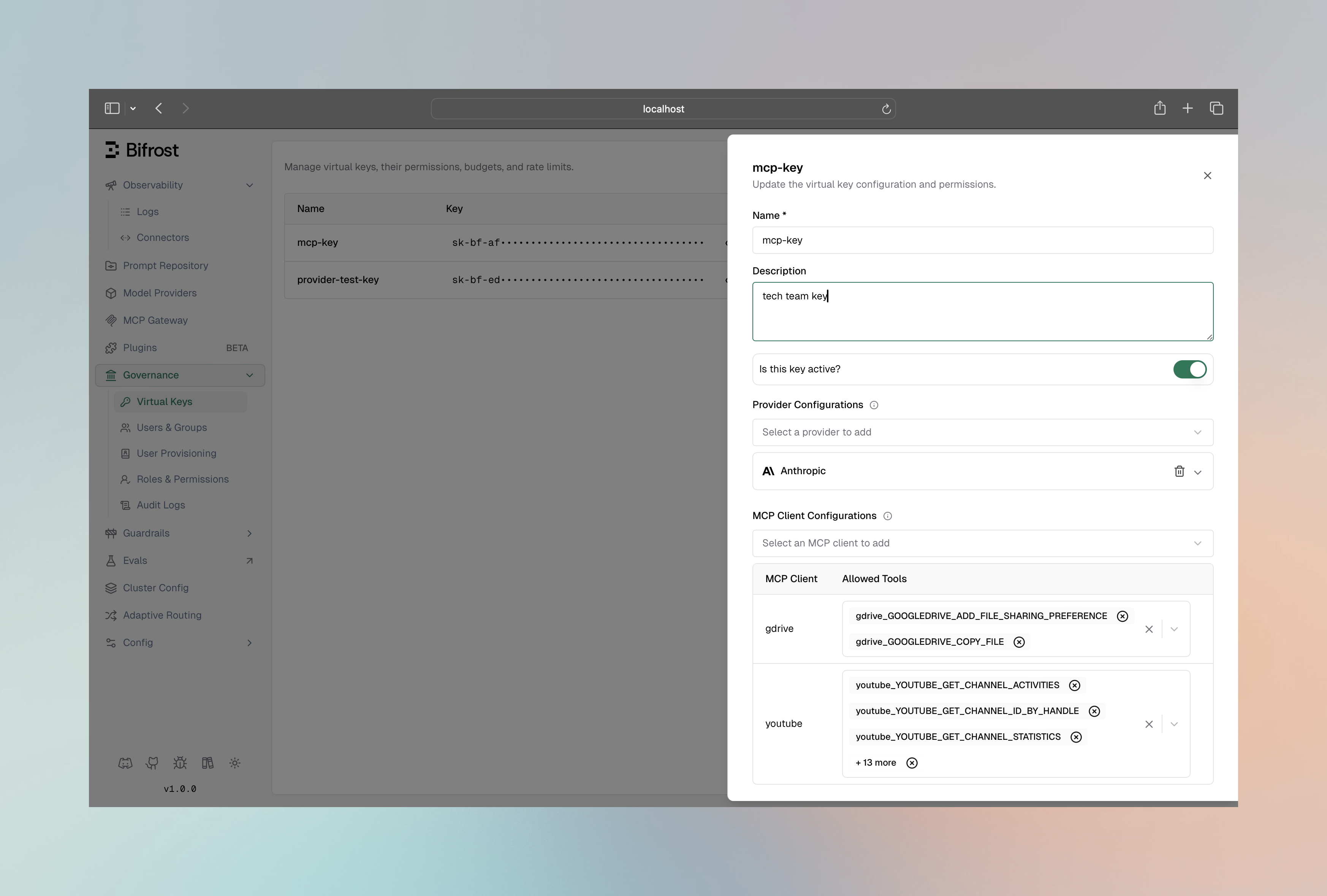
Virtual Key MCP Config Semantics
Learn more in MCP Tool Filtering for Virtual Keys.
Filtering Logic
How Filters Combine
- Client config is the baseline (must include the tool)
- VK config is the ceiling for the request (if the VK has MCP configs, or the client is marked Allow by Default)
- Request filters narrow within that ceiling; an entry the VK does not allow is dropped
Example Scenario
Setup:- Client
filesystemhastools_to_execute: ["read_file", "write_file", "delete_file"] - Virtual Key
prod-keyhasmcp_configs: [{ mcp_client_name: "filesystem", tools_to_execute: ["read_file"] }]
prod-key:
write_file is outside the key’s allow-list, so the header prunes to nothing. Send filesystem-read_file, or omit the header, to get read_file.
Request without VK (if allowed):
write_file is available (request header applies)
Common Patterns
Read-Only Access
Allow only read operations:Environment-Based Filtering
Use different VKs for different environments:Per-User Tool Access
Create VKs for different user roles:Advanced: Context-Based Filtering
For SDK users, filtering can be applied at the context level, enabling per-request tool customization:Go SDK Context Filtering
Filter Precedence
When multiple filters apply, they combine as an intersection (AND logic):- Client config allows: [read_file, write_file, delete_file]
- Request header specifies: [read_file, write_file]
- VK config restricts to: [read_file]
- Result: Only [read_file] available
Debugging Tool Availability
Check Available Tools
Gateway API:Check What LLM Receives
The tools included in a chat request depend on all active filters. To see what tools are available for a specific request, check the request body sent to the LLM provider in your logs or observability platform.Next Steps
Virtual Key MCP Tools
Detailed VK tool configuration
Agent Mode
Configure auto-execution for filtered tools