

Overview
Routing Rules provide dynamic, expression-based control over request routing. They execute before governance provider selection and can override it, allowing you to make sophisticated routing decisions based on request context, headers, parameters, capacity metrics, and organizational hierarchy.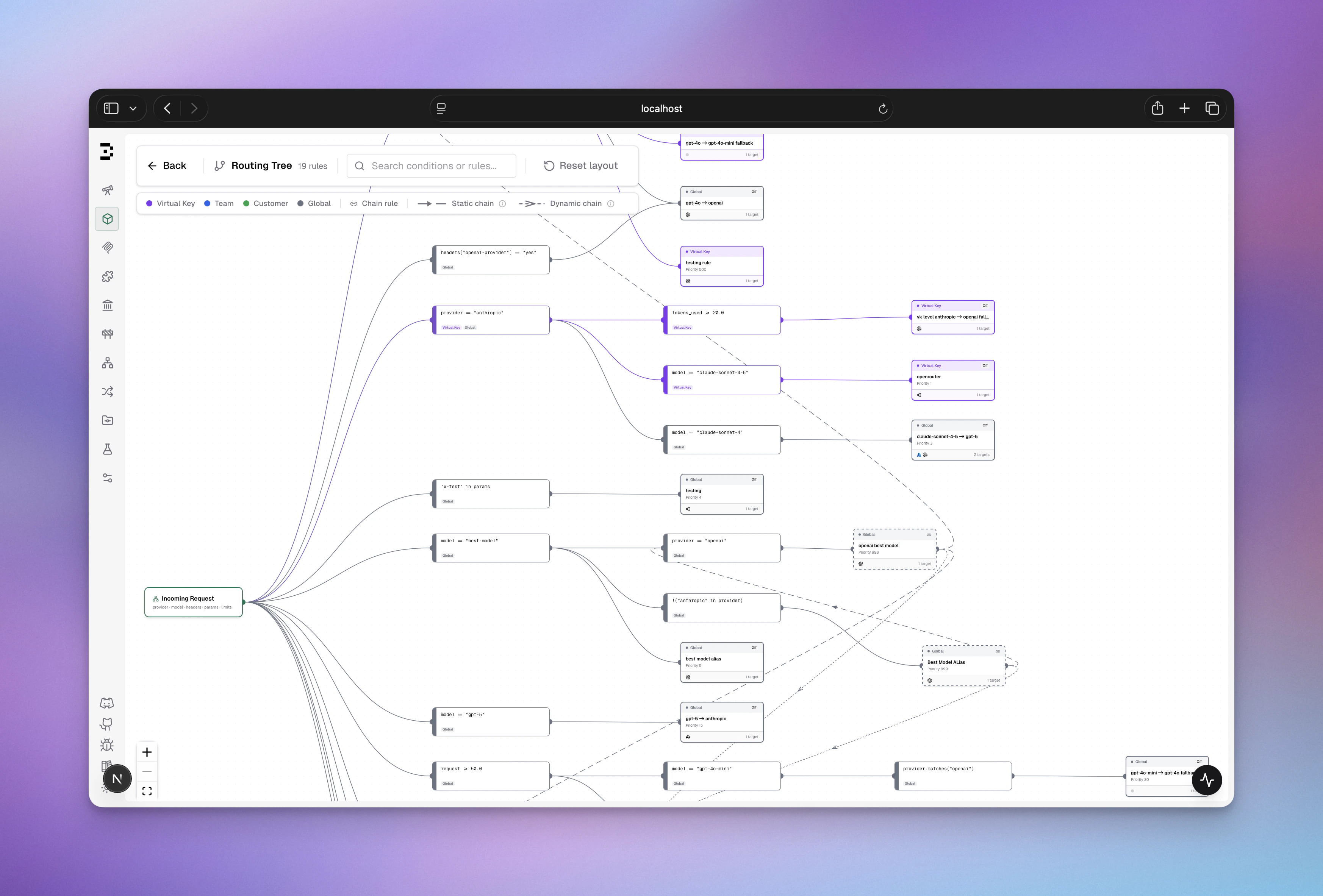
How It Works
Request Flow

Scope Hierarchy & Precedence
Routing rules are organized by scope with first-match-wins evaluation:- When a request arrives with a Virtual Key, Bifrost builds a scope chain
- Rules are evaluated in scope order (highest to lowest)
- The first matching rule wins - no further rules are evaluated in that iteration
- Within each scope, rules are sorted by priority (ascending: 0 evaluates before 10)
- If the matched rule has
chain_rule: true, the resolved provider/model becomes the new context and the full scope chain is re-evaluated from the top - If no rule matches (or the matched rule is terminal), the current decision is applied
- If no rule ever matches, the incoming provider/model is used unchanged
CEL Expression Guide
Available Variables
Routing rules evaluate CEL expressions with these available variables:Request Context
Headers & Parameters
Organization Context
Capacity Metrics (as percentages: 0-100)
Complexity Routing
If complexity classification is unavailable for a request (classifier not configured or not ready, unsupported input, timeout, or a semantic match below the similarity floor),
complexity_tier is treated as unknown when session state has no tier to supply. The rule does not match and evaluation falls through. Rules using other variables are unaffected.How Capacity Metrics Are Resolved
Each variable reflects current usage as a percentage of the configured limit for the request’s provider and model combination. Values above 100 mean the limit is exhausted. Bifrost resolves which limits to read in this order (most specific first):- Model + provider config - a budget or rate limit set on a specific
provider/modelpair (e.g.,openai/gpt-4o) - Model-only config - a budget or rate limit set on a model name without a provider (matched across all providers)
- Global provider config - a budget or rate limit attached to the provider itself (e.g., all
openaitraffic) - Virtual Key provider config - a rate limit or budget attached to a provider entry inside the Virtual Key’s provider configs
budget_used will be 95.
If no limit is configured for the current provider/model, the variable is 0.0 - a rule like budget_used > 80 will never match.
In chained rules, capacity values are re-read at every chain step against the resolved provider/model, so downstream rules always see fresh data.
CEL Operators & Functions
Comparison Operators
Logical Operators
String Functions
Collections
Expression Examples
Simple Conditions
Complex Conditions (Multiple Criteria)
Pattern Matching
Validation & Error Handling
- Invalid CEL syntax → Rule logs warning, skipped, evaluation continues
- Missing header/parameter → Expression returns false (graceful no-match)
- Type mismatches → Logged as warning, rule skipped
- Empty expression → Rule always matches (use
true/falsefor explicit behavior)
Configuration
- Web UI
- API
- config.json
Access routing rules from the dashboard:Routing Rules Dashboard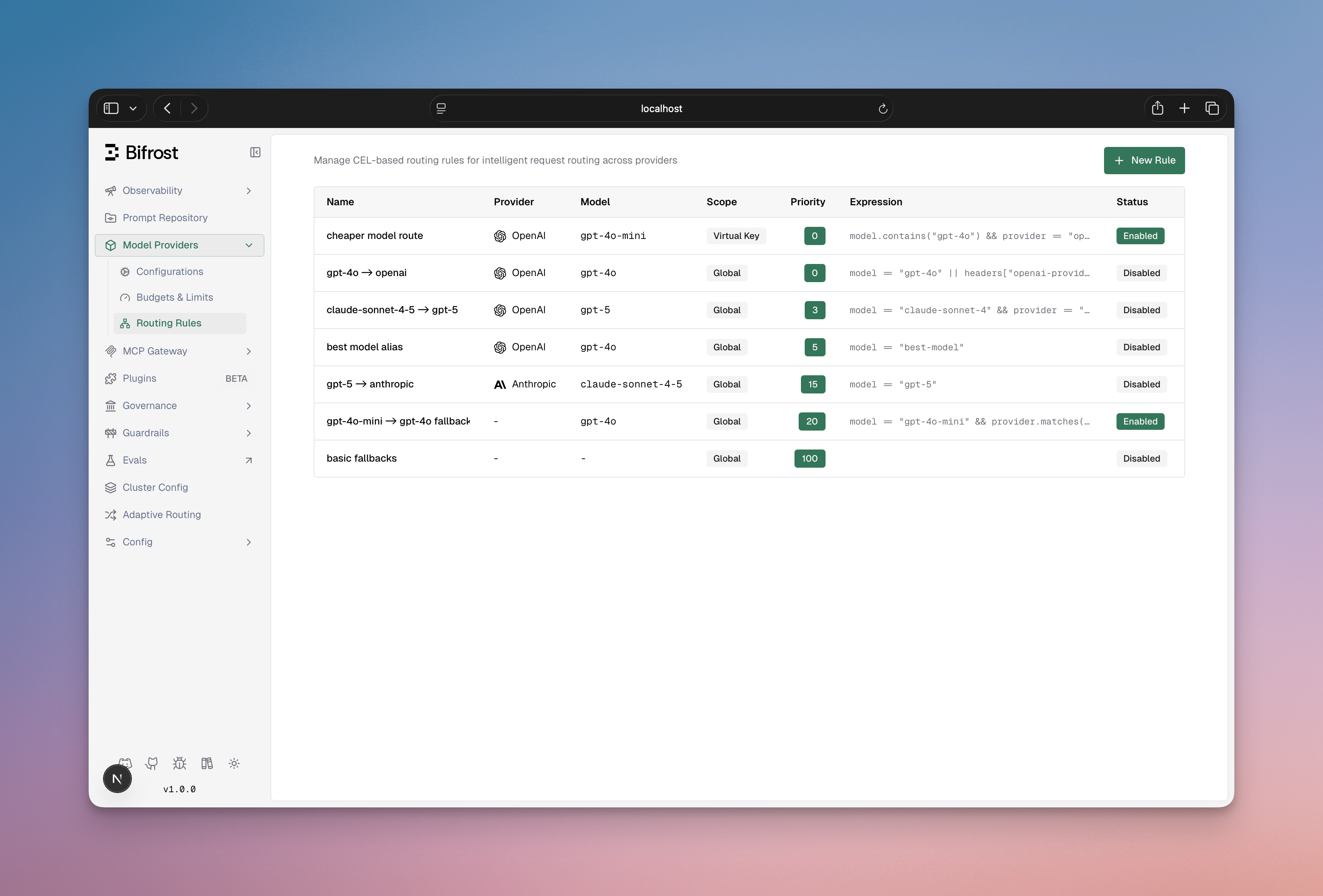
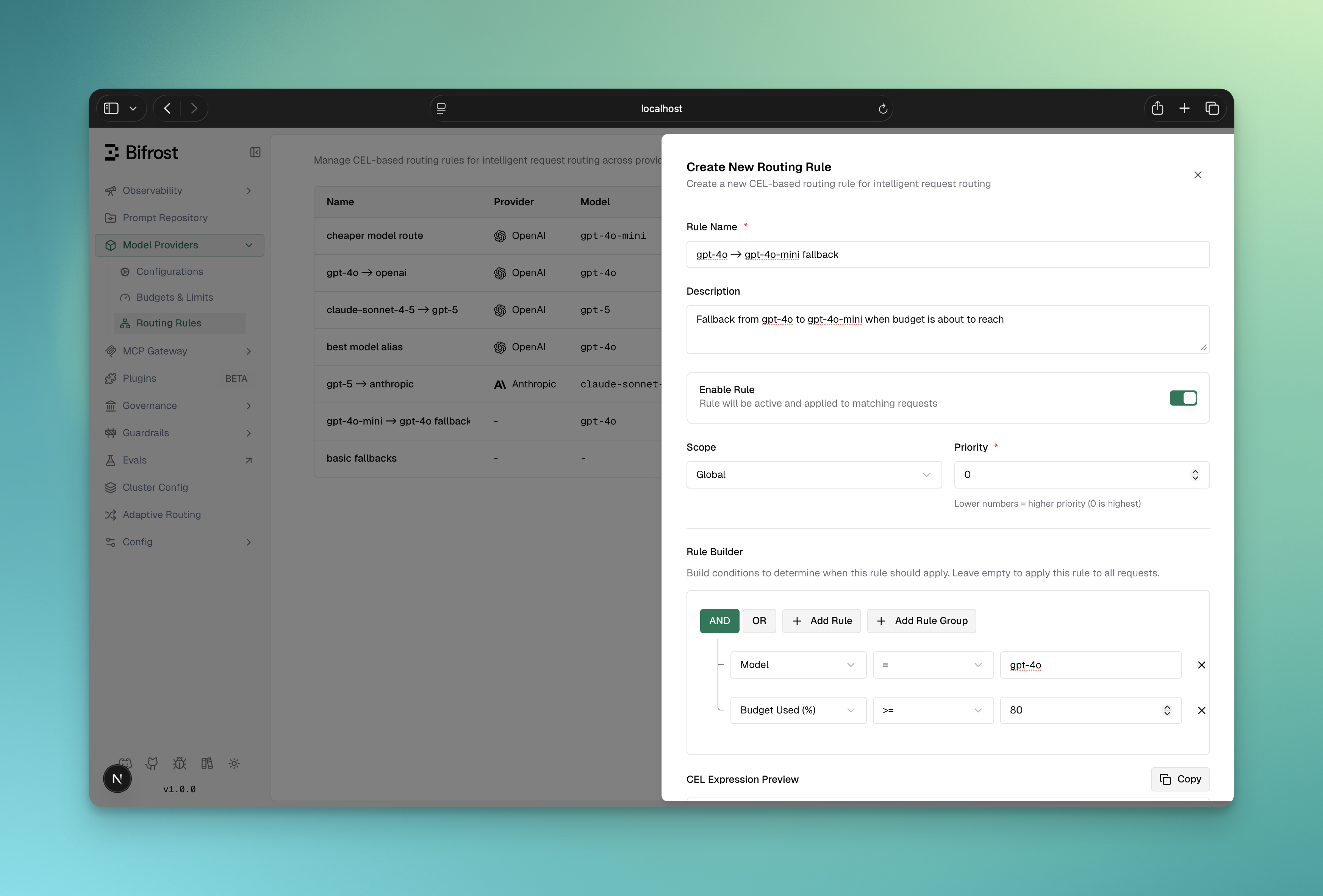
- List all rules with scope, priority, and enabled status
- Filter by scope or scope_id
- Create/Edit/Delete rules
- View rule expressions and targets
- Enable/disable rules without deletion
- Drag to reorder priority
- Name (required): Unique rule identifier
- Description (optional): Internal notes
- Enabled: Toggle rule on/off
- Chain Rule: When enabled, the routing engine re-evaluates all rules after this one matches, using the resolved provider/model as the new context. See Rule Chaining.
- CEL Expression: Visual or manual expression builder
- Targets (required): One or more weighted routing targets - each has Provider (optional), Model (optional), API Key (optional, requires Provider to be set), and Weight (%). Weights must sum to 1. When multiple targets are defined, one is selected probabilistically at request time.
- Fallbacks (optional): Array of fallback providers
- Time to first token cutoff (ms) (optional): For streaming requests, cut off an attempt that has not produced its first token in time and move to the next fallback. See Time to First Token Cutoff.
- Scope: Where rule applies (global, customer, team, virtual_key)
- Scope ID: Required if scope is not global
- Priority: Lower = evaluated first (default: 0). Must be unique within the scope
Visual CEL Builder
The dashboard includes a visual query builder for CEL expressions:- Condition Builder: Select field, operator, value
- Logical Operators: Combine conditions with AND/OR
- Manual Mode: Switch to edit CEL directly
- Validation: Real-time syntax validation
- Conversion: Auto-converts visual rules to CEL
Real-World Use Cases
When to use Routing Rules:- Dynamic routing based on request headers or parameters
- Capacity-based routing (route to fallback when budget/rate limit is high)
- Organization-based routing (different rules for different teams/customers)
- A/B testing or canary deployments
- Conditional provider override based on complex logic
Use Case 1: Tier-Based Routing
Route requests based on customer tier using headers:Use Case 2: Capacity-Based Failover
Route to cheaper provider when budget is exhausted:Use Case 3: Team-Specific Routing
Route team-specific requests to their preferred provider:Use Case 4: Complex Multi-Condition Routing
Combine multiple criteria for sophisticated routing:Use Case 5: Probabilistic A/B Testing
Split traffic across providers or models by weight for canary deployments or cost optimization:Use Case 6: Regional Routing
Route based on region headers:Rule Chaining
Rule chaining is available in Bifrost v1.5.0-prerelease2 and above.
chain_rule: true, the routing engine does not stop after it matches - instead, it updates the request context with the resolved provider/model and re-evaluates the full rule set from the top.
How Chaining Works
Termination Conditions
The chain stops when any of the following occurs:Decision Accumulation
Each chain step overwrites the previous decision - the last matched rule wins for all fields:
Every chain step is logged in the routing engine audit trail for full observability.
Configuration Example
model=gpt-4 is normalized to gpt-4-turbo by Rule 1 (chain continues), then routed to Azure by Rule 2 (chain stops).
Use Cases
- Model alias normalization: Rewrite short aliases to canonical model names before routing
- Tiered policy application: Apply a team-level override first, then a global key-pinning rule
- Feature flag injection: A chain rule sets the target to an experimental model; a downstream rule routes that model to the right provider
- Budget-aware escalation: A chain rule downgrades the model when budget is high; the next rule routes the downgraded model appropriately
Best Practices
- Keep chains short (2–3 steps) - long chains are harder to reason about
- Ensure the last rule in every intended chain path is terminal (
chain_rule: false) to prevent unintended continuation - Use convergence detection as a safety net, not a primary termination strategy - if you rely on it, your rules likely have a logic gap
- Name chain rules clearly to reflect their role: “Normalize X”, “Enrich context”, etc.
Integration with Governance & Load Balancing
Interaction with Governance Routing
Routing Rules run BEFORE the virtual key’s weighted provider selection and can override it: If a routing rule matches:- Governance configures: 70% Azure, 30% OpenAI
- Routing rule exists:
budget_used > 85 → groq - Request arrives with budget_used = 90%
- Result: Groq selected by routing rule, the virtual key’s weights are not used. Groq must still be allowed by the virtual key: governance checks every attempt and refuses a provider the virtual key does not allow with
403
Interaction with Load Balancing
Routing rules determine provider BEFORE adaptive load balancing runs:Fallback Chain
Routing rules can define fallbacks that flow into load balancing:- Level 2 load balancing evaluates Azure keys
- If all Azure keys fail, tries Groq
key_id outranks the caller’s own key pins: when a rule pins the key, x-bf-api-key-id and x-bf-api-key do not apply to the primary attempt. Without a target key_id, the caller’s pin applies only to the first provider, its retries included: the rule’s target, or the provider session affinity moved the request to, and that attempt fails key selection when its provider does not hold the key. The pin itself never moves the request to another provider, and a pin on the target’s own key keeps the session from moving it (see API Key Selection). A caller’s direct key outranks both, since it bypasses the key pool: the attempt on the first provider uses the caller’s key, not the pinned one. Fallbacks run on their configured keys, their own pins included.
Time to First Token (TTFT) Cutoff
A provider can accept a streaming request and then stall before it sends any output. Setttft_timeout_ms on a rule to cap that wait. When the rule matches a streaming request, each attempt that still has a fallback after it gets this deadline. If an attempt has not produced its first token in time, Bifrost closes its connection and moves to the next fallback. The client never sees the slow attempt: nothing is streamed to it until the first token arrives.
0 clears the value on update):
- Streaming only. Non-streaming requests ignore it.
- The last attempt is never cut off. In the example, OpenAI and Azure each get 1.5 s. Bedrock, the last fallback, is never cut off by the TTFT deadline and runs under the normal timeouts, so a slow last provider still gets its full request timeout. A rule without fallbacks (and a request that brings none) is never cut off.
- No retry on the same provider. A TTFT miss goes straight to the next fallback. It does not use the provider’s
max_retries, because retrying a slow provider adds more latency. - What counts as the first token. Real output: text, reasoning, tool call arguments, audio or image data, a finish reason, or usage. Startup events such as
response.createdor an empty assistant role delta do not count. The deadline covers the whole wait, from sending the request to the first token, including the wait for response headers. - Rule chaining. The value comes from the last matched rule, together with that rule’s fallbacks.
- Range. 1 to 300000 ms. Omit it (or send
0over the API) to turn it off.
TTFT timeout: <provider>/<model> produced no first token within <duration>, and in the key attempt trail as ttft_timeout.
The provider may still bill the prompt tokens of an attempt that was cut off, because it already received the request.
Execution & Performance
CEL Compilation
- First evaluation: CEL expression is compiled into a bytecode program
- Subsequent evaluations: Program is cached and reused
- Performance: Cached program evaluation is very fast (microseconds)
- Memory: Compiled programs cached in memory until Bifrost restart
Priority & Ordering
Rules within the same scope are evaluated in ascending priority order:409 Conflict. Rules in different scopes, or for different virtual keys, teams or customers, can use the same number. Rules synced from config.json are checked on the final set, so swapping two priorities in one change works, but two rules in one scope that both omit priority (and so both default to 0) fail the sync.
Best Practice: Use priority 0-10 for critical rules, 100+ for fallbacks.
Optimization Tips
- Order rules by likelihood: Put frequently matching rules first
- Use specific scopes: Avoid global scope when possible (narrower = faster)
- Avoid expensive string operations: Prefer
==over.matches()with regex - Keep expressions simple: Complex conditions increase evaluation time
- Use reasonable priorities: Gaps in priorities (0, 10, 20) make reordering easy
Best Practices
Rule Naming
Rule Naming
✅ Good names:
- “Premium Tier Fast Track”
- “Budget Exhaustion Fallback”
- “ML Team Anthropic Route”
- “Production High Priority Route”
- “Rule 1”
- “Fix”
- “Temp”
- “TODO”
CEL Expression Safety
CEL Expression Safety
✅ Safe patterns:❌ Risky patterns:
Scope Management
Scope Management
✅ Good scope design:
- Global rules for organization-wide policies
- Customer scope for compliance (EU, data residency)
- Team scope for team preferences
- Virtual Key scope for specific integrations
- Too many virtual key-level rules (maintenance nightmare)
- Conflicting rules across scopes
- Rules that duplicate governance routing
Testing & Validation
Testing & Validation
✅ Validate before deployment:
- Test CEL expression with expected headers
- Verify provider/model exist in your setup
- Check fallbacks are valid providers
- Confirm scope_id matches actual entity
- Test with
from_memory=trueto verify in-memory state
- Deploy rules without testing
- Use nonexistent providers
- Create circular fallback chains
Monitoring
Monitoring
✅ Track rule usage:
- Log which rules match (logged in Bifrost logs as
[RoutingEngine]) - Monitor routing decisions by scope
- Alert on unexpected provider selection patterns
- Review priority order occasionally
- Disabling unused rules (instead of deleting)
- Updating documentation when rules change
- Testing failover chains
Troubleshooting
Rule Not Matching
Symptom: Rule expression is correct but doesn’t match Diagnosis:- Check if rule is enabled (
enabled: true) - Verify scope matches (check VirtualKey’s team/customer hierarchy)
- Check rule priority vs other rules in scope (lower priority evaluates first)
- Verify variable values: Use
from_memory=trueto debug
Expression Compilation Error
Symptom: “Failed to compile rule: invalid CEL syntax” Common causes:- Unclosed quotes:
headers["x-tier(missing closing quote) - Invalid operators:
headers["x"] ??(not standard CEL) - String escaping:
headers["x-\type"](incorrect escape)
- Use the visual CEL builder to avoid syntax errors
- Test expressions incrementally
- Check CEL operator documentation above
- Wrap complex expressions in parentheses:
(A && B) || (C && D)
Wrong Provider Selected
Symptom: Request routed to unexpected provider Diagnosis:- Multiple rules matching? (first-match-wins means earlier rules take precedence)
- Governance routing already determined provider? (check scope hierarchy)
- Load balancing changed key? (rule sets provider, LB sets key)
- Lower priority of matching rules
- Verify scope precedence (VirtualKey > Team > Customer > Global)
- Check if another rule has lower priority and matches first
- Review logs:
[RoutingEngine] Rule matched! Decision: provider=...
Header/Parameter Not Found
Symptom: “no such key” error in CEL evaluation This is normal! Bifrost treats missing headers as non-matches:Debugging with Logs
Enable debug logging to see routing rule evaluation:Routing Stops Working After a Downgrade
This only affects a downgrade across the release that added key-pinned fallbacks, and only when a rule has a
key_id (or, in config.json, a provider_key_name) on a fallback.- OSS: rolling back from 2.2.3 or later to 2.2.2 or earlier
- Enterprise: rolling back from v2.2.3 or later to v2.2.2 or earlier
failed to load plugin routing at startup, the routing plugin reports an error status, and GET /api/routing/rules returns 500. If the pinned fallback is in config.json rather than the database, Bifrost exits at startup with failed to unmarshal config instead.
Cause: Since 2.2.3, a fallback with a pinned key is a JSON object, both in config.json and in the fallbacks column of the routing_rules table. Earlier versions only decode string entries. In the database, the decode fails for the whole row, and because rules load in one query, that single row takes every routing rule down with it, including rules that never had a pinned fallback. In config.json, the decode fails for the whole file.
Solution: Rewrite each object entry back to its "provider/model" string, then restart Bifrost. The pinned key is dropped, so that fallback goes back to load-balanced key selection. Every other entry is left as it is.
If config.json defines routing rules, edit the file first: replace each fallback object under governance.routing_rules[].fallbacks with its "provider/model" string. Then run the statement for your config store backend once against the database; rows without an object entry are not touched.
- PostgreSQL
- SQLite
model becomes "provider/", which keeps the incoming model, the same as the string form. Back up the database before running the update. If you upgrade again later, pin the key on those fallbacks a second time through the API or UI.
API Reference
Request/Response Examples
Create Capacity-Based Rule
Create Probabilistic Split Rule
Create Rule with Pinned API Key
List Rules by Team Scope
Get In-Memory Rules (Debug)
Additional Resources
Provider Routing
Understand how routing rules fit into the complete routing pipeline
Virtual Keys
Configure Virtual Keys that scope routing rules
Governance
Learn about the governance layer (applied after routing rules determine provider selection when no rule matches)
CEL Language Spec
Complete CEL expression language documentation