

Overview
Bifrost Enterprise supports CrowdStrike AI Detection and Response (AIDR) as a third-party guardrail provider for LLM request and response traffic. Use it when your organization already manages AI security policies in CrowdStrike and you want Bifrost to enforce those policies inline before prompts reach an LLM and before model responses reach users. CrowdStrike owns the detection policy. Bifrost owns the gateway enforcement path: it selects when to call AIDR, sends the relevant AI traffic, then blocks or rewrites the Bifrost request/response based on AIDR’s verdict.Streaming output: When this profile is used in an
output or both rule, Bifrost accumulates the stream until the model response is complete, then checks the full response. It does not check individual stream chunks. See Streaming Output Guardrails for details.When To Use It
CrowdStrike AIDR is useful for:- Detecting and blocking prompt injection or jailbreak attempts
- Preventing sensitive data, credentials, PII, or custom entities from being sent to an LLM
- Redacting or defanging content when your AIDR policy returns transformed text
- Evaluating both input prompts and output completions with different AIDR policy rules
- Sending AI security findings and metadata into the CrowdStrike AIDR console
- Inspecting tool definitions, assistant tool calls, and tool results in chat-based agent flows
Bifrost follows the AIDR policy response. Detector findings alone do not block traffic unless AIDR returns
blocked: true. If you want Bifrost to stop a request, configure the relevant AIDR policy rule action to block.Prerequisites
- Bifrost Enterprise with the guardrails plugin enabled
- A CrowdStrike Falcon tenant in a supported AIDR cloud: US-1, US-2, or EU-1
- An AIDR subscription: AIDR for Workforce or AIDR for Agents. For Bifrost gateway/application traffic, AIDR for Agents is the relevant subscription.
- A Falcon user with permission to manage AIDR collectors, typically the AIDR Admin role
- A CrowdStrike AIDR collector assigned to the policy you want Bifrost to enforce
- Network egress from Bifrost to the configured AIDR API URL over HTTPS
Set Up The AIDR Collector
Before configuring Bifrost, create or open the CrowdStrike AIDR collector that Bifrost will use:- In the Falcon console, open the menu and go to AI Detection and Response > Collectors.
- Create an Application collector for Bifrost, or open an existing collector your security team already created.
- Configure the collector name, logging mode, and policy.
- Assign a policy if you want AIDR to block or redact traffic.
- If no policy is assigned, AIDR can still provide visibility, but Bifrost will not receive policy block/redaction decisions to enforce.
- Save the collector.
- Open the collector’s Config tab.
- Copy the API token into Bifrost as
api_key. - Copy the Base URL into Bifrost as
base_url.
https://api.crowdstrike.com/aidr/aiguard. For US-2 or EU-1 tenants, use the regional base URL shown in the collector configuration.
How It Works
- Create a Bifrost guardrail provider with
provider_name: "crowdstrike-aidr". - Attach that provider configuration to one or more guardrail rules.
- When a rule matches, Bifrost extracts text content and tool context from the request or response.
- Bifrost calls AIDR at
{base_url}/v1/guard_chat_completionswithevent_type: "input"orevent_type: "output". - AIDR evaluates the payload with the policy assigned to your collector.
- If AIDR returns
blocked: true, Bifrost returnsGUARDRAIL_INTERVENEDand does not continue that request/response path. - If AIDR returns
transformed: truewithguard_output, Bifrost applies the transformed text to the request or response. - If AIDR returns neither
blockednortransformed, Bifrost allows the original content through.
Payload Sent To AIDR
Bifrost sends AIDR an OpenAI Chat Completions-shapedguard_input payload:
Configuration Fields
Configuration
- Web UI
- API
- config.json
- Helm
- Go to Guardrails > Providers.
- Select CrowdStrike AIDR.
- Click Add Configuration.
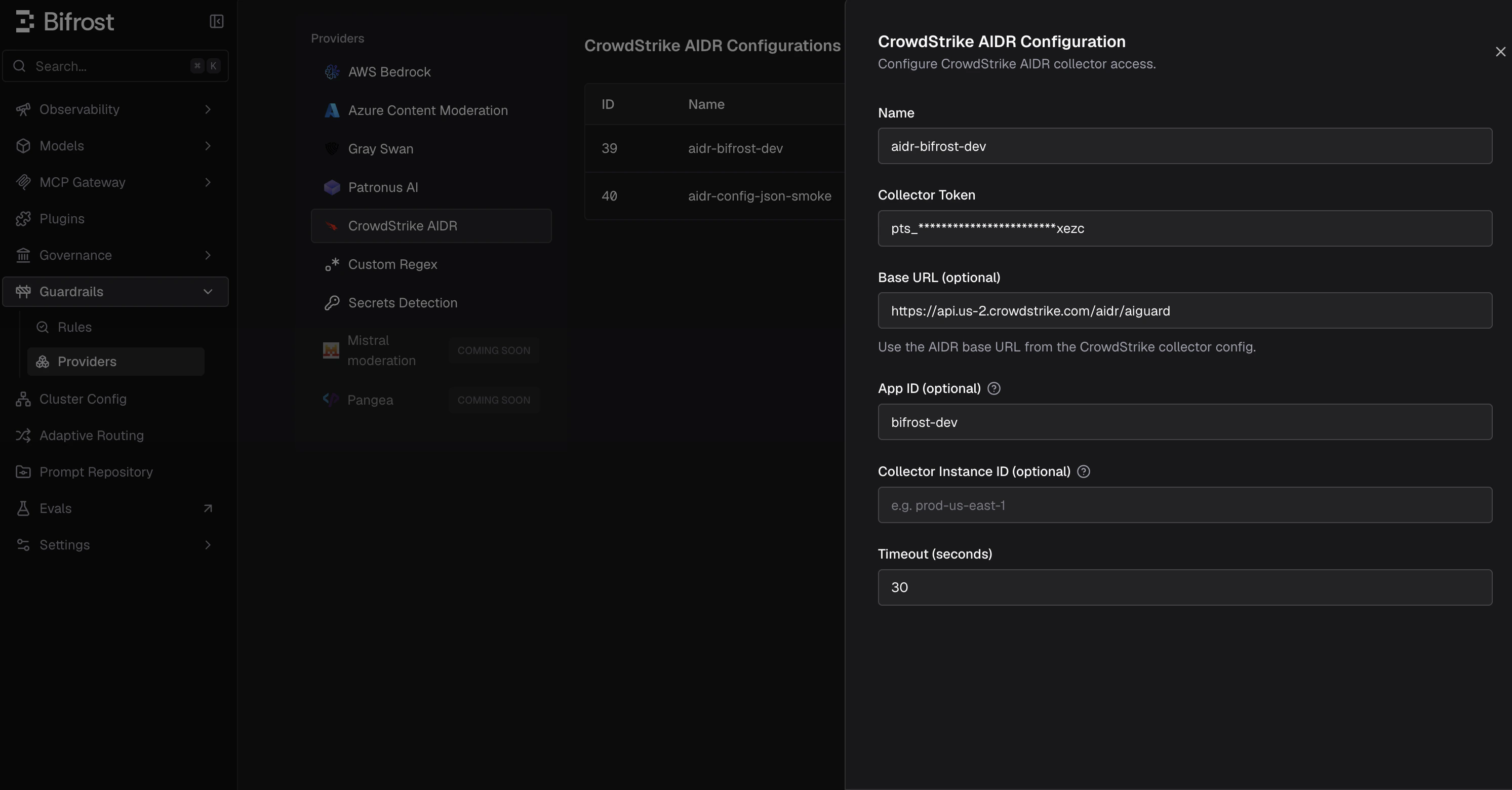
- Enter a descriptive Name, such as
crowdstrike-aidr-prod. - Set Collector Token directly or through an environment variable such as
env.CS_AIDR_TOKEN. - Set Base URL to the AIDR base URL from the collector configuration. Leave it empty to use
https://api.crowdstrike.com/aidr/aiguard. - Optionally set App ID and Collector Instance ID to improve AIDR log attribution.
- Set the timeout and save the configuration.
- Go to Guardrails > Configuration and attach the CrowdStrike AIDR profile to an input, output, or both-phase rule.
Policy Outcomes
Bifrost maps the AIDR response into Bifrost guardrail behavior like this:
Bifrost also records AIDR usage metadata for logs and spans:
- Evaluated AIDR policy name
- Whether AIDR blocked the interaction
- Whether AIDR transformed the content
- Detector count
- Detector names
Blocked Error Response
When CrowdStrike AIDR blocks content, Bifrost returns HTTP400 with type: "guardrail_intervention". The error message uses the AIDR-provided reason when available.
For an input guardrail, the LLM request is not sent to the model. For an output guardrail, the model response is replaced by the error response.
Trimmed example:
CrowdStrike AIDR inspects and can block streaming output after Bifrost accumulates the complete response. Streaming output transformation or redaction is not supported: if AIDR returns
transformed: true for a streaming response, Bifrost ends the stream rather than applying guard_output.Useful Rule Patterns
Run AIDR only for external-user traffic:Troubleshooting
For general rule and profile concepts, see Guardrails. For direct
config.json setup, see Guardrails in config.json.