

Overview
Role-Based Access Control (RBAC) in Bifrost Enterprise provides fine-grained access management for your organization. RBAC allows you to define roles with specific permissions, controlling what users can view, create, update, or delete across all Bifrost resources. Key Benefits:- Principle of Least Privilege - Grant users only the permissions they need
- Centralized Access Management - Manage all permissions from a single interface
- Audit-Ready - Track who has access to what for compliance requirements
- Flexible Role Design - Use system roles or create custom roles for your organization
Roles & Permissions
Navigate to Governance → Roles & Permissions in the Bifrost dashboard to manage roles.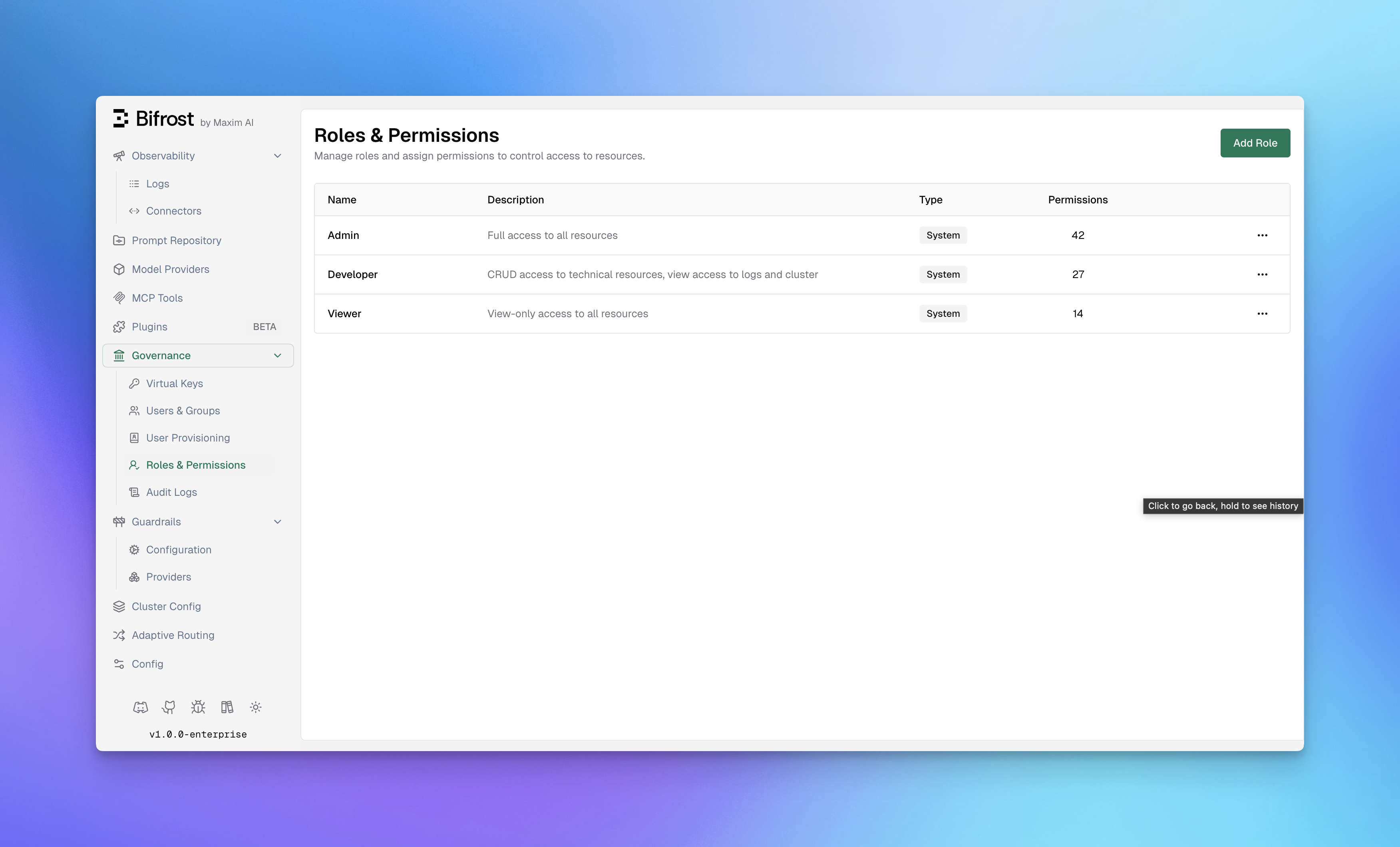
System Roles
Bifrost includes three pre-configured system roles that cover common access patterns:
System roles cannot be deleted, but their permissions can be customized to fit your organization’s needs.
Custom Roles
Create custom roles when system roles don’t match your organizational structure. Custom roles are useful for:- Specialized Teams - Create roles for QA, Security, or Compliance teams
- Project-Based Access - Limit access to specific resources per project
- Temporary Access - Grant limited permissions for contractors or auditors
- Click Add Role in the top-right corner
- Enter a Role Name (e.g., “Auditor”, “QA Team”)
- Add a Description explaining the role’s purpose
- Click Create Role
- Assign permissions using the Manage Permissions dialog
Resources & Operations
RBAC permissions are defined as combinations of Resources and Operations.Protected Resources
Bifrost protects access to the following resources:Operations
Most resources support the standard CRUD operations. Some resources expose specialized operations for security-sensitive or non-CRUD workflows.Managing Permissions
To assign or modify permissions for a role:- Navigate to Governance → Roles & Permissions
- Click the menu icon (•••) on the role you want to modify
- Select Manage Permissions
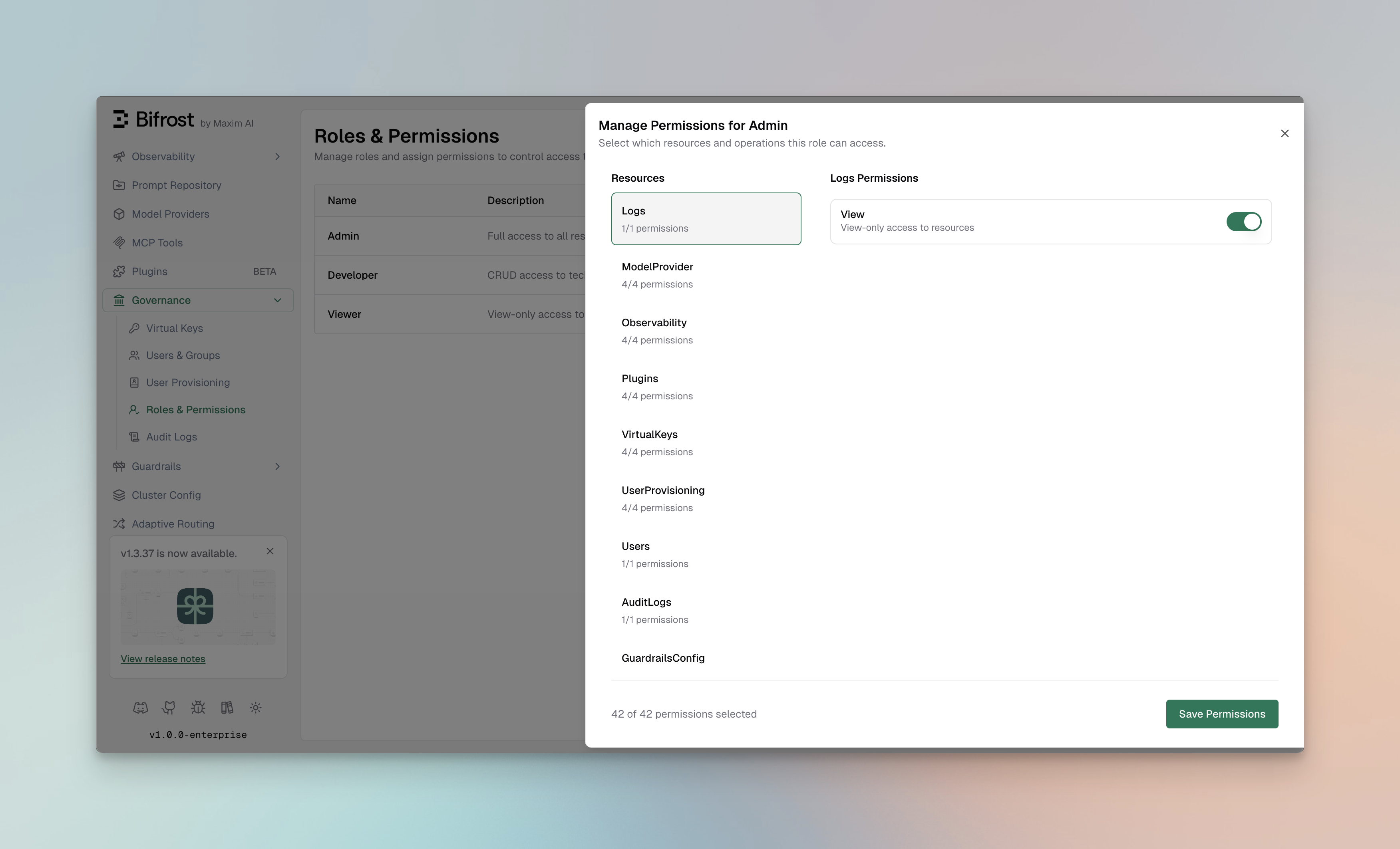
- Lists all available resources
- Shows the count of enabled permissions per resource (e.g., “4/4 permissions”)
- Click a resource to view its permissions
- Displays available operations for the selected resource
- Toggle switches to enable/disable each permission
- Shows operation descriptions for clarity
Assigning Permissions
- Select a Resource from the left panel
- Toggle the operations you want to enable for this role
- Repeat for other resources as needed
- Click Save Permissions to apply changes
Best Practices
Role Design
- Start with System Roles - Use Admin, Developer, and Viewer as templates
- Follow Least Privilege - Only grant permissions that are necessary
- Document Role Purpose - Use clear descriptions to explain each role’s intent
- Review Regularly - Audit role assignments quarterly
Permission Strategies
For Development Teams:Integration with Identity Providers
When using User Provisioning with Okta, Entra, Zitadel, Keycloak, Google Workspace, Auth0, SailPoint, or a generic OIDC provider, roles can be assigned automatically from:- IdP Groups - Map identity provider groups to Bifrost roles
- App Roles - Sync application roles from your IdP
- Claims - Use custom claims to determine role assignment
403, and the user’s role and data are kept as they are. In SCIM only mode, sign-in ignores the token: the role comes from what SCIM last sent, and a user whose SCIM data resolves no role is refused. There is no default role. See How roles are decided.
What each role can see is set separately with its data access scope.
API Access
Roles and permissions can also be managed via the API: List all roles:Next Steps
- Data Access Control - Decide which records each role can see
- Access Profiles - Attach provider, model, and budget policies to roles
- Setting up Okta - Configure Okta for SSO with role sync
- Setting up Microsoft Entra - Configure Entra ID for SSO with role sync
- Audit Logs - Track permission usage and access patterns