

Overview
Bifrost Enterprise supports Google Cloud Model Armor as a guardrail provider for LLM request and response traffic. Use it when your safety and data protection policies are managed in Google Cloud and you want Bifrost to enforce those policies inline before prompts reach an LLM and before model responses are returned. Google owns the Model Armor template. Bifrost owns the gateway enforcement path: it selects when to call Model Armor, sends the relevant text and optionally supported images to the template, then blocks or rewrites the Bifrost request/response based on the sanitize result.Streaming output: When this profile is used in an
output or both rule, Bifrost accumulates the stream until the model response is complete, then checks the full response. It does not check individual stream chunks. See Streaming Output Guardrails for details.When To Use It
Google Model Armor is useful for:- Blocking prompt injection and jailbreak attempts
- Screening responses for unsafe generated content
- Detecting responsible AI safety categories such as hate speech, harassment, sexually explicit content, and dangerous content
- Detecting malicious URLs in prompts or responses
- Blocking sensitive data with Sensitive Data Protection inspection
- Redacting or replacing sensitive data with Sensitive Data Protection de-identification templates
- Keeping policy configuration in Google Cloud while enforcing it at the Bifrost gateway
Bifrost follows the Model Armor template result. If Model Armor returns a non-mutable match, Bifrost returns
GUARDRAIL_INTERVENED. If Model Armor returns SDP de-identified text, Bifrost applies the transformed text and allows the request or response to continue.Prerequisites
- Bifrost Enterprise with the guardrails plugin enabled
- The Model Armor API enabled in your Google Cloud project
- A Model Armor template in the project and location you want to use
- Network egress from Bifrost to the Model Armor regional endpoint over HTTPS
- A Google principal with
roles/modelarmor.useror a higher Model Armor role on the project or template
Set Up Google Cloud
- In the Google Cloud console, open APIs & Services and enable Model Armor API.
- Open Security > Model Armor.
- Create a template.
- Note the template values Bifrost needs:
- Project ID: for example
my-gcp-project - Location: for example
us,eu, orus-central1 - Template ID: for example
bifrost-prod
- Project ID: for example
- Grant the Bifrost runtime identity
roles/modelarmor.useror higher:- Go to IAM & Admin > IAM.
- Click Grant access.
- Add the service account or user identity Bifrost will use.
- Select Model Armor User.
- Save.
sanitizeUserPrompt and sanitizeModelResponse references.
Authentication
Bifrost supports two OAuth-based Google authentication modes.Google ADC
Application Default Credentials (ADC) lets Google client libraries find credentials from the environment. Bifrost uses ADC whenauth_type is default_credential or omitted.
Common ADC sources:
GOOGLE_APPLICATION_CREDENTIALSpointing to a service account key file- Local credentials from
gcloud auth application-default login - An attached service account on Google Cloud compute runtimes
- Workload Identity on GKE or other supported runtimes
With ADC, no key JSON is stored in the Bifrost profile. Grant the identity that ADC resolves to the Model Armor User role or higher.
Service Account Key JSON
Use this mode when the Model Armor profile should authenticate with one specific service account key. To create a key in Google Cloud:- Go to IAM & Admin > Service Accounts.
- Select or create the service account that Bifrost should use.
- Open Keys.
- Click Add key > Create new key.
- Choose JSON and download the file.
- Grant that service account Model Armor User or higher.
How It Works
- Create a Bifrost guardrail provider with
provider_name: "model-armor". - Attach that provider configuration to one or more guardrail rules.
- When an input rule matches, Bifrost sends text to
sanitizeUserPrompt. - When an output rule matches, Bifrost sends text to
sanitizeModelResponse. - If Model Armor returns no match, Bifrost allows the content unchanged.
- If Model Armor returns a blocking match, Bifrost returns
GUARDRAIL_INTERVENED. - If Model Armor returns SDP de-identified text, Bifrost replaces the original text with the transformed text and continues.
images_enabled is on, Bifrost sends each supported image as its own request to the same input or output endpoint. This is separate from text because Model Armor does not screen a mixed text-and-image item.
API Calls
Bifrost sends one Model Armor data item per request. A text input request is:Image screening is opt-in with
images_enabled. It is available only in the us and eu multi-regions, supports JPEG, PNG, and BMP images up to 4 MiB, and is a Model Armor Preview capability. Bifrost does not send files or PDFs to Model Armor.Configuration Fields
Configuration
- Web UI
- API
- config.json
- Helm
- Go to Guardrails > Providers.
- Select Google Model Armor.
- Click Add Configuration.
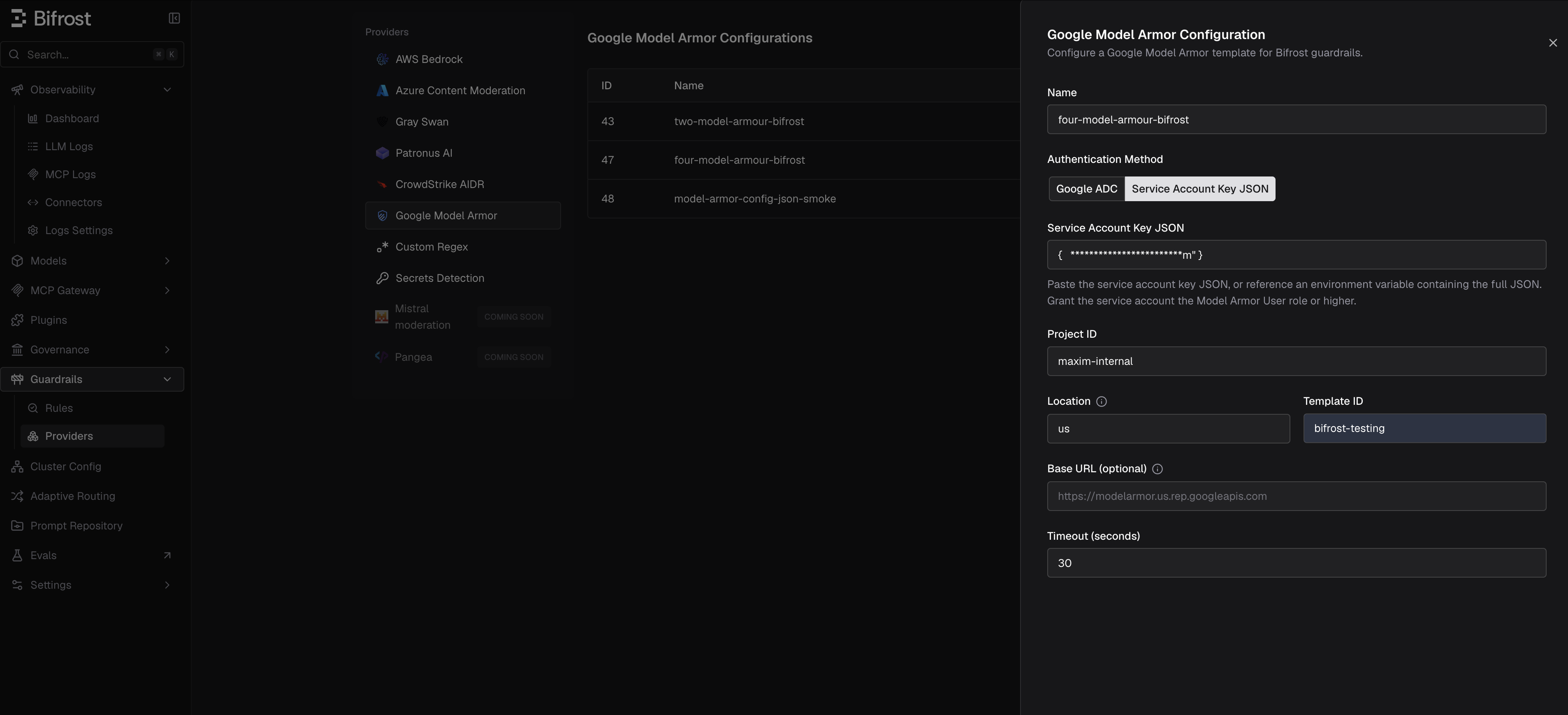
- Enter a descriptive Name, such as
model-armor-prod. - Choose an authentication method:
- Google ADC to use credentials available to the Bifrost runtime.
- Service Account Key JSON to paste a key or reference an environment variable containing the full key JSON.
- Enter Project ID, Location, and Template ID.
- Leave Base URL blank unless you are routing through a proxy or custom endpoint.
- Turn on Screen Images only when the template uses the
usoreumulti-region and should screen supported images. - Set the timeout and save the configuration.
- Go to Guardrails > Configuration and attach the Google Model Armor profile to an input, output, or both-phase rule.
Policy Outcomes
Bifrost records Model Armor usage metadata for logs and spans:
- Evaluated text count
- Matched text count
- Transformed text count
- Blocking filter names
- Invocation result values
Blocked Error Response
When Google Model Armor blocks content, Bifrost returns HTTP400 with type: "guardrail_intervention".
Trimmed example:
For streaming output, Bifrost holds the complete response before Model Armor evaluates it, then applies a permitted transformation before replay. This adds holdback latency and avoids evaluating incomplete tool-call arguments.
Troubleshooting
Google Cloud References
- Model Armor overview
- Sanitize prompts and responses
- Data residency and regional endpoints
- Model Armor IAM roles and permissions
- Application Default Credentials
- Create and delete service account keys
config.json setup, see Guardrails in config.json.