

Overview
Bifrost Enterprise supports Noma Security AI-DR (AI Detection & Response) as a third-party guardrail provider for LLM requests, responses, tool calls, and tool results. Noma owns the detection policy. Detectors, sensitivity, and the action for each detector are configured in the Runtime Protection profile assigned to a Noma application. Attach the Noma profile to a Bifrost rule to choose which traffic is evaluated; Bifrost enforces Noma’s decision inline.If Bifrost cannot interpret or safely apply a Noma decision, for example an unrecognized decision or a masked value it cannot locate in the content, it fails closed with a guardrail intervention instead of forwarding the original content.
Prerequisites
- Bifrost Enterprise with guardrails enabled
- A Noma client credential (Client ID and Client Secret) with the Runtime Integrator role, created in Noma under Settings > Client Credentials
- A Runtime Protection profile in Noma for the applications your traffic reports to
- Network egress from Bifrost to your Noma environment over HTTPS
Set Up Noma
- Under Settings > Client Credentials, click New Client Credentials and give the credential the Runtime Integrator role.
- Choose how traffic maps to Noma applications:
- Leave Application ID empty in Bifrost to report each virtual key as its own application, named after the key. Noma creates the application on the key’s first request.
- Or enter the ID of an application from Runtime Protection > Applications to report all traffic of this configuration to it.
- Assign a Runtime Protection profile to each application and choose each detector’s action: off, alert, mask, or block. Check the profile of any application Noma creates for you.
- Copy the Client ID and Client Secret, and the Application ID if you use one, into Bifrost.
How It Works
- Create a Bifrost provider configuration with
provider_name: "noma-security". - Attach it to a guardrail rule that applies to
input,output, orboth. - Bifrost sends the conversation to Noma before the LLM call, and the completed assistant response after it. Noma evaluates the latest turn: the newest user message and the tool calls, tool results, and response that follow it.
- Noma returns a decision for each item, and Bifrost applies it to the matching request, response, tool-call argument, or tool result.
guardrail_intervention error that carries Noma’s evidence, for example Blocked by Noma AI-DR policy: Email detected in the user prompt. Policies your Noma profile runs deferred are evaluated after Noma replies: they appear in Noma but do not block or mask the request.
Each scan carries the application, the Bifrost request ID, and the authenticated user when there is one. The session is the one Bifrost resolves for the request: the x-bf-session-id header, else the client’s own session header (for example, Claude Code’s x-claude-code-session-id), so related requests are grouped in Noma; otherwise each request is its own session. When client IP capture is enabled (logs_store.capture_client_ip), the caller’s IP is sent too.
Streaming Responses
When the only enforced output rule matching a streaming request has Noma as its only profile, Bifrost streams the response progressively. Once at least 200 characters of new text end at a sentence boundary (., !, or ? followed by whitespace, or a newline), Bifrost sends Noma the response generated so far and releases that text when Noma clears it. Later scans wait for more new text as the response grows, so text arrives in bursts at sentence boundaries rather than token by token. A response shorter than 200 characters is scanned once, when it completes, and is delivered then.
- A block ends the stream after the text already delivered.
- A mask is applied to text that has not been delivered yet. A later scan sees more of the response and can flag text that an earlier scan cleared and the client already received. That text stays as delivered, the rest of the response is still masked, and the stream continues; the request log shows
findings fall in text already delivered to the client. To guarantee that no unmasked value reaches the client, hold the full response instead: add another enforced output rule that matches the request. - If Noma cannot be reached during a stream, Bifrost follows the standard guardrail behavior: the error is reported and the affected text continues to the client unscanned.
- If Noma returns no decision for the response on an intermediate scan, the text stays held and the next scan covers it again; the request log shows
has no verdict yet; keeping text held. - On Responses API streams, including Claude Code through Bifrost, a tool call and everything after it is held until Noma’s final verdict, so a blocked tool call never reaches the client.
Configuration Fields
Configure Bifrost
- Web UI
- API
- config.json
- Helm
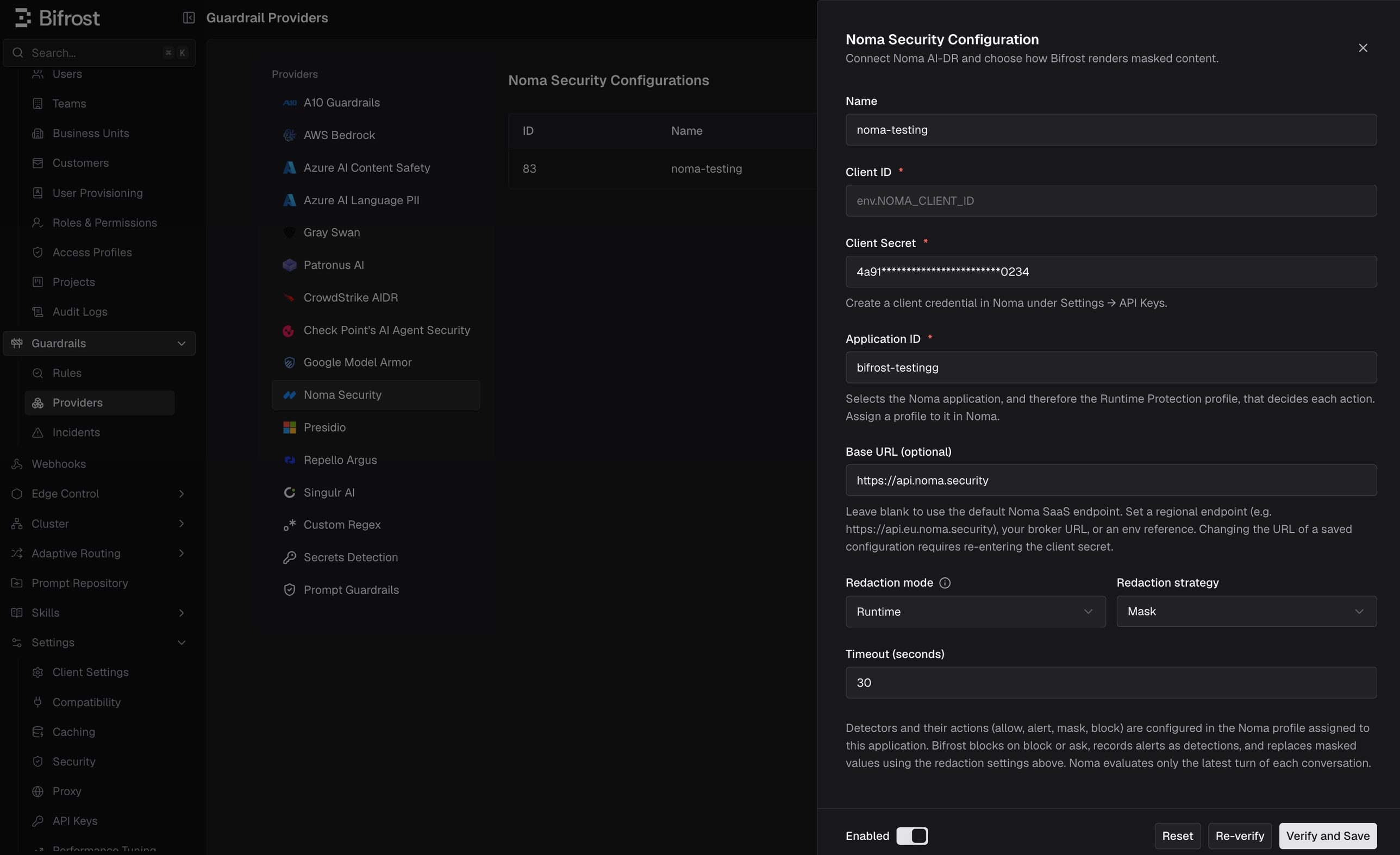
- Go to Guardrails > Providers.
- Select Noma Security and click Add Configuration.
- Enter a descriptive Name, the Client ID and Client Secret, and optionally the Application ID.
- Optionally enter the Base URL of your Noma region or broker. It defaults to
https://api.noma.security. - Choose the redaction mode and strategy used when Noma masks content.
- Set the timeout, enable the configuration, click Verify, then save it. Verification runs a dry-run scan, so nothing is stored in Noma.
- Under Guardrails > Rules, attach the saved Noma profile to an input, output, or both-phase rule.
Supported Content and Limitations
- Latest turn only: Noma evaluates the newest user message and everything after it. Earlier turns are context and are not re-evaluated, and Noma does not re-report items it already scanned in the same session. A value masked on one turn is therefore not masked again when the client replays it in later turns.
- Tool calls and tool results: Noma evaluates tool-call arguments and tool results, and Bifrost can block or mask them. The rules above cover model traffic; to guard MCP tool executions, attach the Noma profile to a separate rule with the
mcptarget (see MCP Guardrails). - System prompts and images: Noma does not evaluate system prompts or image content.
- Fallbacks: When a request falls back to another provider, Bifrost reapplies the first attempt’s Noma decision instead of scanning the same content again.