

Overview
Bifrost provides built-in authentication to protect your dashboard and admin API endpoints. When enabled, users must log in with credentials before accessing the dashboard or making admin API calls. This feature helps secure your Bifrost instance, especially when deployed in production environments. Deleting MCP tool logs requires authenticated management access. Requests that bypass authentication because it is disabled, unconfigured, or whitelisted receive403; enable authentication and remove the deletion endpoint from the auth whitelist before deleting logs.
Bifrost Enterprise: you do not need this password toggle if you use single sign-on. Configuring OAuth 2.0 /
OIDC login or inbound SCIM 2.0 provisioning already counts as configured dashboard authentication, and it gates
the dashboard and admin API the same way. See User Provisioning.
Enabling Authentication
Step 1: Navigate to Security Settings
- Open your Bifrost dashboard
- Go to Workspace → Config → Security tab
- Scroll to the Password protect the dashboard section

Step 2: Enable Authentication
- Toggle the Password protect the dashboard switch to enable authentication
- Enter your Username in the admin username field
- Enter your Password in the admin password field
The username and password fields are only enabled when the authentication toggle is turned on. Make sure to use a
strong password for security.
Creating the first admin account: until an admin account exists, Bifrost’s dashboard/admin API is reachable
without a password from anyone who can route to it. To close that window, the first time you enable authentication
on an instance you must also supply a Setup token. Your operator configures this value ahead of time via
setup_token in config.json (accepts a literal value or an env.VAR_NAME / vault.path reference, same as
admin_username/admin_password) or the BIFROST_SETUP_TOKEN environment variable. Paste that same value into
the Setup token field that appears below the password field. The setup token is never persisted and is never
printed to logs. If no setup token is configured, creating the first admin account is rejected until you set one- and because every node in a multi-node deployment reads the same configured value, there’s no need to target a specific node.
Setup token is required for version 2.0.0-prerelease3 and above.
Re-enabling authentication after disabling it: while authentication is switched off, the admin API is reachable
without a password even though your admin account is still stored. To stop anyone who can reach the port from
switching it back on with their own credentials, a
PUT /api/config that re-enables authentication, or that changes
admin_username / admin_password while it stays disabled, must prove control of the instance with either
auth_config.current_password (the stored admin password) or the configured auth_config.setup_token. Requests made
from an authenticated session (for example through Basic Auth) need neither.Step 3: Configure Inference Call Authentication (Optional)
By default, when authentication is enabled, all API calls (including inference calls) require authentication. You can optionally disable authentication for inference calls while keeping it enabled for the dashboard and admin API:- Enable the Disable authentication on inference calls toggle
- When enabled:
- Dashboard and admin API calls will still require authentication
- Inference API calls (chat completions, embeddings, etc.) will not require authentication
- MCP tool execution calls will still require authentication
This option is useful if you want to protect your dashboard and admin functions while allowing public access to
inference endpoints.
Step 4: Configure Whitelisted Routes (Optional)
You can configure specific routes that bypass the authentication middleware entirely. Requests to these routes will not require authentication, even when auth is enabled.- Scroll to the Whitelisted Routes section
- Enter a comma-separated list of routes in the textarea
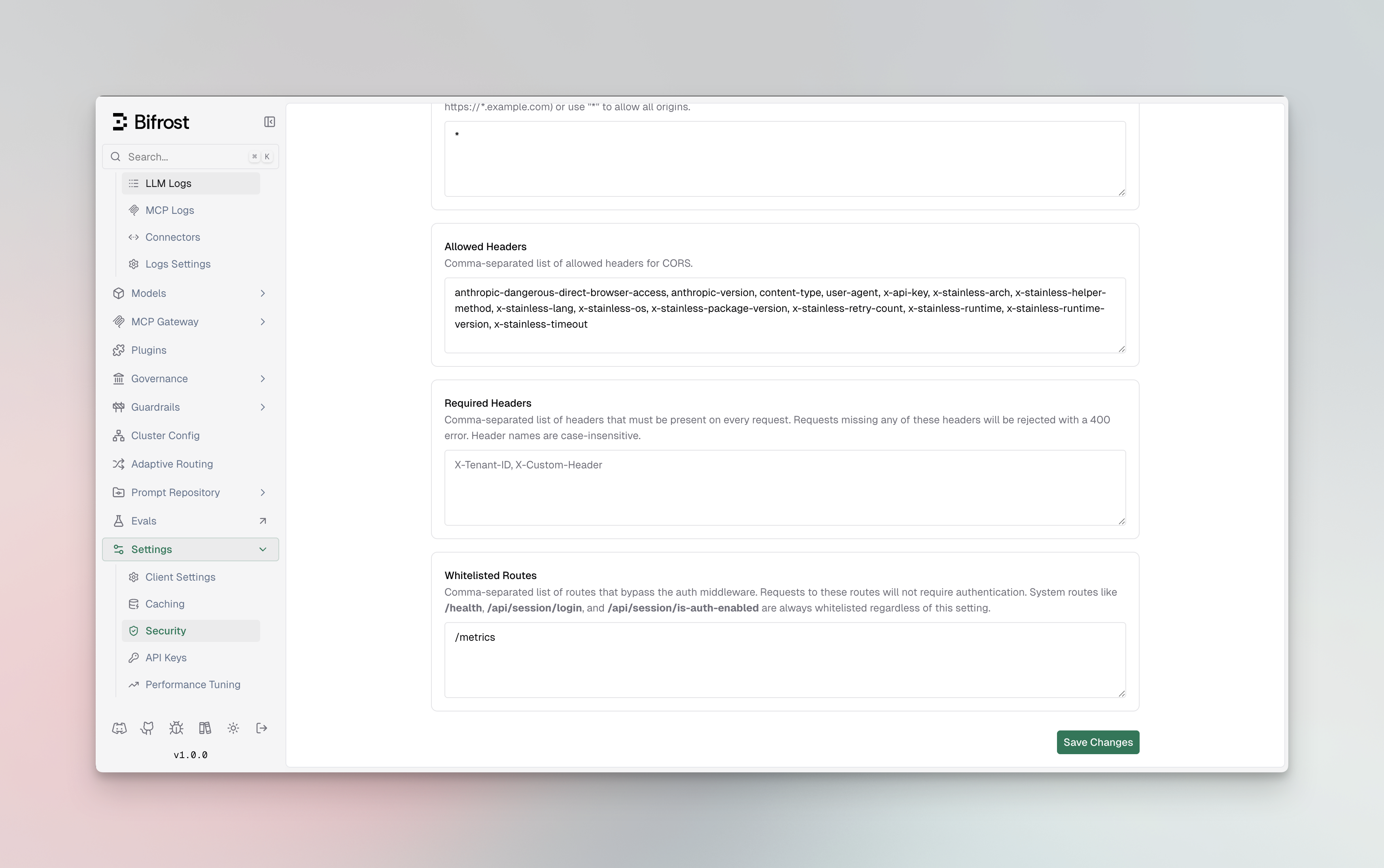
* are treated as prefix matches. For example, /api/webhook* will match /api/webhook, /api/webhook/v1, /api/webhook/github, etc.
Example values:
System routes like
/health, /api/session/login, /api/session/is-auth-enabled, /api/oauth/callback, and
/api/info are always whitelisted regardless of this setting. Whitelisted routes only apply to dashboard and admin
API endpoints - inference endpoints have their own toggle (see Step 3).Step 5: Save Changes
- Click Save Changes to apply your authentication settings
- Changes take effect immediately - no restart required
Logging In
Once authentication is enabled:- Navigate to your Bifrost dashboard URL
- You will be automatically redirected to the login page
- Enter your configured username and password
- Click Sign in
Authentication Methods
Bifrost supports different authentication methods depending on the type of request:Dashboard Access
- Bearer Token Authentication: The dashboard uses Bearer token authentication
- Tokens are automatically managed through the login session
- Tokens are stored in browser localStorage and sent with each API request
API Calls
When authentication is enabled, API calls can be made using- Basic Authentication: Username and password encoded as base64 via HTTP Basic auth
- Bearer Token: Session token issued after login (Bearer token from session)
- Basic Authentication: Username and Password in Basic auth
- Bearer Token: base64 string of username:password as bearer token
Enterprise: IdP tokens are also accepted. On Bifrost Enterprise with SSO configured, anywhere you can authenticate an inference call with a virtual key, you also have the option of sending a token issued by your identity provider:
Authorization: Bearer <idp-token>. Bifrost validates it against your configured IdP and attributes the request to that user, applying their access profile, budgets, and rate limits. With enforce_auth_on_inference on, a first-time user is provisioned on their first request. Send the token in the Authorization header; x-api-key and x-bf-vk carry virtual keys only. If a request carries both, dual_credential_conflict_behavior decides which is used.Whitelisted Routes
When a route is added to the whitelisted routes list in Security settings, requests to that path bypass authentication entirely - no Basic Auth or Bearer Token is required. This applies only to dashboard and admin API endpoints. Inference endpoints are controlled separately via the “Disable authentication on inference calls” toggle.Example: Using Basic Auth for Inference Calls
Important Notes
- No Restart Required: Authentication changes take effect immediately without requiring a server restart
- Session Duration: Login sessions last for 30 days
- Password Security: Passwords are hashed and stored securely in the database
- Inference Calls: If you disable authentication on inference calls, only dashboard and admin API endpoints will be protected
- Whitelisted Routes: Routes configured in Security settings bypass auth on dashboard/admin API endpoints only. Use
*at the end of a route for prefix matching (e.g.,/api/webhook*)
Disabling Authentication
To disable authentication:- Navigate to Workspace → Config → Security
- Toggle off the Password protect the dashboard switch
- Click Save Changes