

Overview
Cohere has a different API structure from OpenAI’s format. Bifrost performs conversions including:- Parameter renaming - e.g.,
max_completion_tokens→max_tokens,top_p→p,stop→stop_sequences - Message content conversion - String and content block formats handled
- Tool conversion - Tool definitions and tool choice mapped to Cohere format
- Thinking/Reasoning transformation -
reasoningparameters mapped to Cohere’sthinkingstructure - Response format conversion - JSON schema handling adapted to Cohere’s format
Supported Operations
Unsupported Operations (❌): Text Completions, Image Generation, Speech, Transcriptions, Files, and Batch are not supported by the upstream Cohere API. These return
UnsupportedOperationError.Setup & Configuration
Configure Cohere as a provider.- Web UI
- config.json
- API
- Go SDK
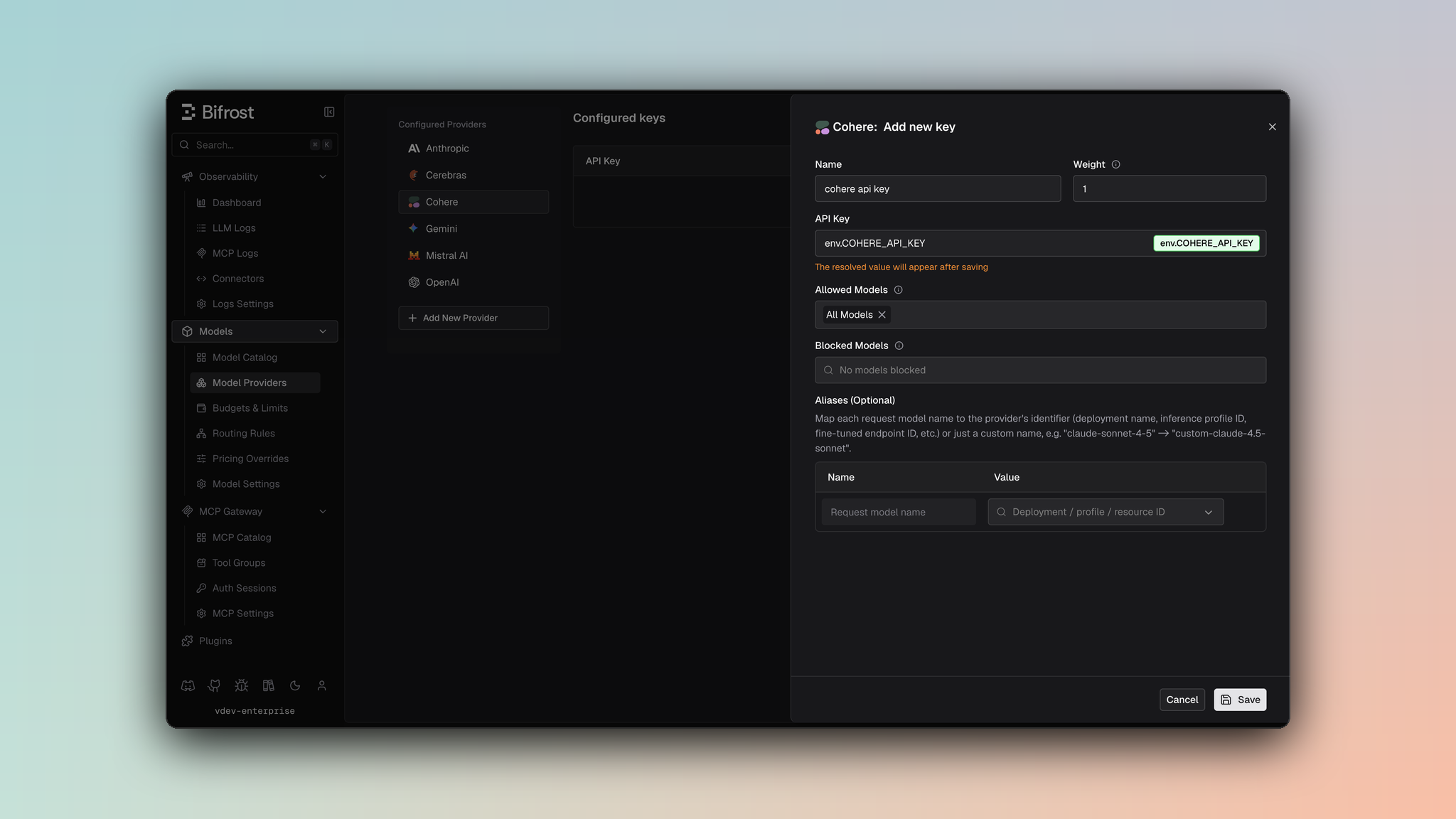
- Navigate to Models > Model Providers. Look for Cohere under Configured Providers. If it is missing, click on Add New Provider and select Cohere.
- Click Add Key or edit an existing key.
- Set a name for your key.
- Paste your API key directly or use an environment variable (for example,
env.COHERE_API_KEY). - Set Allowed Models to All Models (default) or the specific model allowlist you want this key to serve.
- Save the provider configuration.
1. Chat Completions
Request Parameters
Parameter Mapping
Dropped Parameters
The following parameters are silently ignored:logit_bias, logprobs, top_logprobs, seed, parallel_tool_calls, service_tier
Extra Parameters
Useextra_params (SDK) or pass directly in request body (Gateway) for Cohere-specific fields:
- Gateway
- Go SDK
Reasoning / Thinking
Documentation: See Bifrost Reasoning ReferenceParameter Mapping
reasoning.effort→thinking.type(mapped to"enabled"or"disabled")reasoning.max_tokens→thinking.token_budget(token budget for thinking)
Critical Constraints
- Minimum budget: 1 token required; requests with 0 tokens will be converted to disabled
- Dynamic budget:
-1is converted to1automatically
Example
Message Conversion
Content Handling
- String content: Messages can have simple string content
- Content blocks: Messages can have arrays of content blocks (text, images, thinking)
- Image conversion:
image_urlblocks with URL are supported - Tool calls: Converted from message assistant tool calls to Cohere format
- Tool messages: Tool call results are passed with
tool_call_id
Tool Conversion
Tool definitions are adapted to Cohere format with the following mappings:- Function
name→name(unchanged) - Function
parameters→parameters(flexible JSON format) - Strict mode (
strict: true) is silently dropped (not supported)
"none"→"NONE""auto"or"required"→"REQUIRED"or"AUTO"- Specific tool selection →
"REQUIRED"(Cohere uses function-level selection)
Response Format
Supported formats:text- Plain text responsejson_object- Structured JSON responsejson_schema- JSON with schema validation (converted tojson_object)
response_format.json_schema field.
Response Conversion
Field Mapping
finish_reason:COMPLETE/STOP_SEQUENCE→stop,MAX_TOKENS→length,TOOL_CALL→tool_callsinput_tokens→prompt_tokens|output_tokens→completion_tokenscached_tokens→prompt_tokens_details.cached_tokens(if present)- Tool call arguments converted from string → string (no conversion needed, Cohere uses string format)
Streaming
Event sequence:message-start → content-start → content-delta → content-end → message-end
Delta types:
content-deltawith text → message contentcontent-deltawith thinking → reasoning texttool-call-start/delta/end→ tool call eventstool-plan-delta→ tool planning output
Caveats
Minimum Thinking Budget
Minimum Thinking Budget
Severity: Low
Behavior:
reasoning.max_tokens must be >= 1
Impact: Very low impact, conversion happens automatically
Code: chat.go:104-130Top P Renamed
Top P Renamed
Severity: Low
Behavior:
top_p parameter renamed to p
Impact: Parameter name changes internally
Code: chat.go:99Strict Tool Mode Dropped
Strict Tool Mode Dropped
Severity: Low
Behavior:
strict: true in tool definitions silently dropped
Impact: No schema validation enforcement
Code: chat.go:168-185Tool Arguments Format
Tool Arguments Format
Severity: Low
Behavior: Tool arguments are already strings, no JSON serialization needed
Impact: Minimal - Cohere v2 API expects string format
Code:
chat.go:70-782. Responses API
The Responses API uses the same underlying/v2/chat endpoint but converts between OpenAI’s Responses format and Cohere’s format.
Request Parameters
Parameter Mapping
Extra Parameters
Useextra_params (SDK) or pass directly in request body (Gateway):
- Gateway
- Go SDK
Input & Instructions
- Input: String converted to user message or array converted to messages
- Instructions: Becomes system message (prepended to messages)
Tool Support
Supported types:function
Tool conversions same as Chat Completions.
Response Conversion
text→message|tool_use→function_callinput_tokens/output_tokenspreserved- Token details with cached tokens support
Streaming
Event sequence:message-start → content-start → content-delta → content-end → message-end
Special handling:
- Tool call arguments accumulated across chunks
- Synthetic
output_item.addedevents emitted for text/reasoning - Stable item IDs generated as
msg_{messageID}_item_{outputIndex}
3. Embeddings
Request Parameters
Parameter Mapping
Extra Parameters
Useextra_params for Cohere-specific embedding options:
- Gateway
- Go SDK
Critical Notes
- Input Type Required: Cohere v3+ models require
input_typeparameter (defaults to"search_document") - Embedding Types: Specify which embedding types to return (e.g.,
"float","int8")
Response Conversion
embeddings.float→data[].embeddingmeta.tokens→ usage information- Multiple embedding types handled
4. List Models
Request: GET/v1/models?page_size={defaultPageSize}
Field mapping: Model data converted to standard format
Pagination: Cursor-based with next_page_token
Note: endpoint and default_only filters available via extra_params