

Overview
SGL (SGLang) is an OpenAI-compatible local/remote inference engine used for serving models with high throughput. By default Bifrost delegates operations to the OpenAI provider implementation; Chat Completions and the Responses API can instead be routed through SGLang’s Anthropic-compatible Messages endpoint. Key features:- OpenAI API compatibility - Identical request/response format
- Optional Anthropic-compatible mode - Route chat and responses through
/v1/messageswithuse_anthropic_endpoints - Full streaming support - Server-Sent Events with usage tracking
- Tool calling - Complete function definition and execution
- Text embeddings - Support for embedding models
- Parameter filtering - Removes unsupported fields for compatibility
Supported Operations
Unsupported Operations (❌): Speech, Transcriptions, Files, and Batch are not supported by the upstream SGL API. These return
UnsupportedOperationError.SGL is typically self-hosted. Ensure BaseURL is configured correctly pointing to your SGL instance (e.g., http://localhost:8000).Setup & Configuration
Configure SGLang as a provider.- Web UI
- config.json
- API
- Go SDK
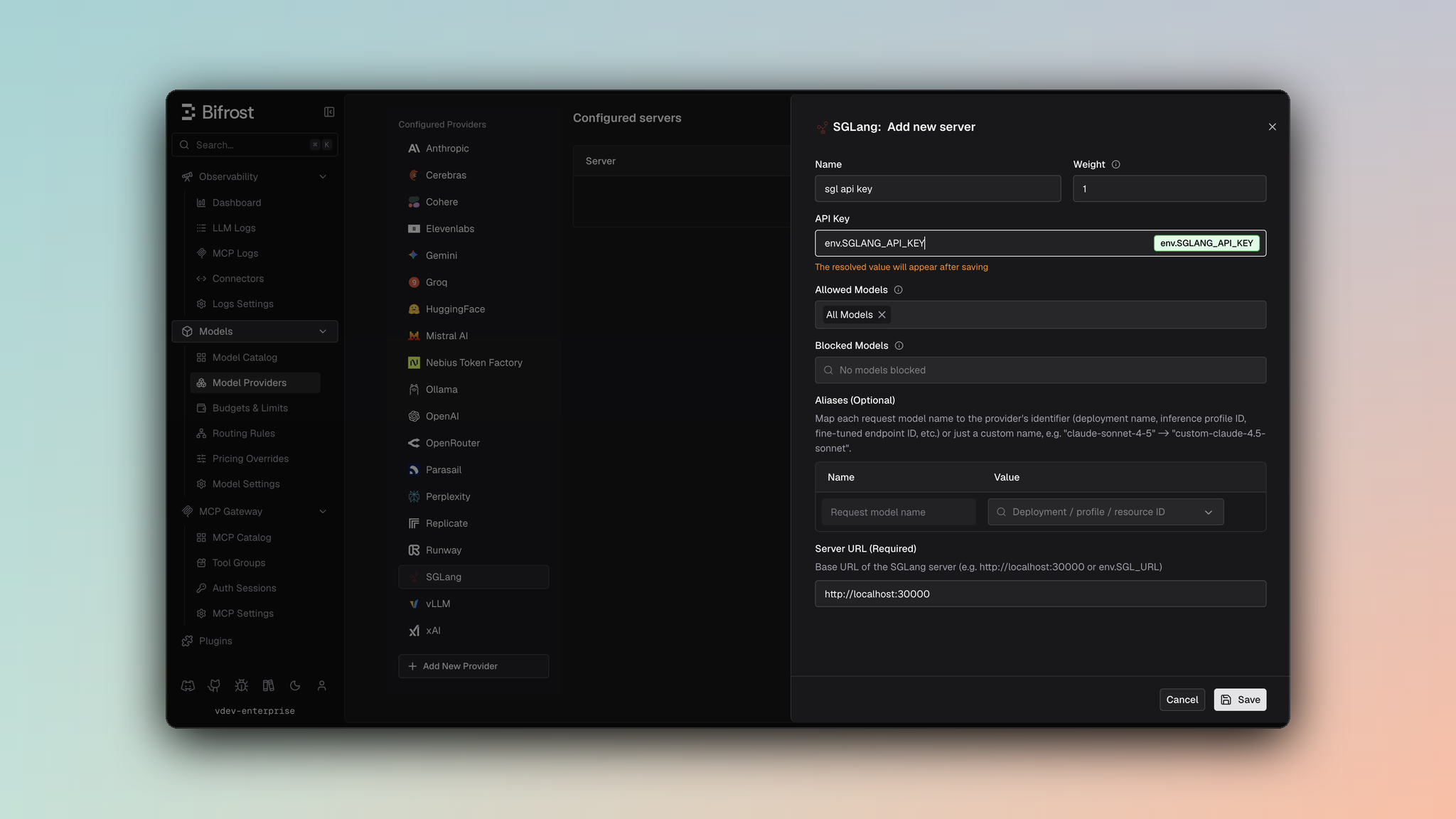
- Navigate to Models > Model Providers. Look for SGLang under Configured Providers. If it is missing, click on Add New Provider and select SGLang.
- Click Add New Server or edit an existing key.
- Set a name for your key.
- Leave API Key blank for local servers. If your endpoint requires auth, paste a bearer token directly or use an environment variable.
- Set SGLang URL to
http://localhost:8000or your remote SGLang endpoint. - Set Allowed Models to All Models (default) or the specific model allowlist you want this key to serve.
- Save the provider configuration.
Anthropic-Compatible Endpoints (optional)
SGLang can serve an Anthropic-compatible Messages endpoint (/v1/messages) alongside its OpenAI-compatible APIs. Setting use_anthropic_endpoints routes Chat Completions and the Responses API through that endpoint instead. Text Completions and Embeddings are unaffected and always use their OpenAI-compatible endpoints.
Two details specific to this mode:
- Authentication does not change. Bifrost sends
Authorization: Bearer <key>either way, and omits the header when the key value is empty. It additionally sendsanthropic-version: 2023-06-01. - Count Tokens is not governed by this setting. It always uses
/v1/messages/count_tokens.
- Key-level - Sets the default endpoint mode for every request made with that key.
- Alias-level - Overrides the key-level default for a single alias, so one key can serve some aliases through the OpenAI-compatible endpoints and others through the Anthropic-compatible endpoint.
- Web UI
- API
- config.json
On the key form, toggle Use Anthropic Endpoints (off by default). To override this for a specific alias, open that alias’s expanded row in the deployments table and toggle Use Anthropic endpoints under SGLang overrides, which takes priority over the key-level setting for that alias only.
1. Chat Completions
Request Parameters
SGL supports all standard OpenAI chat completion parameters. For full parameter reference and behavior, see OpenAI Chat Completions.Filtered Parameters
Removed for SGL compatibility:prompt_cache_key- Not supportedverbosity- Anthropic-specificstore- Not supportedservice_tier- OpenAI-specific
2. Responses API
By default, Responses fall back to Chat Completions with format conversion:use_anthropic_endpoints enabled on the key or alias, Responses skip that fallback and are converted to the Anthropic Messages format, then sent natively to /v1/messages. See Anthropic-Compatible Endpoints.
3. Text Completions
SGL supports legacy text completion format:4. Embeddings
SGL supports text embeddings for vector generation:
Response returns embedding vectors with usage information.
5. List Models
Lists available models from SGL server with capabilities.Unsupported Features
SGL requires BaseURL configuration pointing to your SGL instance (e.g.,
http://localhost:8000 for local, https://sgl.example.com for remote).Caveats
BaseURL Configuration Required
BaseURL Configuration Required
Severity: High
Behavior: BaseURL must be explicitly configured through
sgl_key_config.url or network_config.base_url
Impact: Requests fail without proper configuration
Code: Requests call baseURLOrError before contacting SGLCache Control Stripped
Cache Control Stripped
Severity: Medium
Behavior: Cache control directives are removed from messages
Impact: Prompt caching features don’t work
Code: Stripped during JSON marshaling
Parameter Filtering
Parameter Filtering
Severity: Low
Behavior: OpenAI-specific fields filtered out
Impact: prompt_cache_key, verbosity, store removed
Code: filterOpenAISpecificParameters
User Field Size Limit
User Field Size Limit
Severity: Low
Behavior: User field > 64 characters silently dropped
Impact: Longer user identifiers are lost
Code: SanitizeUserField enforces 64-char max