

Overview
Groq is an OpenAI-compatible provider offering the same API interface with identical parameter handling. Bifrost delegates most functionality to the OpenAI provider implementation with minimal modifications. Key features:- Full OpenAI compatibility - Identical request/response format
- Streaming support - Server-Sent Events with delta-based updates
- Tool calling - Complete function definition and execution support
- Text completion fallback - Via litellm compatibility mode when enabled
- Parameter filtering - Removes unsupported OpenAI-specific fields
Supported Operations
Text Completions (⚠️): Not supported natively by Groq. When enabled via
x-litellm-fallback context, Bifrost internally converts text completion requests to chat completion requests, processes them through Chat Completions, and converts the response back to text completion format.Unsupported Operations (❌): Embeddings, Image Generation, Speech, Transcriptions, Files, and Batch are not supported by the upstream Groq API. These return UnsupportedOperationError.Setup & Configuration
Configure Groq as a provider.- Web UI
- config.json
- API
- Go SDK
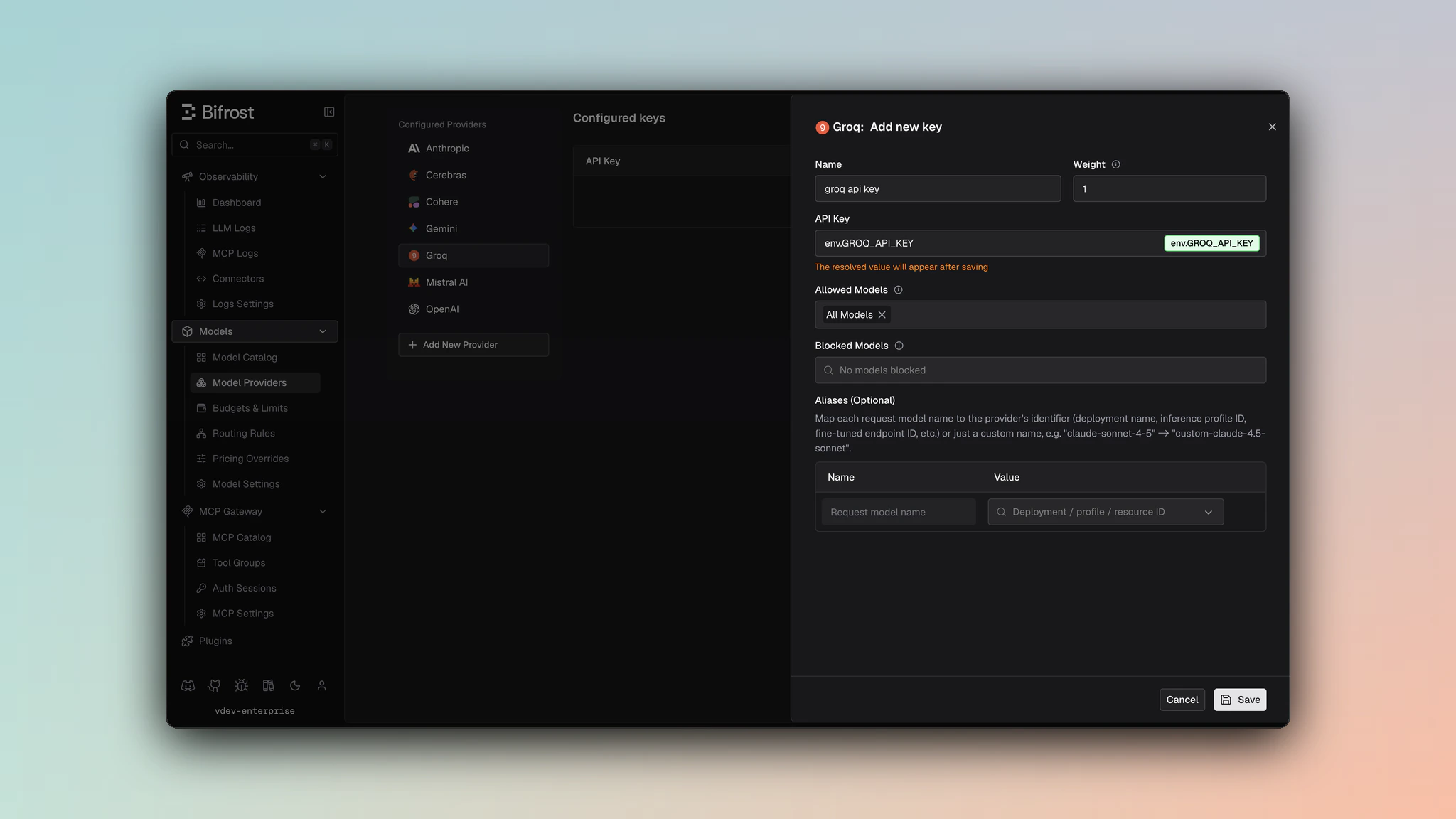
- Navigate to Models > Model Providers. Look for Groq under Configured Providers. If it is missing, click on Add New Provider and select Groq.
- Click Add Key or edit an existing key.
- Set a name for your key.
- Paste your API key directly or use an environment variable (for example,
env.GROQ_API_KEY). - Set Allowed Models to All Models (default) or the specific model allowlist you want this key to serve.
- Save the provider configuration.
1. Chat Completions
Request Parameters
Groq supports all standard OpenAI chat completion parameters. For full parameter reference and behavior, see OpenAI Chat Completions.Dropped Parameters
These parameters are silently removed before sending to Groq:prompt_cache_key- Not supportedverbosity- Anthropic-specificstore- Not supportedservice_tier- Not supported
Reasoning Parameter
Groq supports reasoning via the standardreasoning_effort field:
Reasoning structure to reasoning_effort string.
Message Conversion
Groq uses OpenAI message format with the following content type limitations: Content Types Supported:- ✅ Text content (strings)
- ❌ Images (neither URL nor base64)
- ❌ Audio input
- ❌ Files
2. Responses API
The Responses API is converted internally to Chat Completions:output items instead of message content.
3. Text Completions (Litellm Fallback)
When enabled, text completion requests are converted to chat completions:- Uses chat API (different from native text completion)
- Single choice only (n=1)
- Streaming not available
4. List Models
Groq’s model listing endpoint returns available models with their context lengths and capabilities.Unsupported Features
Caveats
User Field Size Limit
User Field Size Limit
Severity: Low
Behavior: User field > 64 characters is silently dropped
Impact: Longer user identifiers are lost
Code: SanitizeUserField enforces 64-char max