

Overview
OpenAI is the baseline schema for Bifrost. When using OpenAI directly, parameters are passed through with minimal conversion - mostly validation and filtering of OpenAI-specific features.Supported Operations
Setup & Configuration
Configure OpenAI as a provider.- Web UI
- config.json
- API
- Go SDK
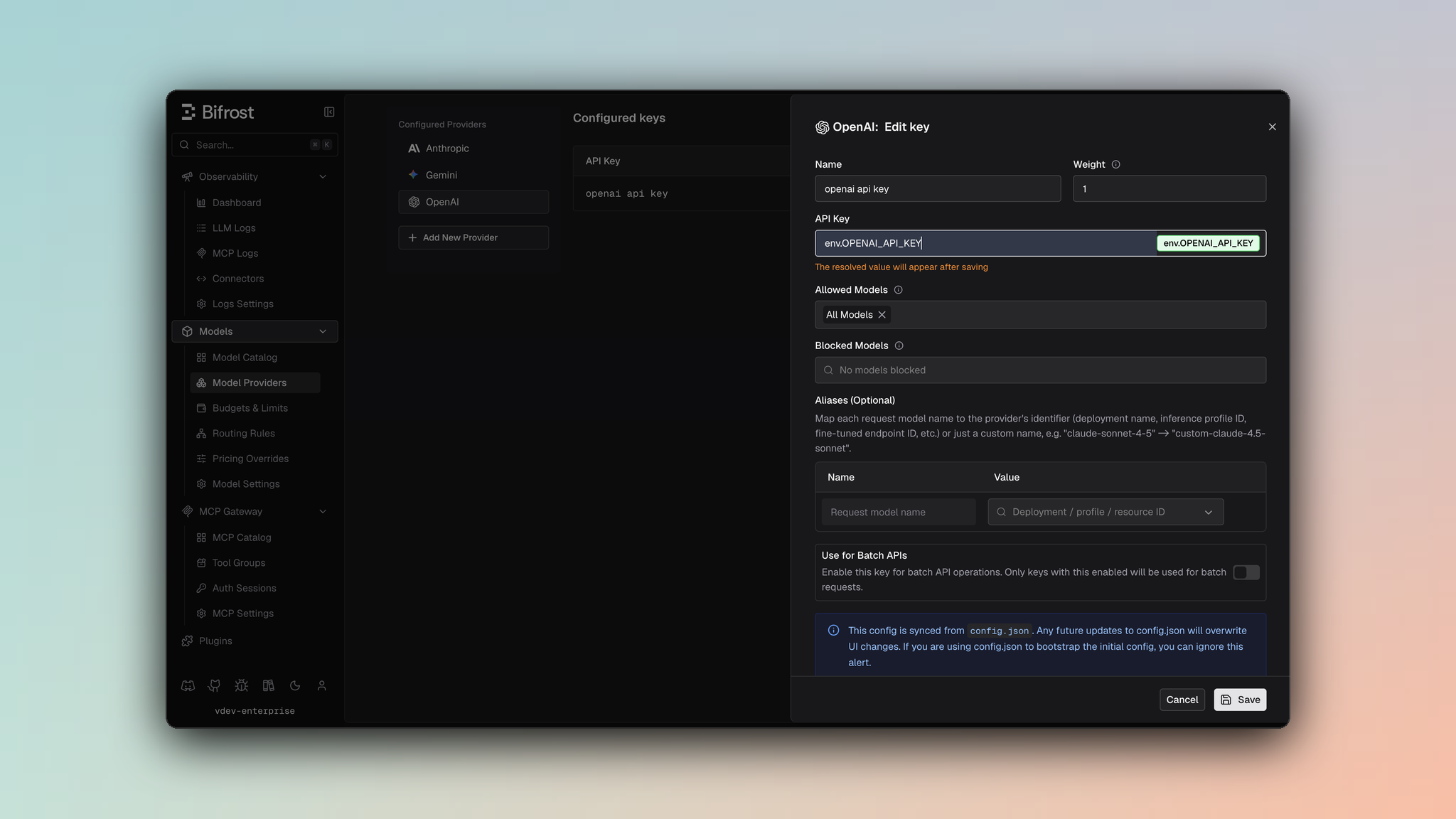
- Navigate to Models > Model Providers. Look for OpenAI under Configured Providers. If it is missing, click on Add New Provider and select OpenAI.
- Click Add Key or edit an existing key.
- Set a name for your key.
- Paste your API key directly or use an environment variable (for example,
env.OPENAI_API_KEY). - Set Allowed Models to All Models (default) or the specific model allowlist you want this key to serve.
- Save the provider configuration.
network_config for timeouts, retries, proxy/TLS settings, and openai_config.disable_store to force store=false on outgoing OpenAI requests.
1. Chat Completions
Request Parameters- Reasoning: OpenAI supports
reasoning.effort(minimal,low,medium,high) andreasoning.max_tokens- both passed through directly. When routing to other providers,"minimal"effort is converted to"low"for compatibility. See Bifrost reasoning docs. - Messages: All message roles are supported:
system,user,assistant,tool,developer(treated as system). Content types: text, images via URL (image_url), audio input (input_audio). Tool messages include atool_call_id. - Tools: Standard OpenAI tool format with strict mode support. Tool choice:
"auto","none","required", or specific tool by name. - Responses: Passed through in standard OpenAI format. Finish reasons:
stop,length,tool_calls,content_filter. Usage includes token counts and optionally cached/reasoning token details. - Streaming: Server-Sent Events format with
delta.content,delta.tool_calls,finish_reason, andusage(final chunk only, automatically included by Bifrost).stream_options: { include_usage: true }is set by default for all streaming calls. - Cache Control:
cache_controlfields are stripped from messages, their content blocks, and tools before sending. The exception is the gpt-5.6 family, where a marked block is translated into OpenAI’s ownprompt_cache_breakpoint. Bifrost does not setprompt_cache_options: the default implicit mode honours explicit breakpoints and also looks back over up to 20 earlier message endings, which is what lets an agent loop with a marker that moves every turn (such as Claude Code) read the previous turn back from cache. Explicit-only mode checks only the breakpoints in the current request, so sendprompt_cache_options.mode: "explicit"yourself only if your breakpoints stay at fixed positions. In implicit mode Bifrost keeps at most three translated breakpoints, since the implicit breakpoint takes one of the four cache-write slots. Earlier models have no such field, so stripping remains correct for them. Bifrost can also add the marker for clients that send none - see Prompt caching. - Token Enforcement:
max_completion_tokensis enforced to have a minimum of 16. Values below 16 are automatically set to 16. - Special handling:
userfield is truncated to 64 characters;prompt_cache_key,store,service_tierare filtered when routing to non-OpenAI providers
2. Responses API
The Responses API is OpenAI’s structured output API. Request ParametersSpecial Message Handling (gpt-oss vs other models): OpenAI models handle reasoning differently depending on the model family:
- Non-gpt-oss models (GPT-4o, o1, etc.): Send reasoning as summaries. Reasoning-only messages (with no summary and only content blocks) are filtered out since these models don’t support reasoning content blocks in the request format.
- gpt-oss models: Send reasoning as content blocks. Reasoning summaries in the request are converted to content blocks since gpt-oss expects reasoning as structured blocks, not summaries.
max_output_tokensis enforced to have a minimum of 16. Values below 16 are automatically set to 16.reasoning.max_tokensfield is automatically removed from JSON output (OpenAI Responses API doesn’t accept it).
- Action types
zoomandregionare converted toscreenshot cache_controlfields are stripped from messages and tools- Unsupported tool types are silently filtered (only these are supported:
function,file_search,computer_use_preview,web_search,mcp,code_interpreter,image_generation,local_shell,shell,programmatic_tool_calling,apply_patch,custom,web_search_preview,tool_search,namespace)
id, status (completed, incomplete, pending, error), output array with message content, and token usage.
Streaming: Server-Sent Events. stream_options: { include_usage: true } is set by default for all streaming calls. Each event carries a type field (ResponsesStreamResponseType) with one of the following values:
Response Lifecycle
Manage stored and background responses after creation (requests made withstore: true or background: true). All lifecycle operations accept an optional provider query parameter (defaults to openai); providers that do not implement these operations return an unsupported operation error.
When multiple API keys are configured for the provider, pin key selection on lifecycle calls (for example, with the
x-bf-api-key-id header, see Request Options) so they hit the same upstream account as the create call that produced the response_id.Retrieve Response
GET/v1/responses/{response_id} - Retrieve a stored response (docs)
Query Parameters
Response: The full response object, same shape as
POST /v1/responses. With stream=true, the same SSE event stream as POST /v1/responses with stream: true.
Delete Response
DELETE/v1/responses/{response_id} - Delete a stored response (docs)
Response: BifrostResponsesDeleteResponse with id, object, and deleted: true.
Cancel Response
POST/v1/responses/{response_id}/cancel - Cancel an in-flight response (docs). Only responses created with background: true can be cancelled.
Response: The full response object, same shape as POST /v1/responses.
List Input Items
GET/v1/responses/{response_id}/input_items - List the input items of a response (docs)
Query Parameters
Response:
BifrostResponsesInputItemsResponse with object: "list", data (array of input items), has_more, first_id, last_id. Cursor-based pagination with has_more flag.
3. Text Completions (Legacy)
Request Parameters- Array prompts generate multiple completions. Finish reasons:
stoporlength. Streaming uses SSE format.stream_options: { include_usage: true }is set by default for streaming calls. userfield is truncated to 64 characters or set to nil if it exceeds the limit.
4. Embeddings
Request Parameters- No streaming support. Returns
embeddingarray with usage counts.
5. Speech (Text-to-Speech)
Request Parameters- Returns raw binary audio. Streaming supported in SSE format (base64 chunks), but not all models support streaming.
stream_options: { include_usage: true }is set by default for streaming calls.
6. Transcriptions (Speech-to-Text)
Request Parameters- Supported audio formats: mp3, mp4, mpeg, mpga, m4a, wav, webm
- Response: Includes
text,task,language,duration, and optionally word-level timing. Streaming supported in SSE format.stream_options: { include_usage: true }is set by default for streaming calls.
7. Image Generation
Request ParametersRequest Conversion OpenAI is the baseline schema for image generation. Parameters are passed through with minimal conversion:
- Model & Prompt:
bifrostReq.Model→req.Model,bifrostReq.Prompt→req.Prompt - Parameters: All fields from
bifrostReq(ImageGenerationParameters) are embedded directly into the OpenAI request struct via struct embedding. No field mapping or transformation is performed. - Streaming: When streaming is requested,
stream: trueis set in the request body.
-
Non-streaming: OpenAI responses are unmarshaled directly into
BifrostImageGenerationResponsesince Bifrost’s response schema is a superset of OpenAI’s format. All fields are passed through as-is. -
Streaming: OpenAI streaming responses use Server-Sent Events (SSE) format with event types:
image_generation.partial_image: Intermediate image chunks withb64_jsondataimage_generation.completed: Final chunk for each image with usage informationerror: Error events
type: Event typesequence_number: Sequence number of the chunkpartial_image_index: Image index (0-N) for partial imagesb64_json: Base64-encoded image data (pointer, may be nil)usage: Token usage (only in completed events)created_at,size,quality,background,output_format: Additional metadata
BifrostImageGenerationStreamResponsechunks with:- Per-image
chunkIndextracking for proper ordering within each image Indexfield indicating which image (0-N) the chunk belongs toPartialImageIndexset only for partial images (not completed events)- Usage information attached to completed chunks
- Latency tracking per chunk
/v1/images/generations
8. Image Edit
Request ParametersRequest Conversion
- Model & Input:
bifrostReq.Model→req.Model,bifrostReq.Input.Images→req.Input.Images,bifrostReq.Input.Prompt→req.Input.Prompt - Parameters: All fields from
bifrostReq.Params(ImageEditParameters) are embedded directly into the OpenAI request struct via struct embedding. No field mapping or transformation is performed. - Multipart Form Data: The request is serialized as
multipart/form-data:- Model & Prompt: Written as form fields (
model,prompt) - Images: Each image in
Input.Imagesis written as a separateimage[]field with proper MIME type detection (image/jpeg,image/webp,image/png) and Content-Type headers - Mask: If present, written as a
maskfield with MIME type detection and appropriate filename (mask.png,mask.jpg,mask.webp) - Optional Parameters: All optional parameters (
n,size,quality,response_format,background,input_fidelity,partial_images,output_format,output_compression,user) are written as form fields - Integer Conversion: Integer fields (
n,partial_images,output_compression) are converted to strings usingstrconv.Itoa - Streaming: When streaming is requested,
stream: "true"is written as a form field
- Model & Prompt: Written as form fields (
-
Non-streaming: OpenAI responses are unmarshaled directly into
BifrostImageGenerationResponsesince Bifrost’s response schema is a superset of OpenAI’s format. All fields are passed through as-is. -
Streaming: OpenAI streaming responses use Server-Sent Events (SSE) format with event types:
image_edit.partial_image: Intermediate image chunks withb64_jsondataimage_edit.completed: Final chunk for each image with usage informationerror: Error events
type: Event type (image_edit.partial_imageorimage_edit.completed)sequence_number: Sequence number of the chunkpartial_image_index: Image index (0-N) for partial imagesb64_json: Base64-encoded image data (pointer, may be nil)usage: Token usage (only in completed events)
BifrostImageGenerationStreamResponsechunks with:- Per-image
chunkIndextracking for proper ordering within each image Indexfield indicating which image (0-N) the chunk belongs toPartialImageIndexset only for partial images (not completed events)- Usage information attached to completed chunks
- Latency tracking per chunk
- Robust handling of interleaved chunks using incomplete image tracking
/v1/images/edits
9. Image Variation
Request ParametersRequest Conversion
- Model & Input:
bifrostReq.Model→req.Model,bifrostReq.Input.Image.Image→req.Input.Image.Image - Parameters: All fields from
bifrostReq.Params(ImageVariationParameters) are embedded directly into the OpenAI request struct via struct embedding. No field mapping or transformation is performed. - Multipart Form Data: The request is serialized as
multipart/form-data:- Model: Written as form field (
model) - Image: The image is written as an
imagefield with proper MIME type detection (image/jpeg,image/webp,image/png) and Content-Type headers. If MIME type cannot be detected, defaults toimage/png - Optional Parameters: All optional parameters (
n,size,response_format,user) are written as form fields - Integer Conversion: Integer field (
n) is converted to string usingstrconv.Itoa
- Model: Written as form field (
- Multiple Images: Additional images beyond the first one (if present in
ExtraParams["images"]) are stored inExtraParamsbut only the first image is sent to OpenAI (OpenAI API only supports single image input)
- Non-streaming: OpenAI responses are unmarshaled directly into
BifrostImageVariationResponse(which is a type alias forBifrostImageGenerationResponse). All fields are passed through as-is. - Streaming: Not supported for image variation requests.
/v1/images/variations
10. Files API
Upload
Request Parameters
Response:
FileObject with id, bytes, created_at, filename, purpose, status (docs)
List Files
Query Parameters
Cursor-based pagination with
has_more flag.
Retrieve / Delete / Content
Operations:- GET
/v1/files/{file_id}- Retrieve file metadata - DELETE
/v1/files/{file_id}- Delete file - GET
/v1/files/{file_id}/content- Download file content
11. Batch API
Create Batch
Request Parameters
Response:
BifrostBatchCreateResponse with id, endpoint, input_file_id, status, created_at, request_counts (docs). Statuses: BatchStatus (validating, failed, in_progress, finalizing, completed, expired, cancelling, cancelled)
List Batches
Query ParametersRetrieve / Cancel Batch
Operations:- GET
/v1/batches/{batch_id}- Get batchBifrostBatchRetrieveResponse(docs) - POST
/v1/batches/{batch_id}/cancel- Cancel batch (docs)
Get Results
- Batch must be
completed(hasoutput_file_id) - Download output file via Files API
- Parse JSONL - each
BatchResultItem:{id, custom_id, response: {status_code, body}}
12. List Models
GET/v1/models - Lists available models with metadata. Model IDs in Bifrost responses are prefixed with openai/ (e.g., openai/gpt-4o). Results are aggregated from all configured API keys. No request body or parameters required.
13. Video Generation
Generate (POST /v1/videos)
Request Parameters
Response:
BifrostVideoGenerationResponse - id, status, model, prompt, created_at
Job Statuses: queued → in_progress → completed / failed
Retrieve / Download / Delete / List / Remix
14. Context Compaction
Compresses a conversation into an opaque encrypted item that can be reused in future Responses API calls, reducing token costs for long-running conversations. Request Parameters
Endpoint:
POST /v1/responses/compact
15. Decisions
Decision models such asgpt-6-luna are served on OpenAI’s native POST /v1/decisions. Send them a request on Bifrost’s /v1/decisions like any other decision model:
supports_decisions, so a newly released decisions model needs only a datasheet entry. Without the datasheet, the gpt-6-luna family is recognized by name. With convert_decision_to_responses off (the default), any other OpenAI model returns unsupported_operation on decision requests. With it on, Bifrost answers them through the model’s Responses API instead; see Decision-to-Responses Emulation.
OpenAI takes text where /v1/decisions also carries TypeSafe’s structured values, so these are converted before the request is sent, the same way they are rendered for a chat model:
A request whose
input is null is rejected with a 400 for the OpenAI attempt, since OpenAI requires one; a configured fallback can still serve it, and if every fallback fails too, the response carries the first attempt’s error. A request with no input key at all is rejected before any provider is tried.
Input messages are sent unchanged, including input_image parts with their detail: OpenAI’s decision models read images, unlike TypeSafe-based models. A part of any other type is rejected with a 400.
OpenAI SDKs can call the same endpoint through Bifrost at /openai/v1/decisions, which takes OpenAI’s request: a top-level state, and a field a question, choice, or level does not define (such as criteria), are rejected with a 400, while other top-level fields a newer SDK sends are forwarded unchanged. See OpenAI SDK.
Endpoint: POST /v1/decisions
Common Error Codes
HTTP Status → Error Type mapping:400-invalid_request_error401-authentication_error403-permission_error404-not_found_error429-rate_limit_error500-api_error