

Overview
Anthropic has significant structural differences from OpenAI’s format. Bifrost performs extensive conversion including:- System message extraction - Removed from messages array, placed in separate
systemfield - Tool message grouping - Consecutive tool messages merged into single user message
- Thinking block transformation -
reasoningparameters mapped to Anthropic’sthinkingstructure - Parameter renaming - e.g.,
max_completion_tokens→max_tokens,stop→stop_sequences - Content format conversion - Images, files, and other content types adapted to Anthropic’s schema
Supported Operations
Unsupported Operations (❌): Embeddings, Speech, Transcriptions, and Image Generation are not supported by the upstream Anthropic API. These return
UnsupportedOperationError.Setup & Configuration
Configure Anthropic as a provider.- Web UI
- config.json
- API
- Go SDK
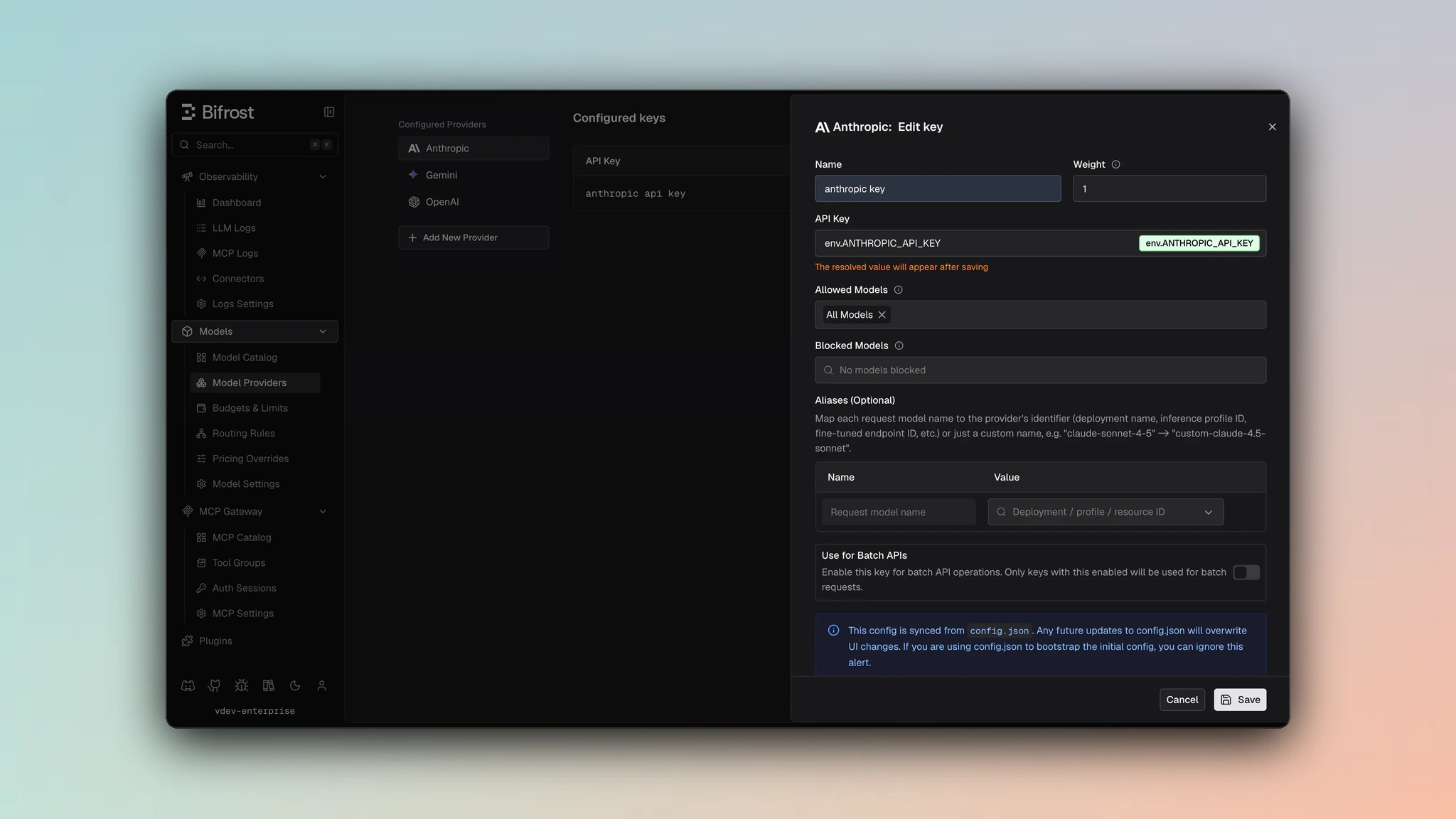
- Navigate to Models > Model Providers. Look for Anthropic under Configured Providers. If it is missing, click on Add New Provider and select Anthropic.
- Click Add Key or edit an existing key.
- Set a name for your key.
- Paste your API key directly or use an environment variable (for example,
env.ANTHROPIC_API_KEY). - Set Allowed Models to All Models (default) or the specific model allowlist you want this key to serve.
- Save the provider configuration.
network_config.beta_header_overrides when you need to override the default Anthropic beta-header support matrix for a provider.
Beta Headers
Bifrost automatically manages Anthropic beta headers - detecting required headers from request features and injecting them. Headers are validated per provider to prevent unsupported headers from reaching the upstream API.Passthrough headers are not auto-injected but are validated and forwarded when set manually via the
anthropic-beta request header. Unknown headers are forwarded to Anthropic only; for other providers (Vertex, Bedrock, Azure), unknown headers are silently dropped by default to prevent upstream errors.Beta header overrides: You can override the default support per provider via the Beta Headers tab in provider configuration, or by setting beta_header_overrides in the provider’s network_config. See Beta Header Overrides for details.1. Chat Completions
Request Parameters
Parameter Mapping
Dropped Parameters
The following parameters are silently ignored:frequency_penalty, presence_penalty, logit_bias, logprobs, top_logprobs, seed, service_tier
Extra Parameters
Useextra_params (SDK) or pass directly in request body (Gateway) for Anthropic-specific fields:
- Gateway
- Go SDK
"cache_control": {"type": "ephemeral"} object on /anthropic/v1/messages requests to enable automatic prompt caching, and Bifrost now forwards that directive through unchanged.
Auto-inject cache breakpoints
Agentic clients such as Codex send no cache markers, so nothing is cached and every turn pays full price for a prompt that barely changed. Bifrost can add the marker for them: setprompt_cache.auto_inject on the provider and the first cacheable block is
marked automatically.
Claude is the primary case, and everything on this page about cache_control applies
to injected markers too. See Prompt caching for the configuration,
the injection point syntax, and the per-request override.
Cache Control
Cache directives can be added to system messages, user messages, and tool definitions to enable prompt caching:- Gateway
- Go SDK
Reasoning / Thinking
Documentation: See Bifrost Reasoning ReferenceParameter Mapping
reasoning.effort→thinking.type(always mapped to"enabled")reasoning.max_tokens→thinking.budget_tokens(token budget for thinking)
Critical Constraints
- Minimum budget: 1024 tokens required; requests below this fail with error
- Dynamic budget:
-1is converted to1024automatically
Example
Message Conversion
Critical Caveats
- System message extraction: System messages are removed from messages array and placed in separate
systemfield. Multiple system messages become separate text blocks in the system array. - Tool message grouping: Consecutive tool messages are merged into single user message with
tool_resultcontent blocks.
Image Conversion
- URL images:
{"type": "image_url", "image_url": {}}→{"type": "image", "source": {"type": "url", ...}} - Base64 images: Data URL →
{"type": "image", "source": {"type": "base64", "media_type": "image/png", ...}}
Cache Control Locations
Cache directives supported on: system content blocks, user message content blocks, tool definitions (see Cache Control examples above)Tool Conversion
Tool definitions are restructured:function.name → name, function.parameters → input_schema, function.strict is dropped.
Tool choice mapping: "auto" → auto | "none" → none | "required" → any | Specific tool → {"type": "tool", "name": "X"}
Response Conversion
Field Mapping
stop_reason→finish_reason:end_turn/stop_sequence→stop,max_tokens→length,tool_use→tool_callsinput_tokens + cache_read_input_tokens + cache_creation_input_tokens→prompt_tokens(all cache counts rolled into the total)- Cache token breakdown surfaced in
prompt_tokens_details:cache_read_input_tokens→prompt_tokens_details.cached_read_tokenscache_creation_input_tokens→prompt_tokens_details.cached_write_tokens
output_tokens→completion_tokensthinkingblocks →reasoning_detailswith index, type, text, and signature fields- Tool call arguments converted from JSON object → JSON string
Streaming
Event sequence:message_start → content_block_start → content_block_delta → content_block_stop → message_delta → message_stop
Delta types: text_delta → content | input_json_delta → tool arguments | thinking_delta → reasoning text | signature_delta → reasoning signature
Caveats
System Message Extraction
System Message Extraction
Severity: High
Behavior: System messages removed from array, placed in separate
system field
Impact: Message array structure differs from input
Code: chat.go:145-167Tool Message Grouping
Tool Message Grouping
Severity: High
Behavior: Consecutive tool messages merged into single user message
Impact: Message count and structure changes
Code:
chat.go:169-216Minimum Reasoning Budget
Minimum Reasoning Budget
Severity: High
Behavior:
reasoning.max_tokens must be >= 1024
Impact: Requests with lower values fail with error
Code: chat.go:113-115Dynamic Budget Conversion
Dynamic Budget Conversion
Severity: Medium
Behavior:
reasoning.max_tokens = -1 converted to 1024
Impact: Dynamic budgeting not supported
Code: chat.go:107-111Strict Tool Mode Dropped
Strict Tool Mode Dropped
Severity: Medium
Behavior:
strict: true in tool definitions silently dropped
Impact: No schema validation enforcement
Code: chat.go:43-72Arguments Serialization
Arguments Serialization
Severity: Low
Behavior: Tool call
input (object) serialized to arguments (JSON string)
Code: chat.go:341-3502. Responses API
The Responses API uses the same underlying/v1/messages endpoint but converts between OpenAI’s Responses format and Anthropic’s Messages format.
Request Parameters
Parameter Mapping
Extra Parameters
Useextra_params (SDK) or pass directly in request body (Gateway):
- Gateway
- Go SDK
Cache Control
Cache directives can be added to instructions (system) and input messages to enable prompt caching:- Gateway
- Go SDK
Input & Instructions
- Input: String wrapped as user message or array converted to messages
- Instructions: Becomes system message (same extraction as Chat Completions)
Tool Support
Supported types:function, computer_use_preview, web_search, mcp
Tool conversions same as Chat Completions with: MCP tools mapped to mcp_servers (server_label → name, server_url → url) and computer tools auto-set with truncation: "auto"
Cache control supported on instructions and input blocks (see Cache Control examples)
Response Conversion
stop_reason→status:end_turn/stop_sequence→completed,max_tokens→incomplete- Top-level
input_tokensandoutput_tokensare rollups that include cache-related usage; they map asinput_tokens→input_tokens|output_tokens→output_tokens. - Cache-specific counts are exposed in details:
cache_read_input_tokens→input_tokens_details.cached_read_tokens|cache_creation_input_tokens→input_tokens_details.cached_write_tokens - Output items:
text→message|tool_use→function_call|thinking→reasoning
Streaming
Event sequence:message_start → content_block_start → content_block_delta → content_block_stop → message_delta → message_stop
Special handling: Computer tool arguments accumulated across chunks (emitted on content_block_stop), synthetic content_part.added events emitted for text/reasoning, MCP calls use mcp_call_arguments_delta, item IDs generated as msg_{messageID}_item_{outputIndex}
3. Text Completions (Legacy)
Request:prompt auto-wrapped with \n\nHuman: {prompt}\n\nAssistant: | max_tokens → max_tokens_to_sample | temperature, top_p direct pass-through | top_k, stop via extra_params (→ stop_sequences)
Response: completion → choices[0].text | stop_reason → finish_reason
4. Batch API
Request formats:requests array (CustomID + Params) or input_file_id
Pagination: Cursor-based with after_id, before_id, limit
Endpoints:
- POST
/v1/messages/batches- Create - GET
/v1/messages/batches- List - GET
/v1/messages/batches/{batch_id}- Retrieve - POST
/v1/messages/batches/{batch_id}/cancel- Cancel
{custom_id, result: {type, message}}
Status mapping: in_progress → InProgress, canceling → Cancelling, ended → Ended
Note: RFC3339Nano timestamps converted to Unix, multi-key retry supported
5. Files API
Requires beta header:
anthropic-beta: files-api-2025-04-14file (required) and filename (optional)
Field mapping: id | filename | size_bytes → bytes | created_at (Unix) | mime_type → content_type
Endpoints: POST /v1/files, GET /v1/files (cursor pagination), GET /v1/files/{file_id}, DELETE /v1/files/{file_id}, GET /v1/files/{file_id}/content
Note: File purpose always "batch", status always "processed"
6. List Models
Request: GET/v1/models?limit={defaultPageSize} (no body)
Field mapping: id (prefixed anthropic/) | display_name → name | created_at (Unix timestamp)
Pagination: Token-based with NextPageToken, FirstID, LastID
Multi-key support: Results aggregated from all keys, filtered by allowed_models if configured