

Overview
vLLM is a self-hosted inference provider with OpenAI- and Anthropic-compatible API surfaces. Bifrost uses the OpenAI-compatible endpoints by default and can route Chat Completions and Responses requests through vLLM’s Anthropic-compatible Messages endpoint per key or model alias. Key characteristics:- Native Responses API - Bifrost sends Responses requests directly to
/v1/responses; it does not translate them to Chat Completions - Optional Anthropic-compatible mode - Set
use_anthropic_endpointsto route Chat Completions and Responses through/v1/messages - OpenAI compatibility - Chat and text completions, embeddings, rerank, transcription, and streaming
- Self-hosted - Typically runs at
http://localhost:8000or your own server - Optional authentication - API key often omitted for local instances
Supported Operations
Unsupported Operations (❌) return
UnsupportedOperationError. Upstream capabilities vary by vLLM version and loaded model; in particular, the server must expose the selected OpenAI- or Anthropic-compatible endpoint.Setup & Configuration
Configure vLLM as a provider.- Web UI
- config.json
- API
- Go SDK
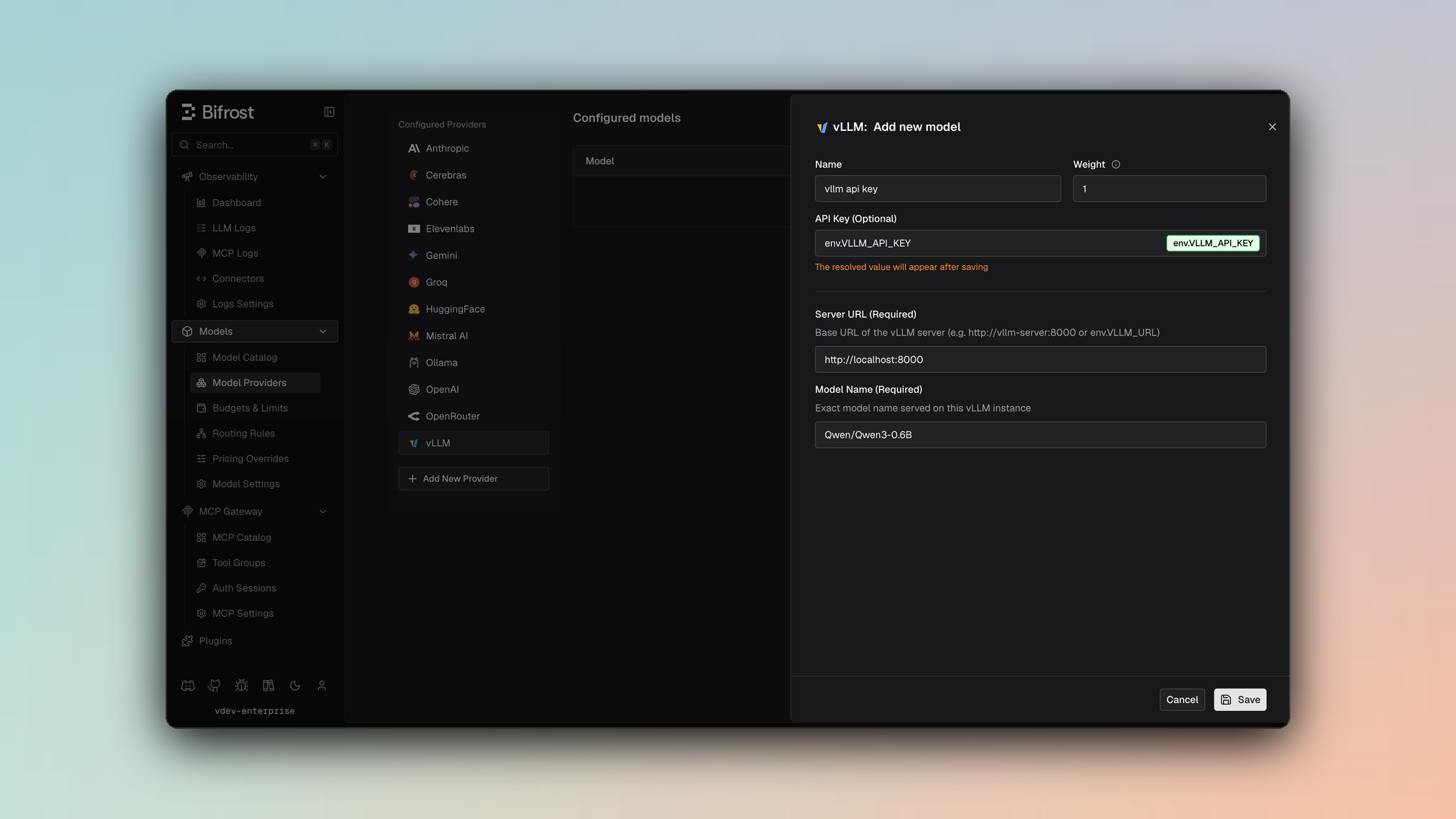
- Navigate to Models > Model Providers. Look for vLLM under Configured Providers. If it is missing, click on Add New Provider and select vLLM.
- Click Add New Model or edit an existing key.
- Set a name for your key.
- Leave API Key blank for local servers. If your endpoint requires auth, paste a bearer token directly or use an environment variable.
- Set vLLM URL to
http://localhost:8000and Model Name to the exact model loaded by the server. - Leave Use Anthropic Endpoints off to use vLLM’s OpenAI-compatible endpoints. Enable it only when the server exposes
/v1/messagesand you want Chat Completions and Responses routed through that endpoint. - Set Allowed Models to All Models (default) or the specific model allowlist you want this key to serve.
- Save the provider configuration.
Endpoint Mode
use_anthropic_endpoints affects only Chat Completions and the Responses API:
- Key-level - Sets the default for requests using that key.
- Alias-level - Overrides the key-level value for a specific model alias.
- Default -
false; requests use vLLM’s OpenAI-compatible endpoints.
/v1/messages/count_tokens, regardless of this setting.
Authentication remains
Authorization: Bearer <key> in both modes. Bifrost omits the header when the key value is empty.Server tool support
Anthropic’s server and client tools (web_search, web_fetch, code_execution, computer, bash, memory, text_editor, tool_search, mcp_toolset) run on Anthropic-operated infrastructure, so a self-hosted vLLM server does not implement them. Bifrost drops them from the request rather than forwarding a tool the server will reject. Your own function tools are never affected.
This matters most for clients that enable a built-in web search by default, which would otherwise fail every request.
Getting started
- Run a vLLM server (Docker or pip). Example with Docker:
- Verify the server:
- Use Bifrost with model prefix
vllm/<model_id>(e.g.vllm/meta-llama/Llama-3.2-1B-Instruct).
1. Chat Completions
By default, vLLM supports standard OpenAI chat completion parameters on/v1/chat/completions. For the full parameter reference, see OpenAI Chat Completions. Message types, tools, extra parameters, and streaming follow the shared OpenAI-compatible behavior.
With use_anthropic_endpoints: true, Bifrost builds an Anthropic Messages request and sends it to /v1/messages. For request conversion behavior, see Anthropic Chat Completions.
Reasoning effort
vLLM is a self-hosted OpenAI-compatible server. Bifrost forwards Chat Completionsreasoning_effort and Responses reasoning.effort without applying OpenAI’s model-name taxonomy, so values such as xhigh reach your checkpoint as-is. Whether a given value is accepted depends on the model loaded in vLLM (for example Qwen3.8 accepts xhigh, medium, and low, but not high).
2. Responses API
Bifrost uses vLLM’s native Responses endpoint by default for both non-streaming and streaming requests:use_anthropic_endpoints: true, Bifrost instead converts the request to Anthropic Messages format, sends it to /v1/messages, and converts the result to a Bifrost Responses response.
3. Text Completions
4. Embeddings
vLLM supports/v1/embeddings. Use model IDs exposed by your vLLM server (e.g. BAAI/bge-m3).
5. List Models
Lists models from your vLLM instance via/v1/models. Available models depend on what is loaded on the server.
6. Rerank
vLLM supports reranking for pooling/cross-encoder reranker models. Bifrost sends requests to/v1/rerank and automatically falls back to /rerank when required by your vLLM deployment.
Your upstream vLLM server must be started with a rerank-capable model (pooling/cross-encoder task support).
7. Transcriptions
vLLM supports non-streaming and streaming transcription requests through/v1/audio/transcriptions. Bifrost sends multipart form data in the OpenAI-compatible format; streaming requests set stream: true and consume SSE transcription events.
8. Count Tokens
Count Tokens uses vLLM’s Anthropic-compatible/v1/messages/count_tokens endpoint. This route is independent of use_anthropic_endpoints, so the upstream vLLM server must expose it even when Chat Completions and Responses use the default OpenAI-compatible endpoints.
Caveats
Per-key BaseURL Required
Per-key BaseURL Required
Severity: High
Behavior: vLLM resolves request routing from
vllm_key_config.url.
Impact: Requests fail without vllm_key_config.url, even if a provider-level network_config.base_url is present.Reasoning effort is not remapped by model name
Reasoning effort is not remapped by model name
Severity: Low
Behavior: Unlike hosted OpenAI, Bifrost does not rewrite
xhigh to high for vLLM based on the checkpoint name.
Impact: Send the effort values your loaded model actually supports. A value OpenAI would coerce (for example xhigh on a non-GPT-5.2 name) is forwarded unchanged and may 400 if that checkpoint rejects it.Error responses with HTTP 200
Error responses with HTTP 200
Severity: Low
Behavior: vLLM may return HTTP 200 with an error payload (e.g.
Impact: Bifrost normalizes these into standard error responses so clients see consistent error handling.
Behavior: vLLM may return HTTP 200 with an error payload (e.g.
{"error": {"code": 404, "message": "..."}}) instead of 4xx/5xx.Impact: Bifrost normalizes these into standard error responses so clients see consistent error handling.