

Overview
Google Gemini’s API has different structure from OpenAI. Bifrost performs extensive conversion including:- Role remapping - “assistant” → “model”, system messages integrated into main flow
- Message grouping - Consecutive tool responses merged into single user message
- Parameter renaming - e.g.,
max_completion_tokens→maxOutputTokens,stop→stopSequences - Function call handling - Tool call ID preservation and thought signature support
- Content modality - Support for text, images, video, code execution, and thought content
- Thinking/Reasoning - Thinking configuration mapped to Bifrost reasoning structure
Supported Operations
Setup & Configuration
Configure Gemini as a provider.- Web UI
- config.json
- API
- Go SDK
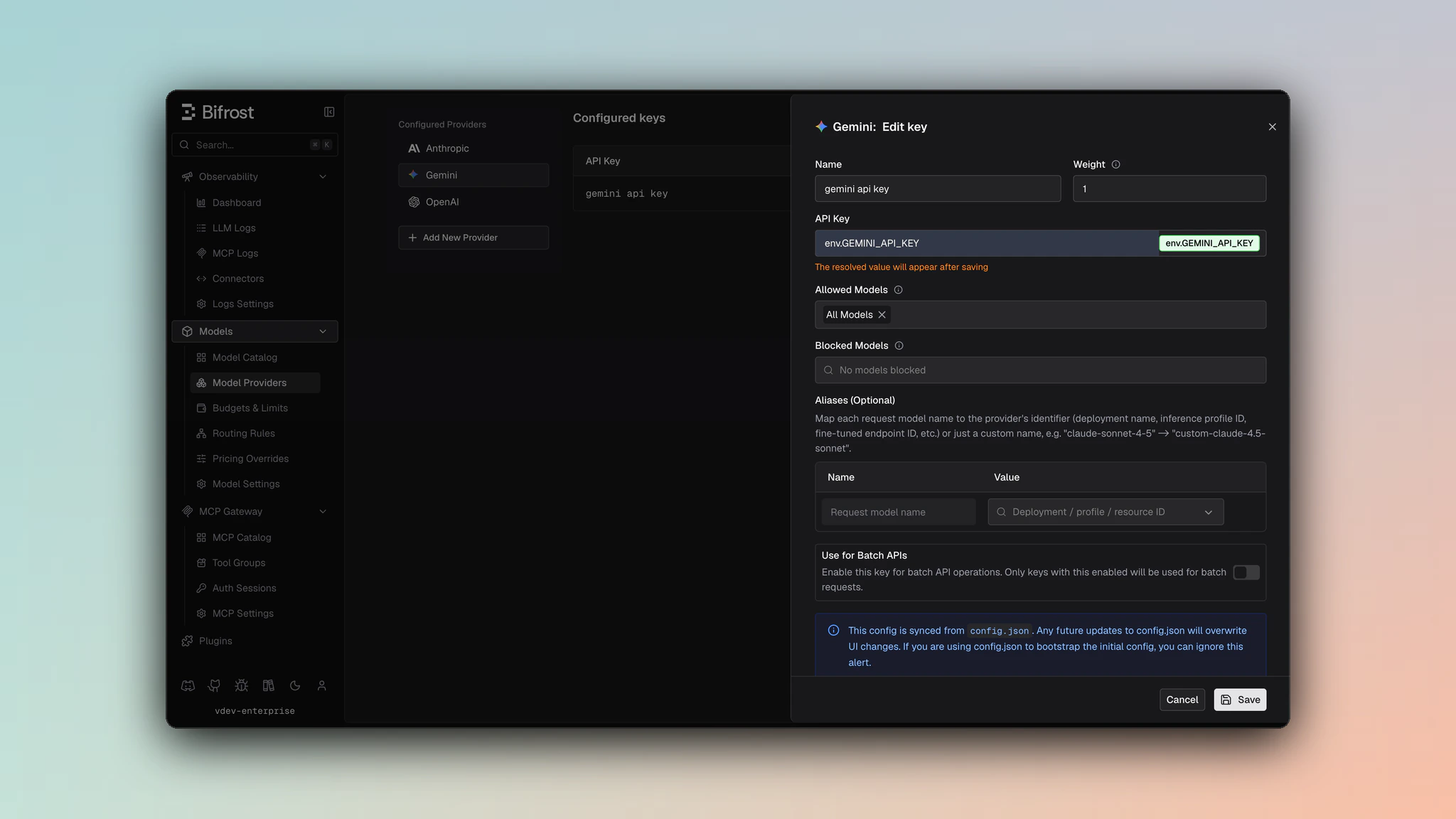
- Navigate to Models > Model Providers. Look for Google Gemini under Configured Providers. If it is missing, click on Add New Provider and select Google Gemini.
- Click Add Key or edit an existing key.
- Set a name for your key.
- Paste your API key directly or use an environment variable (for example,
env.GEMINI_API_KEY). - Set Allowed Models to All Models (default) or the specific model allowlist you want this key to serve.
- Save the provider configuration.
x-goog-api-key header for standard endpoints. Bifrost automatically selects query-parameter authentication where Gemini requires it, such as Imagen and custom endpoint flows.
Authentication
Gemini supports API key authentication in addition to OAuth2 Bearer token authentication. The implementation conditionally uses the appropriate method based on the endpoint type.API Key Authentication
API key authentication is supported via two methods:-
Header Method (standard Gemini endpoints):
- Format:
x-goog-api-key: YOUR_API_KEYheader - Used for: Standard Gemini endpoints (e.g.,
/v1beta/models/{model}:generateContent)
- Format:
-
Query Parameter Method (Imagen and custom endpoints):
- Format:
?key=YOUR_API_KEYappended to request URLs - Used for: Imagen models and custom endpoints
- Example:
https://generativelanguage.googleapis.com/v1beta/models/imagen-4.0-generate-001:predict?key=YOUR_API_KEY
- Format:
1. Chat Completions
Request Parameters
Parameter Mapping
Dropped Parameters
The following parameters are silently ignored:logit_bias, logprobs, top_logprobs, parallel_tool_calls, service_tier
Extra Parameters
Useextra_params (SDK) or pass directly in request body (Gateway) for Gemini-specific fields:
- Gateway
- Go SDK
Reasoning / Thinking
Documentation: See Bifrost Reasoning ReferenceParameter Mapping
reasoning.effort→thinkingConfig.thinkingLevel(“low” →LOW, “high” →HIGH)reasoning.max_tokens→thinkingConfig.thinkingBudget(token budget for thinking)reasoningparameter triggersthinkingConfig.includeThoughts = true
Supported Thinking Levels
"low"/"minimal"→LOW"medium"/"high"→HIGHnullor unspecified → Based onmax_tokens: -1 (dynamic), 0 (disabled), or specific budget
Example
Message Conversion
Critical Caveats
- Role remapping: “assistant” → “model”, “system” → part of user/model content flow
- Consecutive tool responses: Tool response messages merged into single user message with function response parts
- Content flattening: Multi-part content in single message preserved as parts array
Image Conversion
- URL images:
{type: "image_url", image_url: {url: "..."}}→{type: "image", source: {type: "url", url: "..."}} - Base64 images: Data URL →
{type: "image", source: {type: "base64", media_type: "image/png", ...}} - Video content: Preserved with metadata (fps, start/end offset)
Tool Conversion
Tool definitions are restructured with these mappings:function.name→functionDeclarations.name(preserved)function.parameters→functionDeclarations.parameters(Schema format)function.description→functionDeclarations.descriptionfunction.strict→ Dropped (not supported by Gemini)
Tool Choice Mapping
Response Conversion
Field Mapping
-
finishReason→finish_reason:STOP→stopMAX_TOKENS→lengthSAFETY,RECITATION,LANGUAGE,BLOCKLIST,PROHIBITED_CONTENT,SPII,IMAGE_SAFETY→content_filterMALFORMED_FUNCTION_CALL,UNEXPECTED_TOOL_CALL→tool_calls
-
candidates[0].content.parts[0].text→choices[0].message.content(if single text block) -
candidates[0].content.parts[].functionCall→choices[0].message.tool_calls -
promptTokenCount→usage.prompt_tokens -
candidatesTokenCount→usage.completion_tokens -
totalTokenCount→usage.total_tokens -
cachedContentTokenCount→usage.prompt_tokens_details.cached_tokens -
thoughtsTokenCount→usage.completion_tokens_details.reasoning_tokens -
Thought content (from
textparts withthought: true) →reasoningfield in stream deltas -
Function call
args(map) → JSON stringarguments
Streaming
Event structure:- Streaming responses contain deltas in
delta.content(text),delta.reasoning(thoughts),delta.toolCalls(function calls) - Function responses appear as text content in the delta
finish_reasononly set on final chunk- Usage metadata only included in final chunk
2. Responses API
The Responses API uses the same underlying/generateContent endpoint but converts between OpenAI’s Responses format and Gemini’s Messages format.
Request Parameters
Parameter Mapping
Extra Parameters
Useextra_params (SDK) or pass directly in request body (Gateway):
- Gateway
- Go SDK
Input & Instructions
- Input: String wrapped as user message or array converted to messages
- Instructions: Becomes system instruction (single text block)
Tool Support
Supported types:function, computer_use_preview, web_search, mcp
Tool conversions same as Chat Completions with:
- Computer tools auto-configured (if specified in Bifrost request)
- Function-based tools always enabled
Response Conversion
finishReason→status:STOP/MAX_TOKENS/other →completed|SAFETY→incomplete- Output items conversion:
- Text parts →
messagefield - Function calls →
function_callfield - Thought content →
reasoningfield
- Text parts →
- Usage fields preserved with cache tokens mapped to
*_tokens_details.cached_tokens
Streaming
Event structure: Similar to Chat Completions streamingcontent_part.addedemitted for text and reasoning parts- Item IDs generated as
msg_{responseID}_item_{outputIndex}
3. Speech (Text-to-Speech)
Speech synthesis uses the underlying chat generation endpoint with audio response modality.Request Parameters
Voice Configuration
Single Voice:Response Conversion
- Audio data extracted from
candidates[0].content.parts[].inlineData - Format conversion: Gemini returns PCM audio (s16le, 24kHz, mono)
- Auto-conversion: PCM → WAV when
response_format: "wav"(default) - Raw audio returned if
response_formatis omitted or empty string
Supported Voices
Common Gemini voices include:Chant-Female- Female voiceChant-Male- Male voice- Additional voices depend on model capabilities
4. Transcriptions (Speech-to-Text)
Transcriptions are implemented as chat completions with audio content and text prompts.Request Parameters
Audio Input Handling
Audio is sent as inline data with auto-detected MIME type:Gemini caching works differently from the rest of Bifrost’s providers, so the
prompt_cache.auto_inject setting does not apply here. Anthropic-style providers
mark a content block and the cached prefix follows from where the marker sits. Gemini
instead caches through a server-side cachedContent resource that you create,
name, and pass by ID, with its own TTL and billing. There is no per-block marker for
Bifrost to add, so injecting one would do nothing. Create the resource and pass
cachedContent yourself. See Prompt caching for how the setting behaves
elsewhere.Extra Parameters
Safety settings and caching can be configured:- Gateway
- Go SDK
Response Conversion
- Transcribed text extracted from
candidates[0].content.parts[].text taskset to"transcribe"- Usage metadata mapped:
promptTokenCount→input_tokenscandidatesTokenCount→output_tokenstotalTokenCount→total_tokens
5. Embeddings
Supports text and multimodal embeddings (text, image, audio, video, and PDF via
file parts). Multiple input items are sent as a batch — each item maps to a separate entry in requests[].input→ToGeminiEmbeddingRequestmaps eachEmbeddingInputItem.Contentto a separaterequests[]entry (batch). Each content’s parts map tocontent.parts[].dimensions→outputDimensionality- Extra task type and title via
extra_params
embeddings[].values→ Bifrost embedding arraymetadata.billableCharacterCount→ Usage prompt tokens (fallback)- Token counts extracted from usage metadata
6. Batch API
Request formats: Inline requests array or file-based input Pagination: Token-based withpageToken
Endpoints:
- POST
/v1beta/batchJobs- Create - GET
/v1beta/batchJobs?pageSize={limit}&pageToken={token}- List - GET
/v1beta/batchJobs/{batch_id}- Retrieve - POST
/v1beta/batchJobs/{batch_id}:cancel- Cancel
- Status mapping:
BATCH_STATE_PENDING/BATCH_STATE_RUNNING→in_progress,BATCH_STATE_SUCCEEDED→completed,BATCH_STATE_FAILED→failed,BATCH_STATE_CANCELLING→cancelling,BATCH_STATE_CANCELLED→cancelled,BATCH_STATE_EXPIRED→expired - Inline responses: Array in
dest.inlinedResponses - File-based responses: JSONL file in
dest.fileName
7. Files API
Supports file upload for batch processing and multimodal requests.
file (binary) and filename (optional)
Field mapping:
name→iddisplayName→filenamesizeBytes→size_bytesmimeType→content_typecreateTime(RFC3339) → Converted to Unix timestamp
- POST
/upload/storage/v1beta/files- Upload - GET
/v1beta/files?limit={limit}&pageToken={token}(cursor pagination) - GET
/v1beta/files/{file_id}- Retrieve - DELETE
/v1beta/files/{file_id}- Delete - GET
/v1beta/files/{file_id}/content- Download
8. Image Generation
Gemini supports two image generation formats depending on the model:- Standard Gemini Format: Uses the
/v1beta/models/{model}:generateContentendpoint - Imagen Format: Uses the
/v1beta/models/{model}:predictendpoint for Imagen models (detected automatically)
Parameter Mapping
Extra Parameters
Useextra_params (SDK) or pass directly in request body (Gateway) for Gemini-specific fields:
- Gateway
- Go SDK
Request Conversion
Standard Gemini Format
- Model mapping:
bifrostReq.Model→req.Model, withbifrostReq.Input.Prompt→req.Contents[0].Parts[0].Text - Response modality: Set by bifrost internally to
generationConfig.responseModalities = ["IMAGE"]to indicate image generation - Image count: Specify number of images via
n→generationConfig.candidateCount - Extra parameters: Include
safetySettings,cachedContent, andlabelsmapped directly
Imagen Format
- Prompt:
bifrostReq.Prompt→req.Instances[0].Prompt - Number of Images:
n→req.Parameters.SampleCount - Size Conversion:
size(WxH format) converted to:imageSize:"1k"(if dimensions ≤ 1024),"2k"(if dimensions ≤ 2048). Sizes larger than"2k"are not supported by Imagen models.aspectRatio:"1:1","3:4","4:3","9:16", or"16:9"(based on width/height ratio)
- Output Format:
output_format("png","jpeg") →parameters.outputOptions.mimeType("image/png","image/jpeg") - Seed & Negative Prompt: Passed directly to
seedandparameters.negativePrompt - Extra Parameters:
personGeneration,language,enhancePrompt,safetySettingsmapped to parameters
Response Conversion
Standard Gemini Format
- Image Data: Extracts
InlineDatafromcandidates[0].content.parts[]with MIME typeimage/* - Output Format: Converts MIME type (
image/png,image/jpeg,image/webp) → file extension (png,jpeg,webp) - Usage: Extracts token usage from
usageMetadata - Multiple Images: Each image part becomes an
ImageDataentry in the response array
Imagen Format
- Image Data: Each
predictioninresponse.predictions[]→ImageDatawithb64_jsonfrombytesBase64Encoded - Output Format: Converts
prediction.mimeType→ file extension foroutputFormatfield (Imagen doesnt support webp) - Index: Each prediction gets an
index(0, 1, 2, …) in the response array
Size Conversion
For Imagen format, size is converted between formats: Supported Image Sizes:"1k" (≤1024), "2k" (≤2048)
Supported Aspect Ratios: "1:1", "3:4", "4:3", "9:16", "16:9"
Endpoint Selection
The provider automatically selects the endpoint based on model name:- Imagen models (detected via
schemas.IsImagenModel()): Uses/v1beta/models/{model}:predictendpoint - Other models: Uses
/v1beta/models/{model}:generateContentendpoint with image response modality
Streaming
Image generation streaming is not supported by Gemini.9. Image Edit
Gemini supports image editing through two different APIs depending on the model:- Standard Gemini Format: Uses the
/v1beta/models/{model}:generateContentendpoint (for Gemini models) - Imagen Format: Uses the
/v1beta/models/{model}:predictendpoint (for Imagen models, detected automatically)
Request Conversion
Standard Gemini Format (Non-Imagen Models)
- Model & Prompt:
bifrostReq.Model→req.Model,bifrostReq.Input.Prompt→req.Contents[0].Parts[0].Text - Images: Each image in
bifrostReq.Input.Imagesis converted to aPartwith:- MIME type detection (
image/jpeg,image/webp,image/png) with fallback toimage/png - Base64 encoding:
image.Image→Part.InlineData.Data(base64 string) - MIME type:
Part.InlineData.MIMEType
- MIME type detection (
- Response Modality:
GenerationConfig.ResponseModalitiesis set to[ModalityImage]to indicate image generation - Extra Parameters: Extracted from
ExtraParams:safetySettings/safety_settings→SafetySettingscachedContent/cached_content→CachedContentlabels→Labels(map[string]string)
Imagen Format (Imagen Models)
- Reference Images: Each image in
bifrostReq.Input.Imagesis converted toReferenceImagewith:ReferenceType:"REFERENCE_TYPE_RAW"ReferenceID: Sequential IDs starting from 1ReferenceImage.BytesBase64Encoded: Base64-encoded image data
- Mask Configuration: If
Params.Maskis provided ormaskModeis specified:- Default
maskMode:"MASK_MODE_USER_PROVIDED"when mask data is present maskModecan be overridden viaExtraParams["maskMode"]dilationextracted fromExtraParams["dilation"](validated to range [0, 1])maskClassesextracted fromExtraParams["maskClasses"](forMASK_MODE_SEMANTIC)- Mask image (if provided) is base64-encoded and added as
ReferenceType: "REFERENCE_TYPE_MASK"
- Default
- Edit Mode Mapping:
Params.Typeis mapped toEditMode:"inpainting"→"EDIT_MODE_INPAINT_INSERTION""outpainting"→"EDIT_MODE_OUTPAINT""inpaint_removal"→"EDIT_MODE_INPAINT_REMOVAL""bgswap"→"EDIT_MODE_BGSWAP"- If
Typeis not set,editModecan be specified directly viaExtraParams["editMode"]
- Parameters:
n→Parameters.SampleCountoutput_format→Parameters.OutputOptions.MimeType(converted:"png"→"image/png", etc.)output_compression→Parameters.OutputOptions.CompressionQualityseed(viaExtraParams["seed"]) →Parameters.SeednegativePrompt(viaExtraParams["negativePrompt"]) →Parameters.NegativePromptguidanceScale(viaExtraParams["guidanceScale"]) →Parameters.GuidanceScalebaseSteps(viaExtraParams["baseSteps"]) →Parameters.BaseSteps- Additional Imagen-specific parameters:
addWatermark,includeRaiReason,includeSafetyAttributes,personGeneration,safetySetting,language,storageUri
- Standard Gemini Format: Uses the same response conversion as image generation (see Image Generation section)
- Imagen Format: Uses the same response conversion as Imagen image generation (see Image Generation section)
- Imagen models (detected via
schemas.IsImagenModel()): Uses/v1beta/models/{model}:predictendpoint - Other models: Uses
/v1beta/models/{model}:generateContentendpoint with image response modality
10. List Models
Request: GET/v1beta/models?pageSize={limit}&pageToken={token} (no body)
Field mapping:
name(remove “models/” prefix) →id(add “gemini/” prefix)displayName→namedescription→descriptioninputTokenLimit→max_input_tokensoutputTokenLimit→max_output_tokens- Context length =
inputTokenLimit + outputTokenLimit
nextPageToken
11. Video Generation
Generate (POST /v1/videos)
Requests use JSON body (application/json).
Request Parameters
Extra Params (any unrecognized JSON field is forwarded as
extra_params)
Response:
BifrostVideoGenerationResponse - id, status, videos[]
If Gemini filters content for safety, status is failed and content_filter describes the reason.
Job Statuses: in_progress → completed / failed
Retrieve / Download
Video Delete, List, and Remix are not supported.
Content Type Support
Bifrost supports the following content modalities through Gemini:Caveats
Tool Response Grouping
Tool Response Grouping
Severity: High
Behavior: Consecutive tool response messages merged into single user message
Impact: Message count and structure changes
Code:
chat.go:627-678Thinking Content Handling
Thinking Content Handling
Severity: Medium
Behavior: Thought content appears as
text parts with thought: true flag
Impact: Requires checking thought flag to distinguish from regular text
Code: chat.go:242-244, 302-304Function Call Arguments Serialization
Function Call Arguments Serialization
Severity: Low
Behavior: Tool call
args (object) converted to arguments (JSON string)
Impact: Requires JSON parsing to access arguments
Code: chat.go:101-106Thought Signature Base64 Encoding
Thought Signature Base64 Encoding
Severity: Low
Behavior:
thoughtSignature base64 URL-safe encoded, auto-converted during unmarshal
Impact: Transparent to user; handled automatically
Code: types.go:1048-1063Streaming Finish Reason Timing
Streaming Finish Reason Timing
Severity: Medium
Behavior:
finish_reason only present in final stream chunk with usage metadata
Impact: Cannot determine completion until end of stream
Code: chat.go:206-208, 325-328Cached Content Token Reporting
Cached Content Token Reporting
Severity: Low
Behavior: Cached tokens reported in
prompt_tokens_details.cached_tokens, cannot distinguish cache creation vs read
Impact: Billing estimates may be approximate
Code: utils.go:270-274System Instruction Integration
System Instruction Integration
Severity: Medium
Behavior: System instructions become
systemInstruction field (separate from messages), not included in message array
Impact: Structure differs from OpenAI’s system message approach
Code: responses.go:34-46