

Overview
ElevenLabs is a specialized audio provider for text-to-speech and speech-to-text operations. Bifrost performs conversions including:- Model ID mapping - Uses provider model identifier directly
- Voice configuration - Maps voice settings (stability, similarity, boost, speed, style)
- Response format conversion - Speech format handling (MP3, Opus, PCM/WAV)
- Timestamp support - Character-level timing alignment for TTS
- Transcription with alignment - Word and character-level timing, diarization, and additional formats
- Pronunciation dictionaries - Support for custom pronunciation rules
- Voice quality parameters - Stability, similarity boost, and speaker boost controls
Supported Operations
Unsupported Operations (❌): Chat Completions, Responses API, Text Completions, and Embeddings are not supported by ElevenLabs (audio-focused provider). These return
UnsupportedOperationError.Note: ElevenLabs also supports a “Speech with Timestamps” endpoint at /v1/text-to-speech/{voice_id}/with-timestamps (non-streaming only) for enhanced timestamp information.Setup & Configuration
Configure ElevenLabs as a provider.- Web UI
- config.json
- API
- Go SDK
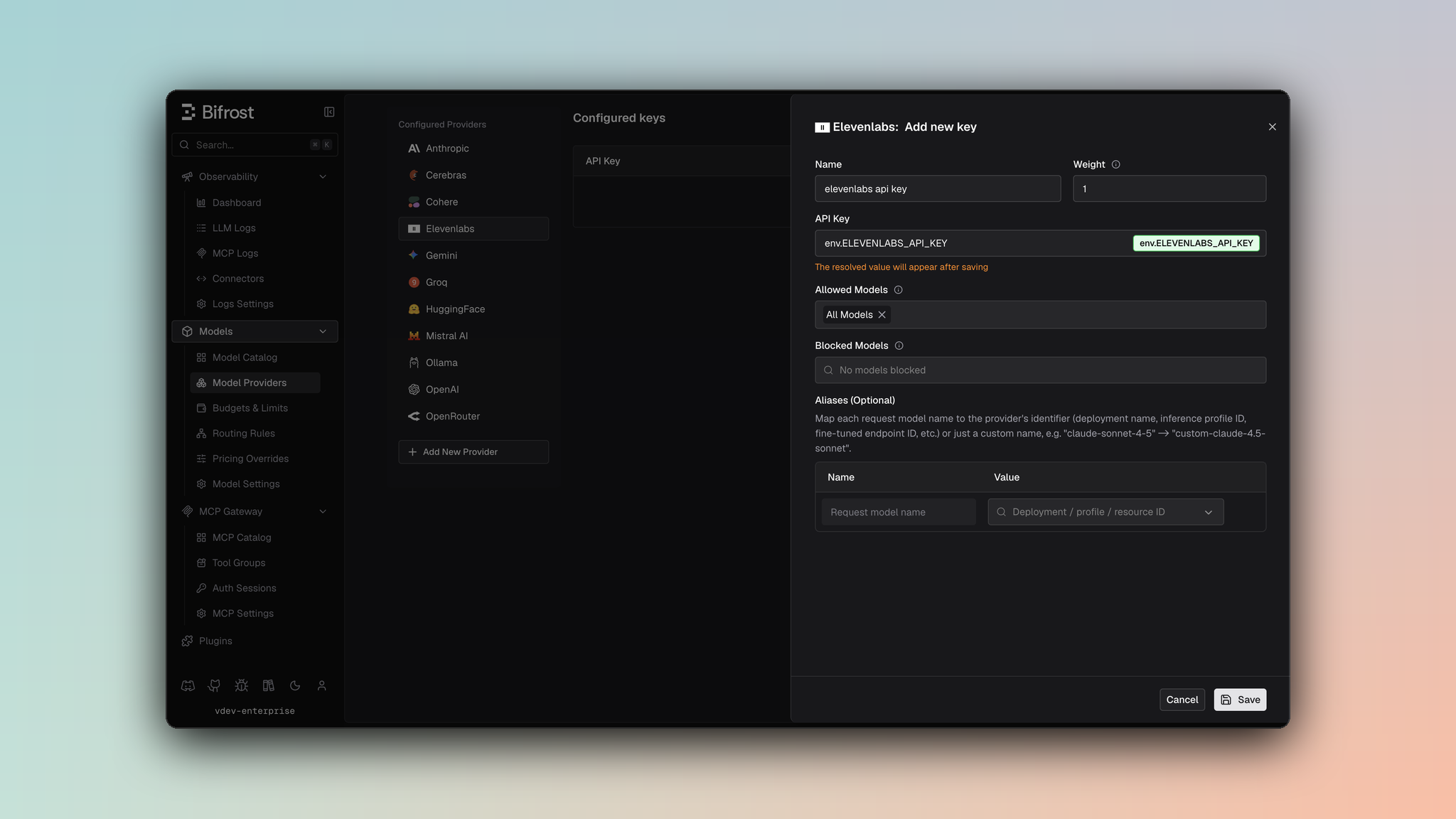
- Navigate to Models > Model Providers. Look for ElevenLabs under Configured Providers. If it is missing, click on Add New Provider and select ElevenLabs.
- Click Add Key or edit an existing key.
- Set a name for your key.
- Paste your API key directly or use an environment variable (for example,
env.ELEVENLABS_API_KEY). - Set Allowed Models to All Models (default) or the specific model allowlist you want this key to serve.
- Save the provider configuration.
model is the ElevenLabs voice ID unless you pass a provider-specific voice override in the request.
1. Speech (Text-to-Speech)
Request Parameters
Core Parameters
Voice Configuration
Voice settings are optional and controlled viaparams:
Advanced Parameters
Useextra_params for ElevenLabs-specific TTS features:
- Gateway
- Go SDK
Advanced TTS Parameters
Response Format
Defaults to MP3 format if not specified. Format is passed via query parameter
output_format.Timestamps Support
To get character-level timing alignment, enablewith_timestamps:
/v1/text-to-speech/{voice_id}/with-timestamps is used and the response includes:
audio_base64- Audio data as base64-encoded stringalignment.char_start_times_ms- Character start times in millisecondsalignment.char_end_times_ms- Character end times in millisecondsalignment.characters- Array of charactersnormalized_alignment- Same as alignment but for normalized text
Response Conversion
Non-Timestamp Response
Timestamp Response
Streaming
Streaming speech returns audio in chunks as they are generated:2. Sound Effects (Text-to-Sound)
ElevenLabs sound-effects models (e.g.eleven_text_to_sound_v2) generate sound
effects from a text prompt via the upstream POST /v1/sound-generation API. This
is a different endpoint from text-to-speech and does not use a voice.
Call POST /v1/audio/speech with a sound model — the provider detects a sound
model by its id and routes internally to sound generation, so no separate endpoint
is needed (SDK and transport APIs stay at parity). Because it stays a speech
request, virtual-key governance (provider/model allowlists, budgets, rate limits)
applies to eleven_text_to_sound_v2 like any other model.
Request Parameters
- Gateway
- Go SDK
inputis a top-level string here (not a nested object).duration_seconds,loop, andprompt_influenceare sent as top-level fields and forwarded as sound-generation parameters. No voice is sent — the provider detects the sound model and skips the voice requirement.
Response
Returns binary audio (same delivery as text-to-speech). Whenduration_seconds is
provided, the response usage carries audio_seconds (the requested duration) for
observability and future duration-based pricing.
Notes
Billing
ElevenLabs itself bills sound effects per generated second. In Bifrost the dollar cost is only computed when the model catalog has a pricing entry for it:- The default pricing datasheet (
getbifrost.ai/datasheet) does not currently includeeleven_text_to_sound_v2, so without extra configuration the request is recorded withcost = 0. - To bill it today, add a pricing override for the model (works with any
config store, e.g. SQLite — no Postgres required). The speech cost path
currently bills on input characters, so an override that sets
input_cost_per_charactertakes effect immediately, e.g.{"input_cost_per_character":0.00018}. output_cost_per_secondis the field that will reflect ElevenLabs’ real per-second pricing, but it only takes effect once theaudio_secondswiring lands; until then it is recorded but not applied.
3. Transcription (Speech-to-Text)
Request Parameters
Input Source
Choose one of the following (mutually exclusive):
Error: Providing both or neither will result in error.
Core Parameters
Advanced Parameters
Useextra_params for transcription-specific features:
- Gateway
- Go SDK
Transcription Options
Additional Formats
Request multiple output formats simultaneously:segmented_json, docx, pdf, txt, html, srt
Response Conversion
Basic Transcription
With Diarization
Whendiarize: true, the response includes speaker identification:
With Timestamps
Character-level timing whentimestamps_granularity: "character":
With Additional Formats
Caveats
Voice ID Required
Voice ID Required
Severity: High
Behavior: Voice ID must be provided for TTS requests
Impact: Request fails without voice configuration
Code:
elevenlabs.go:198-208File or URL Required for Transcription
File or URL Required for Transcription
Severity: High
Behavior: Either
file or cloud_storage_url must be provided (not both)
Impact: Request fails with ambiguous input
Code: elevenlabs.go:471-478Audio Format Conversion
Audio Format Conversion
Severity: Low
Behavior: Response formats (MP3, Opus, WAV) mapped via format string
Impact: Format parameter passed as query string to endpoint
Code:
elevenlabs.go:712-715, utils.go:5-35Timestamps as Separate Endpoint
Timestamps as Separate Endpoint
Severity: Low
Behavior: Timestamp requests use
/with-timestamps endpoint variant
Impact: Switches endpoint based on with_timestamps flag
Code: elevenlabs.go:195-205Multipart Form Data for Transcription
Multipart Form Data for Transcription
Severity: Low
Behavior: Transcription uses multipart/form-data, not JSON
Impact: File and parameters sent as form fields
Code:
elevenlabs.go:480-6904. List Models
Request Parameters
Returns available models with their capabilities and language support.