

Overview
Mistral is an OpenAI-compatible provider with custom compatibility handling for specific features. Bifrost converts requests to Mistral’s expected format while supporting their unique API endpoints. Key characteristics:- OpenAI-compatible format - Chat and streaming endpoints
- Transcription API - Native audio transcription support
- OCR API - Native document and image OCR support
- Tool calling support - Function definitions with string-based tool choice
- Streaming support - Server-Sent Events for chat and transcription
- Parameter compatibility - max_completion_tokens → max_tokens conversion
Supported Operations
Unsupported Operations (❌): Text Completions, Speech (TTS), Files, and
Batch are not supported by the upstream Mistral API. Image Generation is not
currently supported by Bifrost’s Mistral integration (Mistral API supports
image generation, but Bifrost has not yet implemented this feature). These
return
UnsupportedOperationError.Setup & Configuration
Configure Mistral as a provider.- Web UI
- config.json
- API
- Go SDK
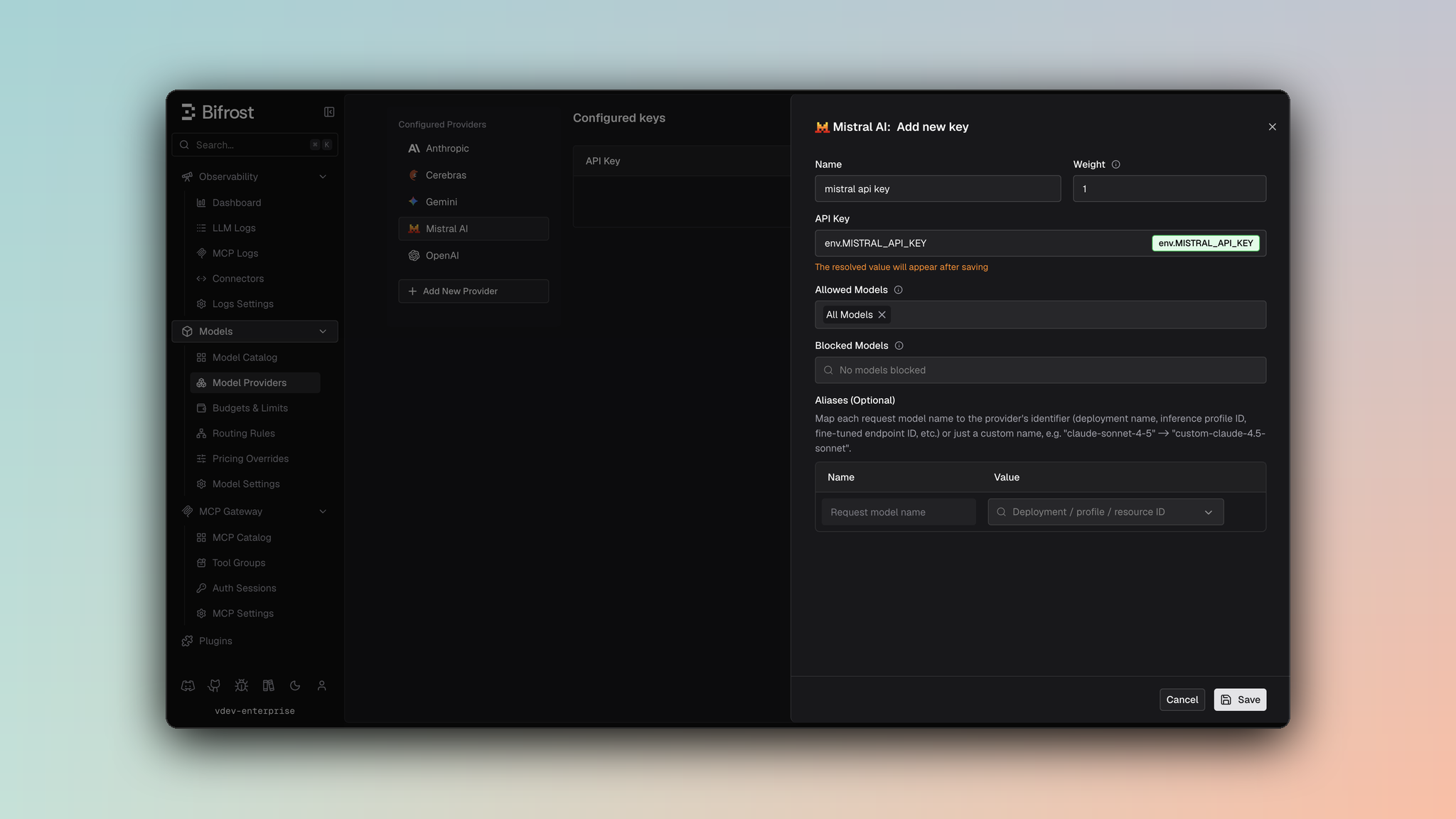
- Navigate to Models > Model Providers. Look for Mistral under Configured Providers. If it is missing, click on Add New Provider and select Mistral.
- Click Add Key or edit an existing key.
- Set a name for your key.
- Paste your API key directly or use an environment variable (for example,
env.MISTRAL_API_KEY). - Set Allowed Models to All Models (default) or the specific model allowlist you want this key to serve.
- Save the provider configuration.
1. Chat Completions
Request Parameters
Mistral supports most OpenAI chat completion parameters with some conversions. For standard OpenAI parameter reference, see OpenAI Chat Completions.Parameter Mapping & Conversions
Critical Conversions
max_completion_tokens → max_tokens:Filtered Parameters
Removed for Mistral compatibility:prompt_cache_key- Not supportedcache_control- Stripped from content blocksverbosity- Anthropic-specificstore- Not supportedservice_tier- Not supported
Message Conversion
Full OpenAI message support:- All roles: user, assistant, system, tool, developer
- Content types: text, images, audio, files
Tool Conversion
Tool definitions supported with constraints:
Limitation Caveat:
Response Conversion
Standard OpenAI-compatible response:choices[].message.content- Response textchoices[].message.tool_calls- Function callsusage- Token counts (prompt_tokens, completion_tokens)finish_reason- stop, tool_calls, length
2. Responses API
Converted internally to Chat Completions with format transformation:3. Transcription
Mistral provides native audio transcription with streaming support.Request Parameters
Parameter Mapping
Multipart Form Structure
Transcription requests are sent as multipart/form-data:Transcription Response
Transcription Streaming
Mistral supports SSE streaming for transcription with custom event types:4. Embeddings
Mistral supports text embeddings:
Response returns embedding vectors with token usage.
5. OCR
Mistral provides native OCR support for extracting text and content from documents and images via themistral-ocr-latest model.
Request Parameters
Document Types
6. List Models
Lists available Mistral models with context length and capabilities.Unsupported Features
Caveats
Cache Control Stripped
Cache Control Stripped
Severity: Medium Behavior: Cache control directives removed from
messages Impact: Prompt caching features unavailable Code: Stripped
during JSON marshaling
Parameter Filtering
Parameter Filtering
Severity: Low Behavior: OpenAI-specific parameters filtered
Impact: prompt_cache_key, verbosity, store removed Code:
filterOpenAISpecificParameters
User Field Size Limit
User Field Size Limit
Severity: Low
Behavior: User field > 64 characters silently dropped
Impact: Longer user identifiers are lost
Code: SanitizeUserField enforces 64-char max